


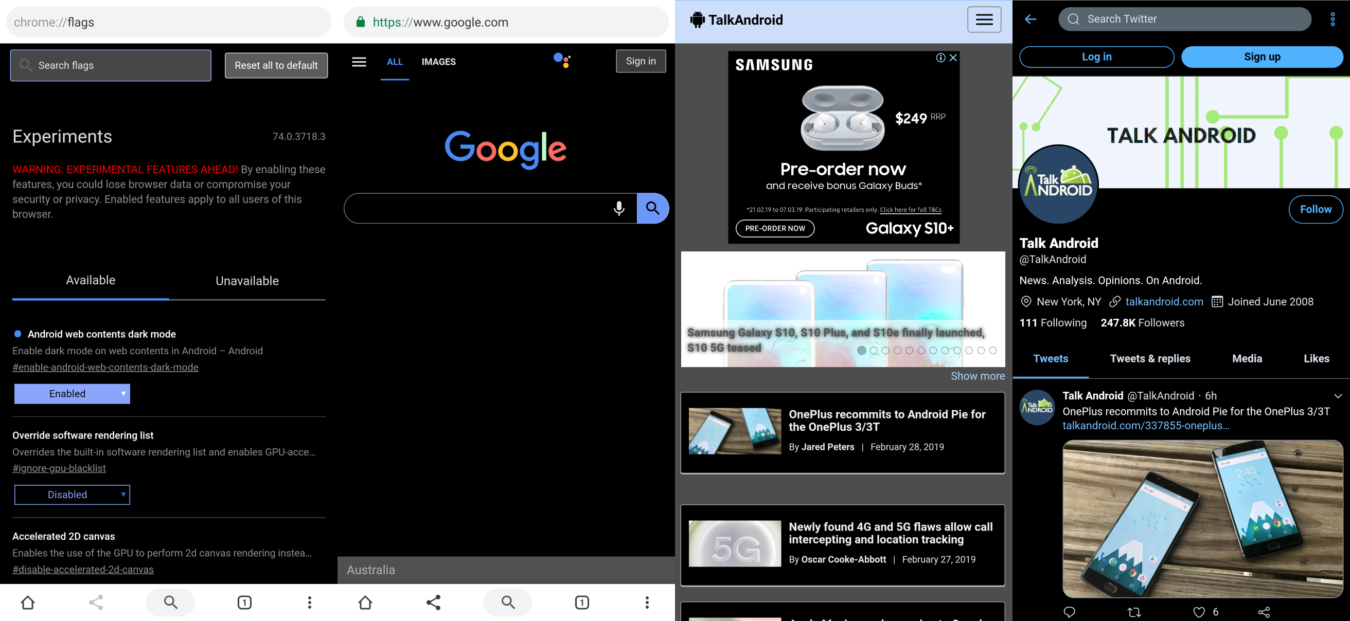
A new update to Chrome's ‘Canary' channel includes the ability to brute-force a net-wide dark mode which may release to all users eventually, but it's not ready yet.
After transitioning to a whiteout visual language with their ‘Material Design 2.0' app design guidelines, Google eventually realised their error and began rolling out atypically-unified dark modes to each of their apps after realising what everyone else already knew: dark modes are easier on the eyes and the battery.
Now it seems as though Google may be starting on a crusade to give the world the option for dark mode, as they are now attempting to apply this aesthetic to the entire web in one fell swoop.
In a new update to their ‘Canary' developer channel of their Chrome browser for Android, Google has added a new flag (flags allow hidden features to be enabled) called ‘Android web contents dark mode'. When switched on it attempts to turn the web dark more-or-less by inverting everything, or everything that isn't already dark and text; a rather inelegant solution.
This isn't the first time this inversion approach has been used to achieve a sort of dark-web, though due to its many issues which can be seen in the head image, it has never gone mainstream. This is early days yet for the experiment, however, evident in that the feature is relegated to the Canary channel and even then relegated to a flag, and if Google decides to go further with the idea then they will undoubtedly improve it and probably even work with sites directly to optimise it.
If you'd like to enable the feature yourself, follow these instructions:
1. Download Chrome Canary from the Google Play Store
2. Navigate to chrome://flags via the omnibar (search/url bar)
3. Search for 'dark' in the chrome flags' own search bar
4. Enable 'Android web contents dark mode' (it will be the only result for the search)
5. Restart Chrome Canary