


As many of the book-reading Android faithful may know, Amazon is releasing a free Kindle app for the Android platform. While there's no mention of a release date for the app, that doesn't mean that you can't get your e-book reading on using your Android phone. Of the couple of e-book reader apps I've used thus far, Aldiko is probably my favorite due to its ease of use, intuitive user interface, and wealth of customization options.
When you first boot up Aldiko, the first thing that pops up (after the user agreement) is a helpful hint box. Clicking “Next Tip” a few times gives you some ideas as to how the app works and gives you some tips that you might not have been able to figure out on your own. If you would rather jump in and mess around with the app, you can click Dismiss, and if you would prefer the tip box never pop up again, there's a check mark for that. Very simply but intelligently designed, and a good idea for those less tech savvy.
Once past that, you're left with a very nice book-shelf interface with 3 rows. On the top shelf, you'll find a sliding representation of the books you currently have; in the middle, your “Bookshelf,” to browse your collection; and on the bottom you'll see “Download Books,” where you'll (go figure) go to download new titles to your collection.

Now Aldiko doesn't have the sheer volume of e-books that you'll find with the Kindle, but what it does have is a lot of free e-books (mostly classics) nicely laid out in an organized fashion. Along with the free e-books, Aldiko does offer some paid ones as well. If you can't find anything that's your particular cup of tea, there's also the option of loading your own via microSD.
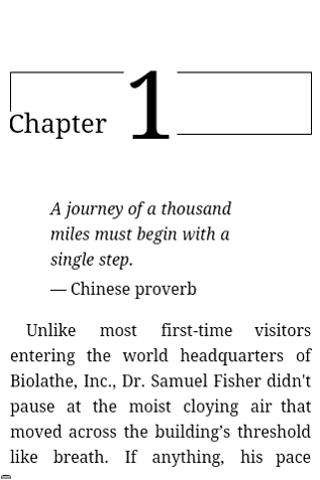
Where Aldiko really differentiates itself from other readers though is in the reader itself. Upon opening any eBook, a dialog opens explaining the different gestures and options. Like most e-books, you swipe left to go to the next page, and right to go to the previous page. One gesture I found really cool and intuitive, however, is by sliding your finger vertically along the left side of the screen, you can dim and brighten the backlight. Customizations also abound with Aldiko: font types, font thickness, font color, font weight, background color, and link color are all customizable, with separate settings available for both day and night reading. Beyond these, the expected tools like dictionary and word search are also available.
So while an avid reader may be waiting for Amazon's Kindle app with bated breath for the wealth of books available, there's still some very viable readers available to keep you occupied. Aldiko is available in the Market for free, though there is a premium version available to support the developers.
Now I'll get back to reading Alice's Adventures in Wonderland.
If you'd like to download or comment on this app, then head HERE.

yeah but relevant both comment link and page title should be same
This review relates to version 1.2 of Aldiko, which was fantastic. Now app has gone to V2, and its >8Mb, and slow on HTC Desire. Suggest read detailed reviews before installing it.
This is the first app I ever bought and I love it.
Nice write up. But I disagree with this statement
“Now Aldiko doesn’t have the sheer volume of e-books that you’ll find with the Kindle,”
It arguably has more, since you can import anything in .epub format. Every time I look at the reviews people are always crying about the selection. I use Calibre ebook management on my desktop, I can easily convert most formats to epub This makes my choices virtually endless. Granted it takes a bit more learning. But this option is always over looked when it comes to Aldiko