

You’ve done everything right—recorded the video, edited it carefully, and hit upload… but the views just don’t come in. More often than not, the issue is not the content itself, it’s the thumbnail. On YouTube, a single thumbnail decides whether someone clicks or scrolls away, directly shaping your clicks, CTR, views, and audience engagement within seconds.
Yet for many creators, thumbnails are the most frustrating part of the process. They take too much time, require design skills most beginners don’t have, and often end up looking repetitive or don’t stand out in a crowded feed.
That’s exactly why AI is changing the way thumbnails are made. Tools like Media.io and its Image to Image AIare helping creators instantly transform ordinary images into high-click, scroll-stopping YouTube thumbnails without the design struggle.
In this article, you will learn how creators are using AI to turn simple images into powerful and attention-grabbing YouTube thumbnails that actually drive clicks and engagement.
Why YouTube Thumbnails Matter More Than Ever
A YouTube thumbnail is the first thing viewers notice. Also, it often decides whether a video gets clicked or ignored. In simple terms, better thumbnails lead to higher click-through rates (CTR). That directly increases views and overall audience engagement. YouTube is a very competitive site, as there are millions of videos uploaded daily, and thumbnails are a major factor in grabbing attention.
Common Thumbnail Problems:
- Dull visuals that don’t stand out
- Low contrast that blends into the feed
- Poor or unclear facial expressions
- Generic layouts used by many creators
- Overcrowded designs with too much text or elements
Even great videos can struggle to perform if the thumbnail doesn’t grab attention instantly. In most cases, the viewer decides to click or scroll away within just a couple of seconds.
What Is an Image-to-Image AI Tool for YouTube Thumbnails?
An image-to-image AI tool helps creators transform existing photos into upgraded, stylized visuals.
Instead of manually editing in Photoshop, the workflow becomes simple:
Upload image → Apply AI style → Generate enhanced thumbnail
These tools use AI models to reinterpret your image while preserving the subject, making it ideal for YouTube creators.
Key Features Creators Look For:
- Background enhancement and replacement
- Cinematic lighting effects
- Facial focus and expression enhancement
- Color grading and visual sharpening
- AI-generated artistic styles
One of the most beginner-friendly tools is Media.io Image to Image AI, which is built for quick and easy transformation of images.
It stands out because:
- It works directly in the browser
- No editing experience is required
- It generates multiple visual styles quickly
- It’s ideal for thumbnail experimentation
For creators who want speed and quality together, this kind of AI workflow is becoming essential.
How Creators Use Media.io to Make Viral YouTube Thumbnails
Modern creators are no longer relying only on manual design tools. Instead, they are building AI-powered thumbnail workflows that save time and increase performance.
Transforming Basic Photos Into High-Impact Visuals
Creators often start with simple images—selfies, screenshots, or video stills. Using AI tools, these basic visuals are transformed into cinematic-quality thumbnails.
With AI enhancement:
- Lighting becomes more dramatic
- Backgrounds look more dynamic
- Subjects appear sharper and more focused
- Overall visuals feel more “clickable.”
This instantly upgrades the professional feel of a channel.
Creating Multiple Thumbnail Variations Quickly
One of the biggest advantages of using an image to image AI generator free workflow is speed.
Instead of designing one thumbnail at a time, creators can:
- Generate multiple variations from a single image
- Test different moods and styles
- Experiment with color tones and composition
This improves A/B testing strategies and helps identify which thumbnail gets the highest CTR.
Creators no longer redesign thumbnails from scratch; they iterate.
Enhancing Emotions and Facial Expressions
Emotions drive clicks.
YouTube thumbnails that show:
- surprise
- excitement
- shock
- curiosity
tend to perform better than neutral expressions.
AI tools help subtly enhance facial expressions, making reactions more visible and engaging without looking unnatural. This is especially powerful for reaction channels and commentary videos.
Making Gaming, Tech, and Commentary Thumbnails More Engaging
Different content niches benefit from AI thumbnail generation:
- Gaming channels → cinematic effects, action lighting
- Tech tutorials → clean, futuristic visuals
- Reaction videos → expressive face enhancement
- Storytelling content → dramatic color grading
AI tools help unify branding while keeping thumbnails visually fresh and engaging.
My Experience Using Media.io for Thumbnail Creation
When I first started testing Media.io Image to Image AI, I didn’t expect the process to be this smooth. But from the very beginning, everything felt simple, fast, and beginner-friendly, perfect for creating YouTube thumbnails without any design stress.
Here is a simple workflow:
Step 1: Launch the Media.io site
Open your browser and go to the Media.io platform. From there, navigate to the Image to Image AI tool to start creating your thumbnail.
Step 2: Upload Image
Now, upload a clear image you want to edit. The tool supports common formats like JPG, PNG, WEBP, and HEIC, so you can upload your image without any hassle.
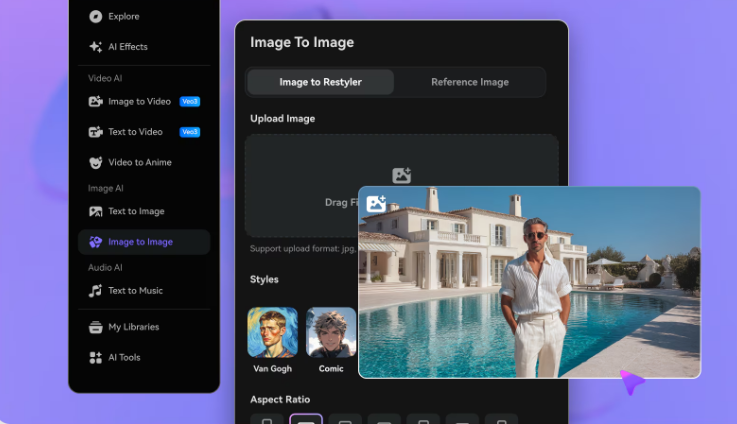
Step 3: Select an AI Style
Choose a style that fits your video. You can try cinematic looks, creative effects, or enhanced visual styles to make your thumbnail more attractive and clickable.
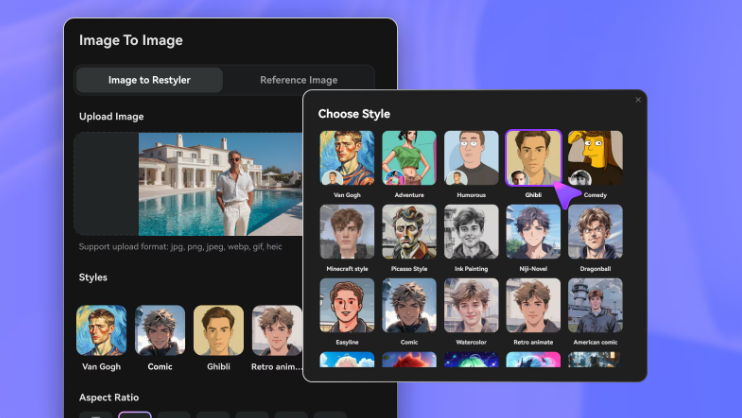
Step 4: Generate & Download
Click Generate and let the AI do its magic. Preview the result carefully. If it fits your video topic and thumbnail style, download it and use it as a starting point for your YouTube thumbnail.

That’s it—no stress, no complex tools, just quick and simple thumbnail creation that actually looks professional.
What stood out:
- Fast rendering speed
- Easy interface (no learning curve)
- High-quality visual output
- Realistic image enhancement
Some styles worked especially well for:
- reaction-based thumbnails
- cinematic storytelling visuals
- gaming-related content
The biggest advantage was how quickly ideas could be tested without spending hours in design software.
Try it now on Media.io and explore different styles to improve your YouTube video thumbnails.
Best Practices for AI-Generated YouTube Thumbnails
Strategy still matters even with powerful AI tools.
Proven Thumbnail Tips:
- Use close-up facial expressions
- Keep text minimal (2–4 words max)
- Use high contrast colors
- Focus on one clear subject
- Avoid cluttered backgrounds
AI-Specific Tip:
AI works best when the original image is clear, well-lit, and focused. The better your input, the stronger your output.
Think of AI as a creative amplifier, not a replacement for good visuals.
Conclusion
AI thumbnail creation is now becoming a natural part of modern YouTube workflows. That helps creators stay consistent and competitive. AI tools are helping creators save time, boost their CTR, and create more engaging thumbnails in a matter of seconds.
As this trend continues to grow, it's worth trying out AI-powered tools to elevate video performance. Use a free online tool like Media.io to experiment with various thumbnail styles. And see how fast you can transform regular images into high-click visuals that can help you grow your YouTube channel.
FAQ
Can AI create YouTube thumbnails?
Yes. AI tools can generate and enhance images specifically for YouTube thumbnails using smart visual models.
What makes a YouTube thumbnail go viral?
Strong emotions and curiosity-driven visuals usually perform best.
Is image to image AI useful for YouTube creators?
Yes. It helps convert basic images into professional-looking thumbnails quickly.
Can beginners use AI thumbnail tools easily?
Absolutely. Most tools are browser-based and require no editing experience.
How do creators improve thumbnail CTR using AI?
By testing multiple AI-generated variations and selecting the highest-performing design based on engagement data.