




A new update to the Google Photos app on Android was spotted rolling out a few hours ago and reports indicate a new movie editor is now included in the app. Many thought this move was close to happening based on some earlier teardowns of the Google Photos app. Those who have been waiting patiently have had to spend the last year watching their iOS using friends access the features which were apparently obtained by Google through their acquisition of Fly Labs in 2015.
Probably the two most glaring changes to the movie editor feature include a new interface that abandons the old dark them and goes for a white background consistent with many other Google apps. Google also moving the preview screen from the middle of the layout to the top of the screen. Below that, video clips or other media are stacked with indicators showing what portions are included in the video. For those who have worked with desktop video editing tools, the layout will be much more familiar. Sources note that this layout, as opposed to the use of a carousel in the old version, is much more efficient.
Lurking beneath these surface changes lie other new features like the ability to long press then drag a clip to a new location for easy repositioning. Google also added options like moving clips up and down in the timeline, showing or hiding unused portion of a clip, muting audio, inserting new clips, duplicating a clip or removing a clip altogether.
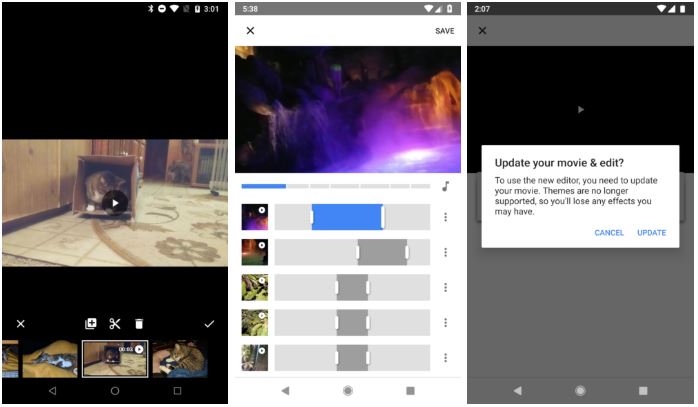
While the new movie editor appears to be a good step forward for Google Photos, it does still lack quite a few tools that could really make it a strong tool for producing videos. For example, themes that apply a certain look to a clip or an entire movie in a fashion similiar to what Instagram can do are missing. Similarly, there are no options available to do things like flip a clip or rotate an image or censor portions of a clip or image. There is also no way to add text to a movie in the editor. The lack of these tools means users will have to resort to other apps to accomplish these effects, then pull those edited clips and images into Google Photos.
At present, the update to Google Photos and the appearance of the new movie editor interface appears to require a manual restart of Photos after the update. That is not consistent with how Android app updates generally function.
If you do not have Google Photos on your device, a download link is provided below if you want to give things a try.
Download It Now: Play Store
source: Android Police
