




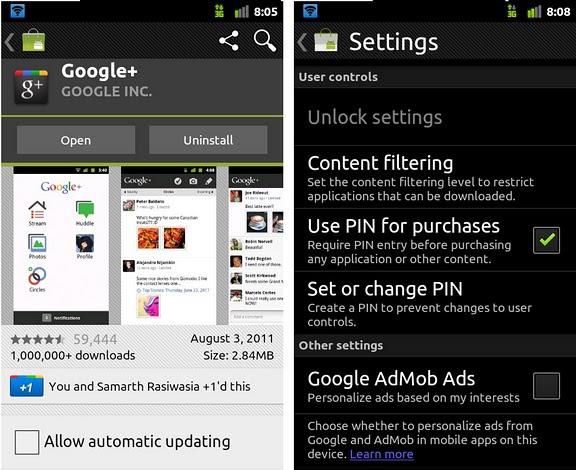
Android Market 3.1.3 is rolling out OTA to phones right now. This update adds two big new features. First, you’ll notice the addition of Google’s +1 button. The +1 button will be used to help shape market search results, so +1 those apps you love! Also in this update is the addition of a pin lockout control system. Going to the market’s preferences you’ll find that you can set up a pin to prevent purchases without authorization. While that may not be useful for everyone, I can see how it would be a very welcome update to parents whose kids use their smartphones. Among other things we’re starting to notice slight organizational changes; for example, moving app size and last revision into better view and even a slightly changed Market icon.
If by chance you are as impatient as I am, you can forgo waiting on the OTA and download the new market now from here. Just remember to allow unknown sources.
[via PocketNow]

Help! I got this version through automatic update but I don’t have the +1 button and the Movies and Books category. My device is a Galaxy Tab P1010 I live in the Philippines. Is the +1 button and the movies etc category US exclusive?
I got this version through automatic update but I don’t have the +1 button and the Movies and Books category. My device is a Galaxy Tab P1010 I live in the Philippines.
@WizKid
I think its mostly a matter of downloading from a reliable source, as well as possibly the fact that sometimes the leak of a system app is not as up to date as the actual ota which may address security bug issues. In either case, I can attest to this download being just fine :)
@Curt
That’s a great question, I haven’t encountered it myself. Can anyone comment as to whether or not the pin pop-up shows up for in-app purchases?
Nice to see an added layer of protection for unauthorized app purchases.
The one question that has not been answered in this article. Does the pin pop up when there is an inapp purchase? I would hope so, but I do not assume anything at this point.
I still haven’t figured out the downsides with upgrading a system app that way, i.e. downloading the APK and manually installing it. Are there any at all?