



I'm not going to use this piece to perpetuate the battle between the different music streaming services that are available to us. But hey, if you're one of the people who uses YouTube Music, you do you. It comes conveniently packaged with YouTube Premium, so that's a major perk — you can essentially get it for free.
That aside, if you've ever had friends who want to get into the kind of music that you listen to but you're not sure how you can conveniently do that, YouTube Music has provided the answer. It has rolled out a new Personal Radio feature that uses your music taste for an auto-generated playlist, and you can even share it with your friends.
The Personal Radio On YouTube Music Is A Daily, Auto-Generated Playlist That Aligns With Your Music Taste
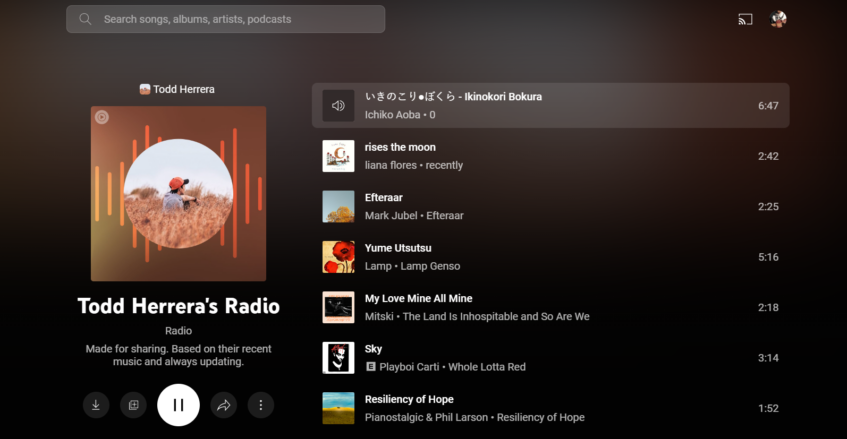
YouTube Music has always had the concept of radio stations. You could hear radio based on a particular artist or song that you really like, and the app would generate a playlist comprising similar songs or artists with a similar sound. It provides a really great way to discover new music when you're in a more exploratory mood.
However, there's a new addition rolling out to YouTube Music, and that's a radio based on you. Yep, it's a personal radio that puts together songs and artists based on the music that you like to listen to. This makes it personalized and gives you the ability to see a “summary” of your listening in one place. I'd also assume that it won't just be a playlist of songs that you've actually heard, and will likely include some new recommendations too.
This personal radio is going to update every single day to shake things up, so there'll always be a different catalog for you to listen to. Google is still currently rolling it out, so you might not be able to see it right away, but be patient as it is bound to arrive on your doorstep soon.
Here's How To Enable Your Personal Radio
Your personal radio isn't made available by default, even when it has been rolled out in your direction. To do so, follow these steps:
- Tap on your profile picture.
- Select Settings.
- Choose “Privacy and location”.
- Tap “Channel settings”.
- Now, turn on the “Enable public personal radio” switch to finish up.
Your Personal Radio Can Now Be Shared With Your Friends And Family

With your personal radio accessible through your profile, other people who view your profile will be able to listen to it, and you'll even be able to share a link to friends and family who you want to give the opportunity to have a taste of what you like when it comes to music.
Anyone will also be able to save the playlist to their library — the same way you can do with any other playlist — if they like your music taste that much. I'd certainly consider that to be a compliment if anyone saved my personal radio.
