





Google's iconic Circle to Search feature allows you to select any item on your screen and run a quick search without switching to your browser. So, if you took photos of weird rocks on those rare hikes with friends, you can highlight them and the feature helps you to identify them.
Initially, it was limited to the Pixel 8 and Samsung Galaxy S24 phone series, until Google rolled it out to select other devices — and it's about to get even better.
You will soon be able to share circled items
Ordinarily, you can circle items on your screen to find more information on the web. Soon, the feature will take its capabilities three steps further. Leaker AssembleDebug, together with Android Authority, have shared what the new features are.
Circle to Search may allow you to save any part of your screen that you've selected to the cloud. It's a useful feature for keeping specific information, especially when you don't need everything in a regular screenshot. The partial screenshots won't go to your usual Google Photos library. Instead, you'll find them stored in a separate “Saved” menu to form a collection. The menu is within the Google app or the web version.
Sadly, you can't share the saved screenshots. You can only share a link to the collection with third-parties, and they can see everything you've stored. It'd be nice to set access restrictions like most Google apps allow.
Listen and select all texts on your screen
In addition to the upcoming sharing feature for Circle to Search, a “Listen” button will make an appearance. Alongside it, another “Select all” button will be introduced. If the existing Google Lens features are anything to go by, the new elements may let you grab texts on the screen instead of having to manually highlight them all, and point your camera at texts and have them read aloud to you.
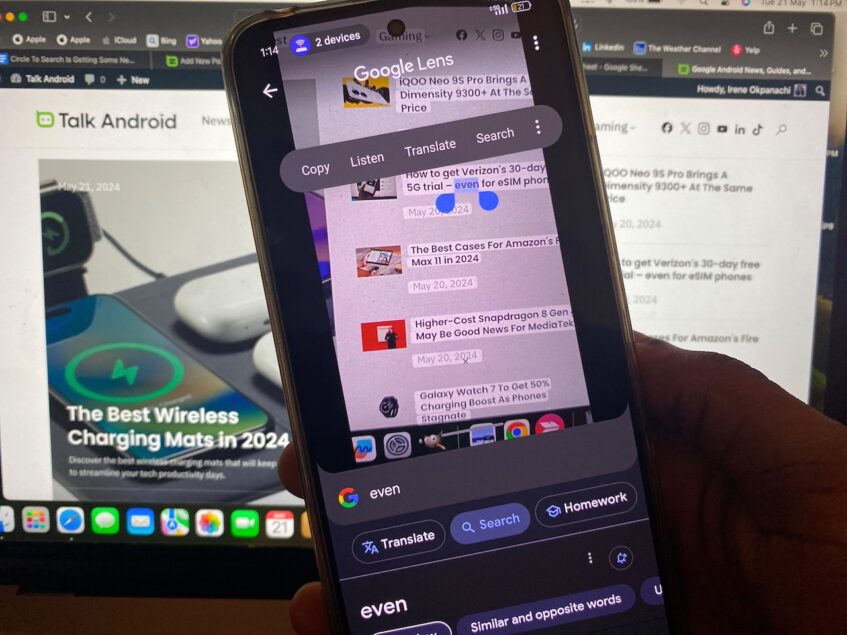
For now, the features are still in the beta version of the Google app. So they might not be available to everyone yet or even make it to the final release. Afterall, Google still needs to decide that they meet quality standards. But considering that the leaker has successfully accessed version 15.20.36.29 of the Google beta app, and tested them to some extent, there's a high possibility that we'll see them soon.
Circle to Search is growing into a knowledge companion
Circle to Search is evolving beyond a simple search tool. Before now, there were numerous sightings of code on the v5.19.45.29.arm64 beta suggesting that Google is adding barcode support, and another feature that will help students solve tough equations with step-by-step instructions. Already, Google lens has these capabilities, and makes for a great substitute on phones lacking advanced AI functionality.

You'll want to keep the Google app, as well as your phone's OS, updated in preparation for the upcoming changes. Most times, you receive automatic update notifications, but you can also check for them manually in your phone's settings. Additionally, follow Google announcements on the official blog to see what other search and assistant features the tech giant might be cooking in their lab.

