



WhatsApp conversations can contain personal memories, customer discussions, project decisions, photographs and important documents. Android users who want to protect this information often look for a “backup,” but a backup is not always the right solution.
Sometimes the goal is to restore every conversation after changing phones. In other situations, the user only wants a readable copy of one chat or a structured file covering a specific date range.
That is the difference between a WhatsApp backup and a chat export. Understanding it can prevent users from choosing a method that creates the wrong type of file.
What Is a WhatsApp Backup?
A WhatsApp backup is primarily designed for recovery. On Android, WhatsApp can back up chat data so that it can later be restored to the application.
This is useful when:
- Moving to a replacement Android phone
- Reinstalling WhatsApp
- Recovering after resetting a device
- Protecting the broader chat history against device loss
A backup usually contains data in a format intended for WhatsApp itself. It is not designed to be opened like a normal document or reviewed in a spreadsheet.
If the goal is to restore the account and continue using conversations inside WhatsApp, a backup is generally the appropriate option.
What Is a WhatsApp Chat Export?
A chat export creates a separate file containing selected conversation data. Instead of being used to restore WhatsApp, the resulting file can be opened or processed outside the application.
Chat exports can help users:
- Keep a readable copy of one conversation
- Save messages from a specific period
- Document a project or customer service case
- Review messages in a spreadsheet
- Prepare an authorised account handover
- Store selected photographs or documents with the chat
This makes exporting more selective than a full backup. Users can focus on the conversation and dates they actually need.
Backup vs Export: The Main Differences
Although both processes preserve information, they serve different purposes.
Purpose
A backup is designed to restore WhatsApp data. An export is designed to create an independent record.
Scope
A backup usually covers a broad set of account data. An export can focus on one selected conversation and date range.
File Access
Backup data is generally intended to be read by WhatsApp. Exported HTML, Excel and CSV files can be opened with compatible browsers or office applications.
Restoration
A backup may be used during WhatsApp restoration. A normal chat export cannot simply be imported to recreate the conversation inside the app.
Review
A backup is not convenient for examining individual messages outside WhatsApp. An export is more suitable for reading, filtering or documenting selected conversations.
When an Android Backup Is the Right Choice
Choose a WhatsApp backup when the main objective is continuity inside the app.
For example, a user replacing a damaged phone will normally want the complete chat history to appear on the new device. Creating individual documents from selected conversations would not provide the same result.
Before relying on a backup, users should check:
- When the last backup was completed
- Which account is being used
- Whether videos are included
- Whether sufficient storage is available
- Whether the backup is protected appropriately
A backup is most useful when it is created before the original device is lost, reset or damaged.
When a Chat Export Is More Useful
A separate export is the better choice when the user needs to access information outside WhatsApp.
For instance, a freelancer may want to preserve project instructions before closing a contract. A small business may need a readable record of a resolved support case. An individual may want to keep one meaningful conversation without creating a complete account archive.
WAExport gives users control over a selected conversation by allowing them to define a date range, choose an output format and decide whether media should be included.
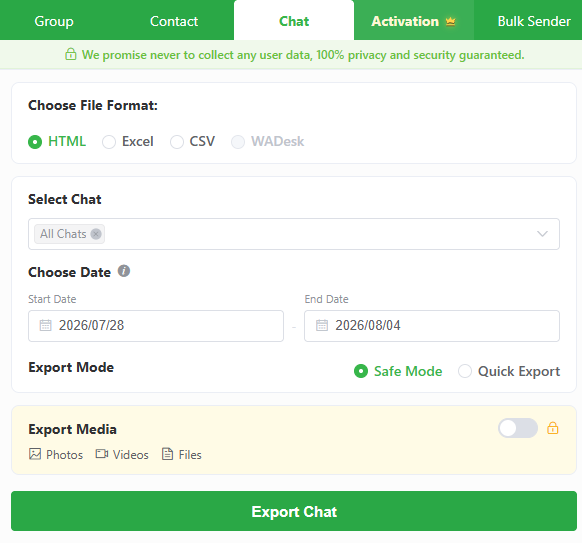
It should be treated as an export tool rather than a phone migration or deleted-message recovery solution.
How to Export a Selected Conversation
The process begins with a clear purpose. Decide which chat is required and what will be done with the resulting file.
Step 1: Select the Chat
Choose the conversation that needs to be preserved. Confirm that the correct WhatsApp account is active, particularly when using a shared computer or linked browser session.
Step 2: Set the Date Range
Choose a start and end date. A narrow range reduces file size and prevents unrelated messages from being included.
Step 3: Choose the Format
Users who need to export WhatsApp chats to HTML, Excel or CSV should select the format according to how the information will be used.
Step 4: Select an Export Mode
Choose Safe Mode or Quick Export. A short test export can help confirm the settings before processing a longer conversation.
Step 5: Configure Media
Decide whether photos, videos and files are required. Media can make the export much larger and may contain sensitive information.
Step 6: Review the Output
Open the downloaded file and verify the chat, dates, message order and requested attachments. Move the approved export from the downloads folder to a more appropriate storage location.
HTML vs Excel vs CSV
HTML for Reading
HTML is generally the best option when the user wants to read the conversation in sequence. It can be opened in a browser and works well for personal archives, project documentation and handovers.
An HTML file can still be modified, so it should not automatically be treated as tamper-proof evidence.
Excel for Manual Review
Excel is useful when messages need to be sorted, filtered or labelled. It may help a team review customer questions or identify messages from a particular period.
Because spreadsheets can contain private information, access should be restricted.
CSV for Structured Processing
CSV provides a simpler structure for compatible data and reporting tools. However, it offers limited visual formatting and may not be comfortable for reading a conversation.
Users should test a small CSV export before processing a large chat. Applications may interpret dates and special characters differently.
Safe Mode vs Quick Export
WAExport offers two processing options.
Safe Mode uses a more measured approach and may be preferable for longer conversations or first-time exports. Quick Export focuses on speed and may suit smaller chats or previously tested workflows.
The selected mode does not remove the need to review the final file. Users remain responsible for checking whether the correct content was exported.
Should Media Be Included?
Including photos, videos and files may be necessary when they provide essential context.
Examples include:
- Product or delivery photographs
- Receipts and invoices
- Design approvals
- Project documents
- Files related to a support case
If the user only needs written messages, media can normally be excluded. This reduces storage requirements and limits the amount of sensitive material collected.
Storage and Privacy Tips
An exported conversation exists outside WhatsApp and must be protected separately.
Users should:
- Store the file in an approved location
- Remove unnecessary copies from the downloads folder
- Restrict access to authorised people
- Encrypt sensitive files when appropriate
- Avoid exporting unrelated messages
- Delete the archive when it is no longer needed
- Check media before sharing the file
Exporting a conversation does not automatically provide permission to distribute or retain another person’s messages indefinitely.
Frequently Asked Questions
Can a chat export be restored into WhatsApp?
No. HTML, Excel and CSV files are independent records and are not substitutes for a restorable WhatsApp backup.
Can WAExport recover deleted messages?
WAExport exports content available in the selected conversation. It should not be considered a deleted-message recovery tool.
Which format is easiest to read?
HTML is usually the most convenient option for reading a conversation in a browser.
Can a specific period be exported?
Yes. Users can define a start and end date.
Can photos and videos be included?
Yes. Media can be included when required, although it may significantly increase the size and sensitivity of the export.
Final Verdict
Choose a WhatsApp backup when the goal is to restore conversations inside the app after reinstalling WhatsApp or changing devices. Choose a chat export when the goal is to create a readable or structured copy of one selected conversation.
WAExport supports the second use case by producing HTML, Excel or CSV files with controls for date range, export mode and media.
Neither option replaces the other. Android users who understand the difference can protect their data more effectively and avoid discovering too late that they created a file that cannot serve their intended purpose.