

Most people take photos daily, but small mistakes can spoil a nice memory. Sometimes someone blinks, looks away, or closes their eyes at the wrong moment. Fixing these problems earlier needed hard editing skills and complex computer software. Now, smart mobile tools make photo fixing easy for normal users everywhere.
A modern AI photo app can repair small issues in seconds automatically. These apps can open closed eyes and improve facial features with very simple steps. You only upload a photo and let the tool adjust the image gently. Thus, this guide explores helpful apps that support opening eye AI now.
Part 1. What Makes an AI Photo App Useful for Everyday Photo Fixes
Everyday photo edits can be done quickly using an AI photo editor app. Below are the main features that make fixing photos simple and fast:
- One-Tap Enhance: This feature makes your dull photos look bright and very sharp. One small tap will fix the colors in your image right now.
- Background Tools: You can blur or remove a messy room behind your happy face. Also, this makes your main subject look clear and very professional.
- Object Removal: Easily erase a trash can or a stranger from your best shot. The smart app fills the empty space to look very clean now.
- Face Retouching: Make your skin look smooth, and your smile look very white. So, your face stays real while all the tiny spots go away fast.
- Quick Cropping: Change the size of your photo for any social media site fast. Plus, use ready-made shapes to fit your post in just a few seconds.
Part 2. Top AI Photo App Tools That Support Opening Eye AI Now
Sometimes your photos look a bit sleepy, and opening eye AI can fix them fast. Let's explore the top AI photo app tools that make this feature work easily:
1. Relumi App (Android/iOS)
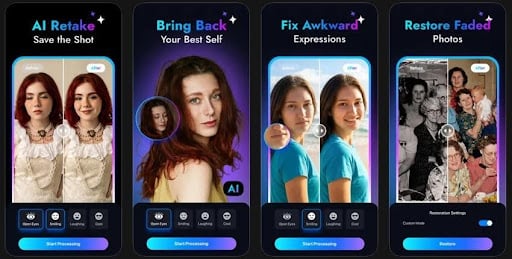
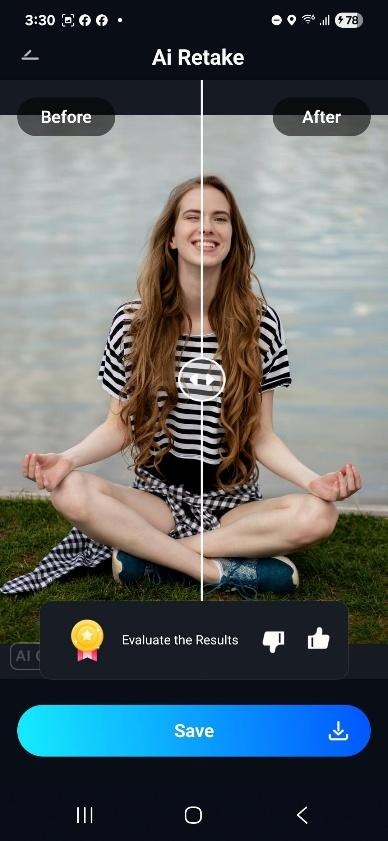
Many users close their eyes unexpectedly when taking selfies or group photos. To fix this, the Relumi app is the best option to open closed eyes. This AI photo editor app uses smart AI Retake tools to open eyes naturally. You can even fix only 1 person with closed eyes in a group photo, leaving the others untouched. It generates eyes matching the original color while keeping the gaze natural and aligned properly.
Moreover, users can provide 3 reference images to guide AI for more accurate eyes. The app maintains original smiles while opening eyes, keeping expressions natural and consistent. It allows exporting photos in custom aspect ratios like 16:9 or 4:3 easily. Apart from that, it offers Nano Banana Pro for more detailed, high-quality eye reconstruction edits. You can preview before and after images to see AI corrections clearly.
Pros
- One tap automatically detects and fixes closed eyes without any effort.
- Scene lighting is analyzed to ensure that eyes blend naturally into photos.
- Delivers similar high-quality open-eye fixes across different lighting conditions and angles.
A Complete Guide to Fix the Open Eyes Issue Using Relumi App
Go through the guide below to open closed eyes with minimal effort:
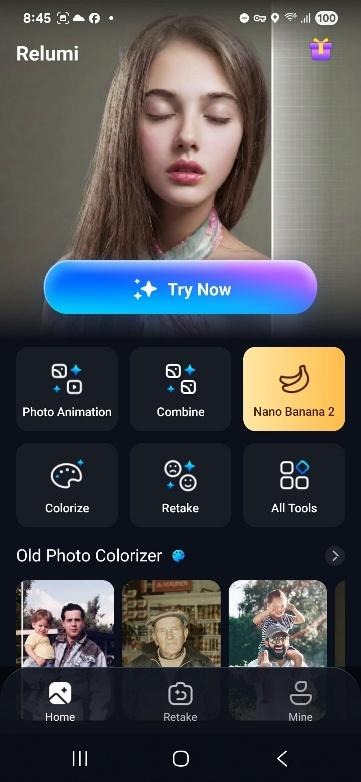
Step 1. Access AI Retake Feature
Open the app and tap the “Retake” option from the main screen.
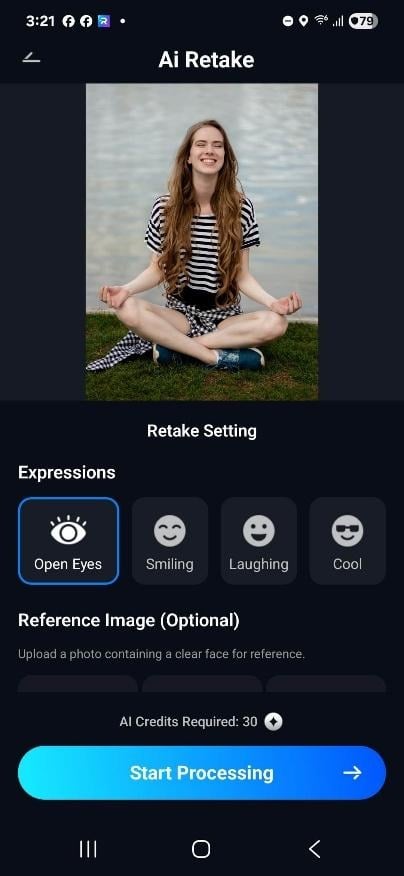
Step 2. Add Photo to Open Closed Eyes
After accessing it, add a closed eye photo and select the “Open Eyes” option, then tap “Start Processing.”
Step 3. Preview and Save the Photo
Once your added photo gets fixed, preview the before and after result and press “Save” to download it.
Why Choose the Relumi App for Open-Closed Eyes
- Supports multiple faces, only correcting blinking eyes while leaving others untouched.
- Blends all fixes into existing lighting, shadows, and skin tones seamlessly.
- Maintains facial expressions, smiles, and emotions while correcting closed eyes accurately.
- Fixes photos that cannot be reshot, rescuing special moments instantly with AI.
- Turns almost-perfect shots into keep-forever photos instead of discarding them entirely.
2. Evoto AI (Android/iOS)
You can also use this AI photo app to naturally smooth subtle eyelid-closure effects in partially blinking portraits. Moreover, it simulates a gentle eye-opening for minor eyelid closure correction. After opening, Evoto AI automatically detects and removes red-eye from flash or low-light shots. The app adjusts surrounding skin tones to naturally frame eyes and enhance focus.
Pros
- Automatically detect fully or partially closed eyes to apply targeted corrections or enhancements.
- Supports batch processing for multiple portraits needing consistent eye enhancement efficiently.
Cons
- Some iris enhancements can appear artificial if overdone or mismatched with skin tones.
- Partial eyelid corrections might appear unnatural if not carefully adjusted manually.
3. AirBrush AI (Android/iOS)
This is another AI photo editor app, as it merges multiple images to combine the best open-eye elements. Users can open closed or squinting eyes naturally using an AI-generated reference from your photo. It matches your uploaded open-eye reference to recreate a realistic eye appearance. The app corrects uneven pupils while keeping realistic reflections and natural eye detail.
Pros
- Quick processing ensures eye fixes and beauty edits finish in seconds.
- AI algorithms maintain lighting and shadow consistency for realistic portrait outcomes.
Cons
- Not fully automatic; requires brushing eye areas and sometimes reference photos.
- Occasionally, AI may slightly misalign eyes if the reference photo is unclear.
4. Retake AI (Android/iOS)
Retake AI can correct closed eyes or expressions for multiple faces in a single photo. It preserves an authentic look and avoids a plastic or heavily filtered appearance. You can retain the intended emotional expression while using this opening eye AI to fix blinking eyes seamlessly. Additionally, this app shows instant previews of each open-eye variant before confirming.
Pros
- Saves time for frequent selfie users by reusing a personal AI face model.
- Offers multiple variations, allowing selection of the most natural eye appearance.
Cons
- Occluded eyes from hair or glare may not regenerate perfectly every time.
- Slight misalignment may occur in group photos with multiple edited faces.
5. Photoshop (Generative Fill) (Android/iOS)
The AI photo editor app produces several AI eye options to pick the most natural look. You can select the closed eye precisely using Photoshop’s lasso tool for AI generation. It automatically adjusts the generated eye layer opacity to blend perfectly with the original skin. Furthermore, users can adjust eye rotation to match head pose and expression consistently.
Pros
- AI recognizes facial features for more accurate open eye reconstruction automatically.
- Allows non-destructive edits so the original photo remains untouched during the eye reconstruction process.
Cons
- Results can be hit-or-miss if AI fails to match identity or symmetry properly.
- AI sometimes generates unnatural-looking eyes needing manual cleanup or re-generation for realism.
Part 3. Which AI Photo Editor App Is Best for Opening Eye AI Now
Sometimes your photos have blinking eyes, and choosing the right AI photo app is essential. Review the table below to compare the best tools for opening eyes effectively:
| Feature | Relumi App | Evoto AI | AirBrush AI | Retake AI | Photoshop |
| Eye Detection | Auto detects closed eyes | Detects partial closures | Requires manual brushing | Corrects multiple faces | AI generates options |
| Multiple Faces | Corrects all blinking eyes | Limited support | Limited multi-face | Multi-face supported | Manual multi-face selection |
| Natural Gaze | Maintains natural gaze | Slight eye-opening correction | Matches the reference photo | Preserves iris patterns | Adjusts eye rotation |
| Reference Support | Supports reference images | No reference support | Needs uploaded reference | No reference guidance | Manual selection required |
| Preview Option | Before-after preview | Minimal preview | No instant preview | Variant previews | Preview possible |
Part 4. Avoid Common Mistakes While Using an AI Photo Editor App
Users make errors while editing, causing photos to look unnatural with an AI photo editor app. Go through the points below to learn common mistakes and how to fix them effectively:
- Over-Smoothing: Pushing skin smoothing too high removes natural texture, making faces appear fake. Always keep skin sliders low, check pores, and zoom in before saving images.
- Identity Change: Heavy AI reshaping can alter facial features, eyes, or body proportions. Use subtle edits only for minor fixes like lighting, skin, and small blemishes.
- Repeating Manually: Editing each photo individually wastes time on similar images in series. Utilize batch tools or copy settings to apply AI adjustments to multiple photos.
- Over-Brightening: Auto brightness can blow out highlights, making skin tones look unrealistic. Reduce exposure slightly after auto adjustments and compare before-and-after carefully.
- Ignoring Artifacts: AI may create extra fingers, warped glasses, or strange shadows around objects. Zoom to 100% and inspect all edges, faces, and hands before exporting.
Conclusion
In conclusion, choosing the right AI photo app makes it easy to save your favorite memories with a simple blink. You now have the best tools to fix closed eyes and improve every small detail in seconds. These smart features ensure your group shots and selfies always look professional and very natural. However, if you want the most realistic results, you must try the Relumi app to open your eyes.