Sideloading has always been one of Android’s most prideful features, and the thing its users hold over Apple users. You can install apps from anywhere, even outside the Play Store. Of course, you’d be doing it at your own risk as such apps aren't always safe.
Even Google warns against it. But the operating system is still relatively secure, especially with features like Google Play Protect, permission controls, and built-in warnings that scan apps and flag anything suspicious. Now, Google wants you to seriously rethink if sideloading is that much important to you.
There are so many precautions, you'll reconsider
In a new development, Android is introducing a stricter sideloading process for apps from unverified developers. You can still sideload, but it’s not a quick process. You’ll need to go through multiple steps, including enabling developer options, confirming you’re not being coerced, restarting your phone, and then waiting a full 24 hours before you can install the app.
The company made the announcement in an official blog post today. They're introducing a one-time secure system for power users to avoid scams, and it's called “Advanced flow”.
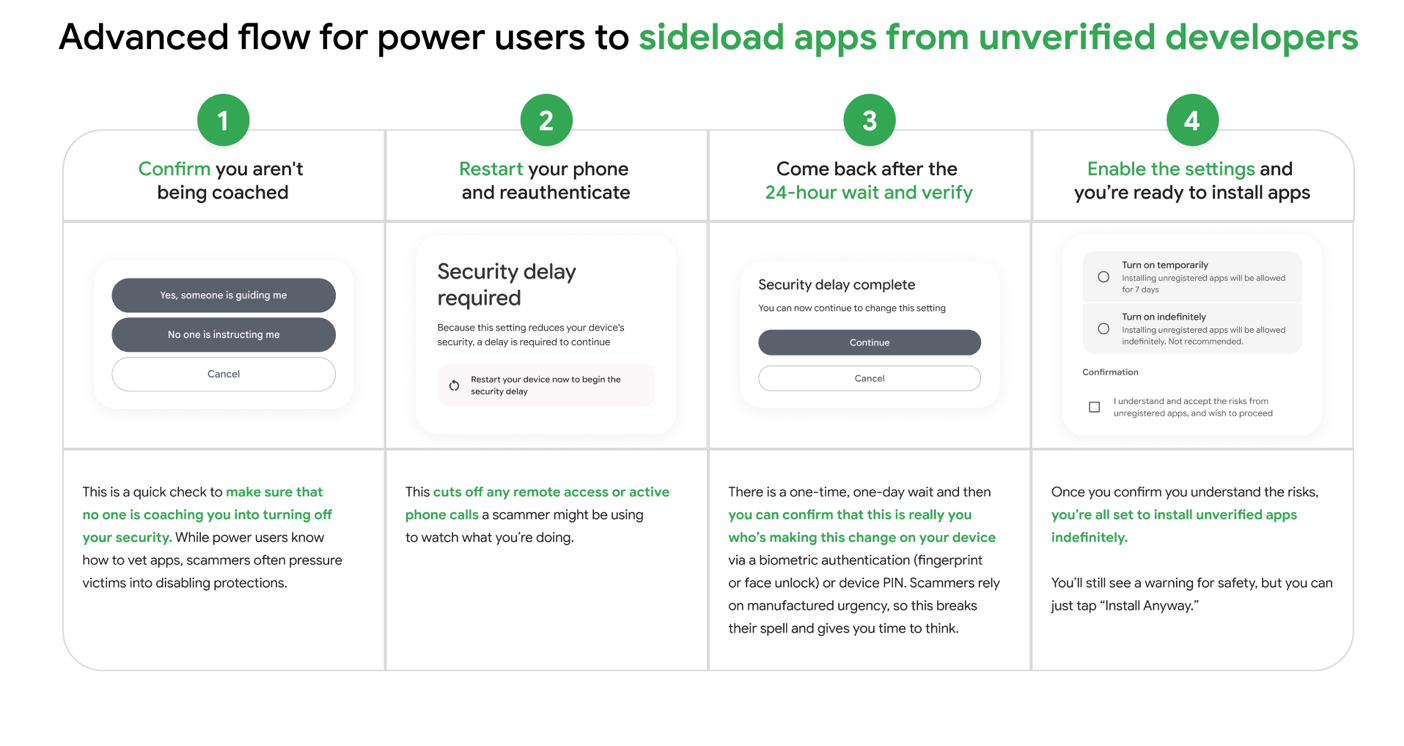
If you want to sideload apps under the new rules, go into your settings and enable Developer Options first. You should see Build number or Version number. Tap it multiple times to unlock the mode.
Then Android will prompt you to confirm that no one is guiding or coercing you. You simply acknowledge that you’re doing it of your own free will. Next, you’ll restart your phone to cut off any active screen sharing or remote access.

You won’t be able to install anything immediately when your phone comes back on. There's a 24-hour wait time. When the wait is over, you’ll return and verify your identity using your fingerprint, face unlock, or PIN. Installation should be possible after that, and you can choose to allow sideloading temporarily or keep it on indefinitely.
Adb installation will bypass 24-hour side loading lock
Ex-Android Authority reporter Mishaal Rahman, who now works for Google, confirmed that installing apps through the Android Debug Bridge bypasses the side loading restriction entirely.
ADB is a tool that lets you control your phone from a computer. It’s mainly for developers, but anyone can use it if they know how. Simply connect your phone to a PC and run the appropriate command for specific apps in the computer's terminal, and you'll be able to install it.
The command looks something like this:
adb install app.apk
The app.apk part is where you'll insert the app file you want to install. Your computer will send the command to your phone telling it to install the app.
Mishaal also confirms that you don’t need to turn Developer Options on after setting up Advanced Flow. You only need it to enable the feature, and it stays on even if you turn Developer Options off. But if you later want to disable sideloading access, you’ll need to turn Developer Options back on to change it.