



To access Multiplayer in Wuthering Waves, players will first need to reach Union Level 22. Read below for all the ways you can access multiplayer and co-op in Wuthering Waves!
Can You Play Multiplayer Co-op in Wuthering Waves?
Yes, you can!
Similar to Genshin Impact, Wuthering Waves does offer a Multiplayer co-op feature. The only catch is that it must first be unlocked by playing through the game.
How to Unlock Multiplayer
Reach Union Level 22

To unlock multiplayer access, players will first need to play through the game and increase their Union Level to 22. This means that players below Union Lv. 22 will be locked out of any multiplayer activities until they've grinded to the appropriate level.
Make sure to check out our How to Farm Union EXP Fast guide below so that you can play Wuthering Waves with your friends as soon as possible!
How to Access Multiplayer Co-op
Friends Interface
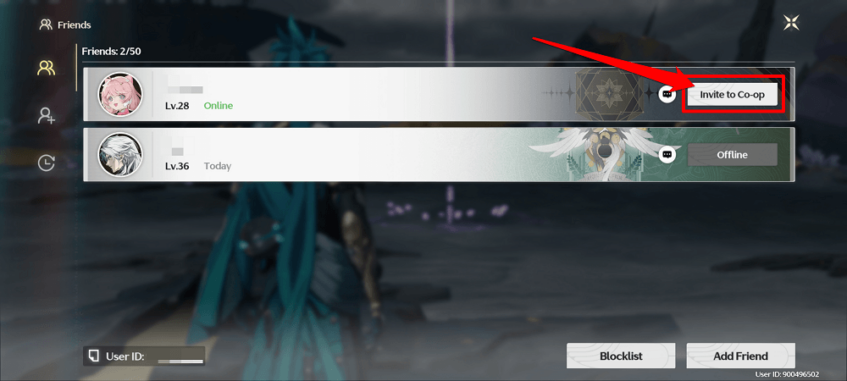
If you have some friends who are playing Wuthering Waves, you can request to join each other's games by accessing the Friends interface from the menu, and pressing the Invite to Co-op button.
Note: The person pressing the “Invite to Co-op” button is actually the one who is requesting to join. This means that if you invite your friend to co-op, them accepting means you will join their world. It does not mean that they will join your world.
Co-op Mode Button
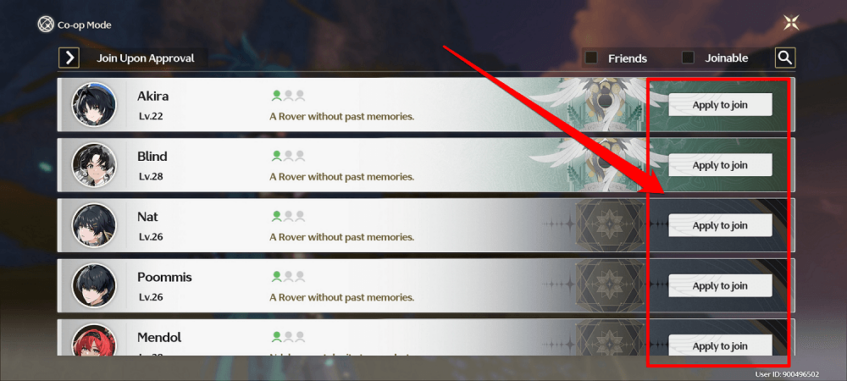
Located to the top left of the mini-map is the Co-op button. Pressing on that button will bring up a list of candidates that you can Apply to Join.
Keep in mind that the players shown here are a random selection of players, meaning that it is completely up to them whether or not they'll allow you into their instance.
Match Making
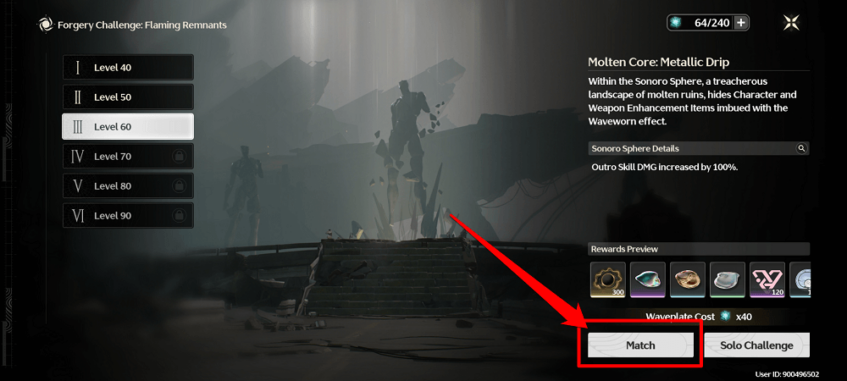
Available in some Game modes is the Match button. Pressing this button will have your game automatically look for other players who are looking to tackle the same content.
Currently, this button has only been observed to exist on the Forgery Challenge interface. But it may soon be added to other game modes, such as Weekly Bosses, or Tacet Fields.
How Many Max Players in Wuthering Waves?
Maximum of Three (3) Players
Similar to playing the game in Solo Mode, there can only be a maximum of three existing characters per instance. The first player that joins your world will replace the Resonator in your 3rd slot, while the second player to join your world will replace the Resonator in your 2nd slot.