



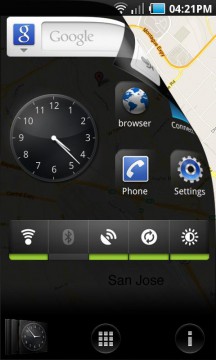
The vast number of possible Android launchers has increased by yet another as Samsung has released their own UI rendition called Pure Breeze from Samsung San Jose Mobile Lab. The launcher replaces the standard Android Home layout (for any Android device 2.1 or greater) in the hopes of giving users custom options, better organization and simplified navigation to apps and files. The twist? It works around a unique grouping system with a floating “Kite” that holds those groups and acts as your home screen. Whether or not this is a recipe for success remains questionable however.
Here’s what they say:
Pure Breeze is a customizable user interface that lets you easily organize your apps, groups, and tasks, and create shortcuts. Pure Breeze replaces your default home screen and allows you to enhance navigation by organizing your applications into groups. The “Kite”, a customizable floating window is always available with one touch to access your phone’s widgets and shortcuts. The “Kite” becomes your new launcher and home screen.
The full version of Pure Breeze in available in the Android Market for £1.23 ($1.74US), or you can snag a free trial before you make any commitments.
[via market]
![Motorola DROID Bionic Eye Live Wallpaper [Download] 3](https://www.talkandroid.com/wp-content/uploads/2011/09/Bionic-Wallpaper-1-360x250.jpg)

My vote is for GoLauncher; Pure Breeze just doesn’t offer the functionality I need.
@Tom Jasper: Here’s a few links for you to checkout on the Samsung San Jose Mobile Lab..
https://www.facebook.com/pages/Samsung-San-Jose-Mobile-Lab/175674769170390?sk=info
https://www.youtube.com/user/SamsungSanJMobileLab
Sure glad I just did the trial. This app is slow. Ill stick with Launcher Pro Plus.
Don’t waste your time, its a 1 star app.
Use Zeam Launcher with Application Folder, you will get 10 times the functionality.
Fancy animations don’t make up for lack of functionality.
Are you folks sure this is legit? Dev website link from Google Market takes you to https://developer.samsung.com&usg=AFQjCNF1ceDOFxrfsRiqrp2QuNnqBThJsg which has no reference to either “Samsung San Jose Mobile Lab” or Breeze