



Everyone is always waxing lyrical about the Apple ecosystem and how tightly integrated your iPhone can be with your Mac. The thing is, Android has pretty much the same potential when paired with Windows if you know how to use the Phone Link app. Ever since I started using it, I never turned back.
The only thing I've never liked about Phone Link is that the only files that you can remotely access are your media files, that is, photos and videos. What if you want to move a document from your smartphone to your computer without needing to grab your phone? Well, it looks like the change I've been waiting for is finally on its way.
With Phone Link, You Might Be Able To View Your Phone's Storage Like A Wireless External Drive

Phone Link is awesome and there's no other way to put it. It lets you send and receive text messages, make and receive phone calls, share images and videos between your phone and PC, and so much more (and I really mean a lot more). However, one notable thing that Phone Link has never had is a way to share or even view files that aren't photos or videos.
Well, right now, one of my prayers has been answered, as it seems that this feature might be finding its way to Phone Link soon. The idea is that when your phone is connected to your Windows PC via Phone Link, you'll be able to open the File Explorer on Windows 11 and see your phone's storage appear as one of the drives there. This would basically make it like a wireless drive that you can use.
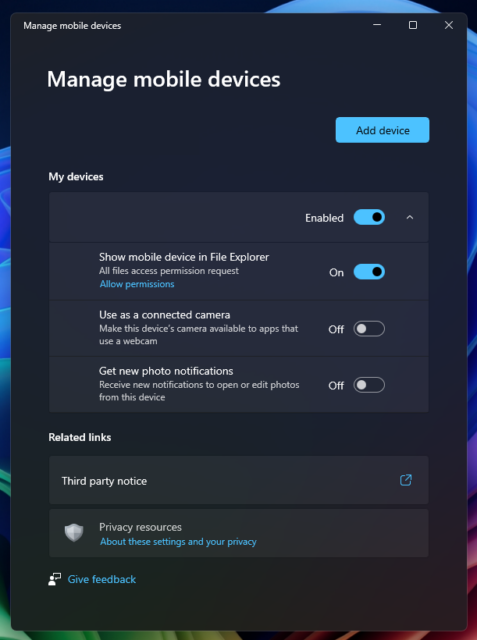
Thanks to PhantomOfEarth on X, the new Cross Device Experience Host in Windows 11 has a “Manage mobile devices” section. The screenshot provided by the X user shows a “Show mobile device in File Explorer” toggle that requires file access permission and will allow your phone to show up as its own drive. This is what I've been waiting for! The only thing is that it isn't officially available and we have no idea when it will be, but the fact that it is finally coming is enough joy for me.
Not Sure How To Get Phone Link Up And Running? Our Video Will Show You The Way
Phone Link on Windows is incredibly useful. For me, two of the things I love it for are the ability to get messages and app notifications to show up on my desktop when my phone is away charging, and the power to copy text on my computer to my Android device and vice-versa. Yet, there's so much more that you can do with Phone Link, so it is worth exploring.
It might seem like a bit of a daunting task trying to get it set up, but worry not, our benevolent selves have put together a video guide to show you the ropes of setting up Phone Link.
There's really no excuse not to use Phone Link in 2024 if you've got a Windows PC. You deserve to be able to take full advantage of the ecosystem being built between the two platforms (and Nearby Share makes things even richer).