



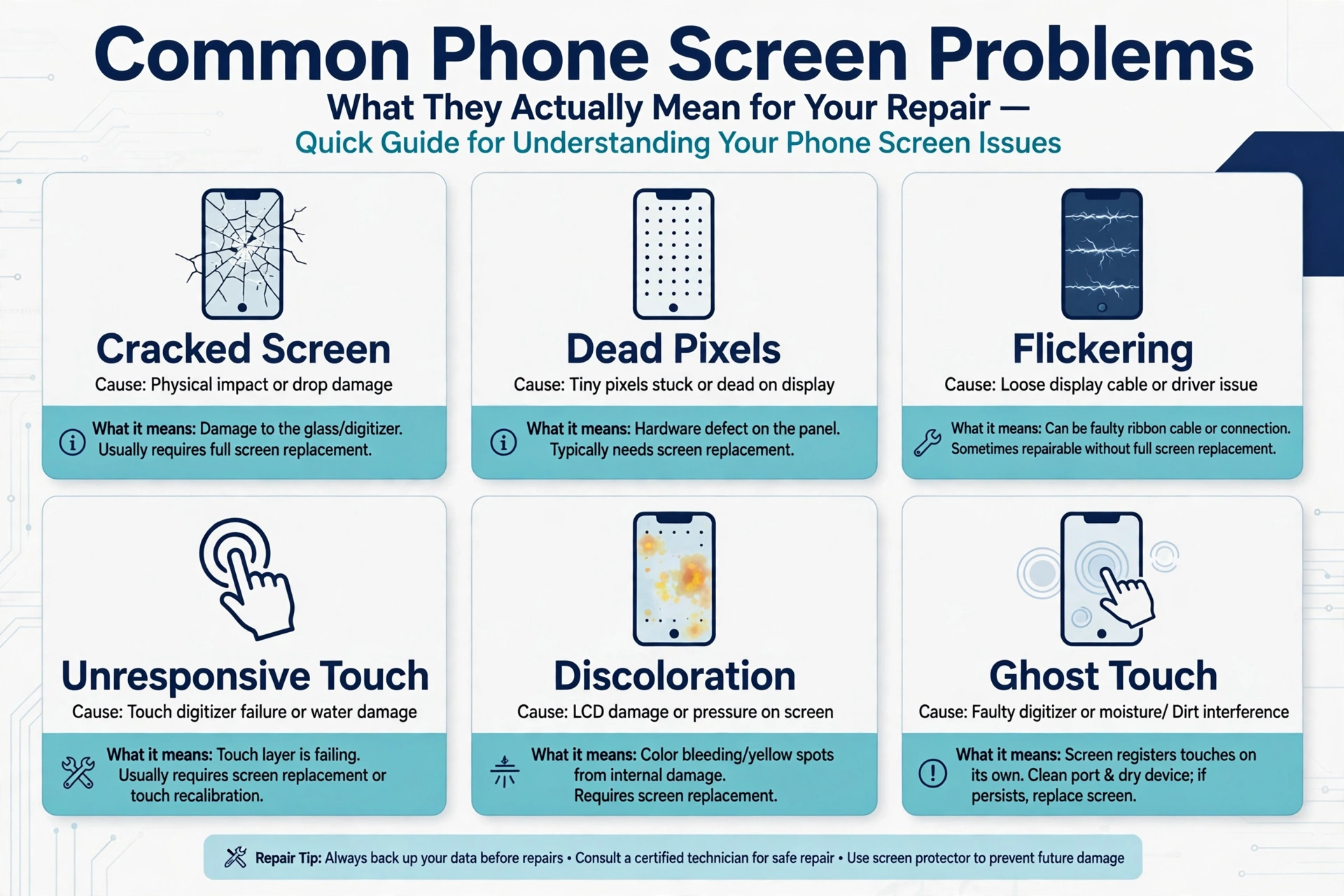
When a phone screen is damaged, the visible crack is only part of the story. What is happening underneath the glass, inside the display panel and touch layer, determines what kind of repair you actually need. Understanding the difference between surface damage and internal damage saves time, money, and the frustration of paying for a repair that does not fix the real problem.
Not All Screen Damage Looks the Same
A cracked screen can mean very different things depending on what has been damaged. The outer glass is the protective layer on top. Behind it sits the display panel, which generates the image you see. Behind that is the touch layer, which detects your finger input. These components can be damaged independently or together, and the type of damage tells you which parts need to be replaced.
This is why the size of a crack is not a reliable guide to how serious the damage is. A small crack in the corner of the glass can look minor while causing serious problems with the touch layer underneath. A large spiderweb crack across the whole screen can look dramatic but leave the display and touch functions completely intact.
Signs That Only the Outer Glass Is Damaged
If your phone screen is cracked but the display still shows a clear, complete image with no discoloration, and the touch function still works accurately across the whole screen, there is a reasonable chance the damage is limited to the outer glass. You can test this by trying to use the phone normally. If it responds correctly everywhere you touch and the display looks normal, the internal components may still be intact.
In this situation, a glass-only repair may be technically possible. However, this type of repair requires professional equipment to separate the broken glass from the display panel without damaging it. It is not a straightforward job and is generally best left to technicians with specific experience in screen refurbishment.
Signs That the Display Panel Is Damaged
Certain symptoms tell you clearly that the damage has gone beyond the outer glass and into the display panel itself.
Black Spots or Dark Areas
If you can see dark patches or black spots on the screen that have nothing to do with what is displayed, the display panel has been damaged internally. These areas are where the display is no longer functioning. Replacing only the glass will not fix this.
Screen Bleeding or Discoloration
Screen bleeding looks like a spreading shadow or ink stain beneath the surface of the display. It usually appears near the point of impact and can grow larger over time. This indicates damage to the liquid crystal layer in LCD screens or the OLED panel itself. Again, glass-only repair will not resolve this issue.
Lines Across the Screen
Horizontal or vertical lines running across part or all of the display are another sign of panel damage. These lines may be a single color or may show distorted image information. They are caused by damage to the display circuitry or the connection between the panel and the flex cable.
Signs That the Touch Layer Is Damaged
The touch layer can be damaged separately from the display, particularly in some screen constructions where the layers are not bonded together. If your display shows a normal, undamaged image but certain areas of the screen do not respond to touch, or respond incorrectly, the touch layer has been affected.
Partial touch failure is easy to miss if you are only testing the center of the screen. It tends to show up at the edges or corners first. Try swiping from the very edges of your screen and tapping in each corner to check whether the response is consistent across the whole surface.
When You Need a Full Phone Screen Assembly Replacement
If any of the symptoms above are present, a full phone screen assembly replacement is the appropriate repair. A phone screen assembly combines the display panel and touch layer in a single unit, so replacing it addresses damage to either or both components at the same time.
For most users who have experienced a drop or impact, a complete Mobile phone screen replacement is also the more practical option. It is more straightforward than glass-only refurbishment, does not require the original panel to be separated and re-laminated, and restores both display and touch functions in one step.
Choosing the Right Assembly for Your Phone
When choosing a replacement phone screen assembly, the most important step is confirming the exact model of your phone before ordering. Different variants of the same phone series can use different connectors or screen dimensions. A screen listed as compatible with a broad model range should ideally list the specific models it supports rather than using vague series names.
Also consider the type of display technology your phone originally used. Replacing an OLED phone screen with an LCD assembly will work, but you may notice differences in display quality. If maintaining a similar visual experience to the original screen is important to you, it is worth checking which screen types are available for your specific model.
A Practical Note on DIY Repairs
Replacing a phone screen assembly at home is achievable for many phone models if you follow the right procedure and take your time. The most important step before bonding the screen permanently is to connect it and test it first. Check the display, the touch response across the whole surface, the brightness, and whether any dead pixels are visible. Identifying a fault before the screen is fully installed is much easier than discovering it afterward.
Having the right tools, working in good light, and keeping track of the screws and small components that come out during disassembly all make the process considerably less stressful.