

Many people are into content creation these days. If you're not, it's almost expected that you eventually will be. Starting itself used to be the hardest part, and you'd think you needed a thousand-dollar studio.
But we're at a point in technology where you can do almost anything with your mobile devices. Recording quality may not be on par with a full studio rig, but it's good enough to attract minor complaints.
The Maono PD200W is one accessory that makes such setups possible. LeadLeo, a Chinese market research firm, recognized it as the top-selling internet microphone globally in 2021. I've put it to work enough to see why.
What's in the box?
The PD200W mic comes with everything you need to get started. In my box are the following items:
- The dynamic microphone itself.
- USB-C receiver for wireless connection.
- USB A&C to USB C 2-in-1 cable.
- USB A&C to USB C 2-in-1 adapter cable.
- Stand pole.
- Stand base.
- Two extra microphone suspension bands.
- Scannable user manual slip.
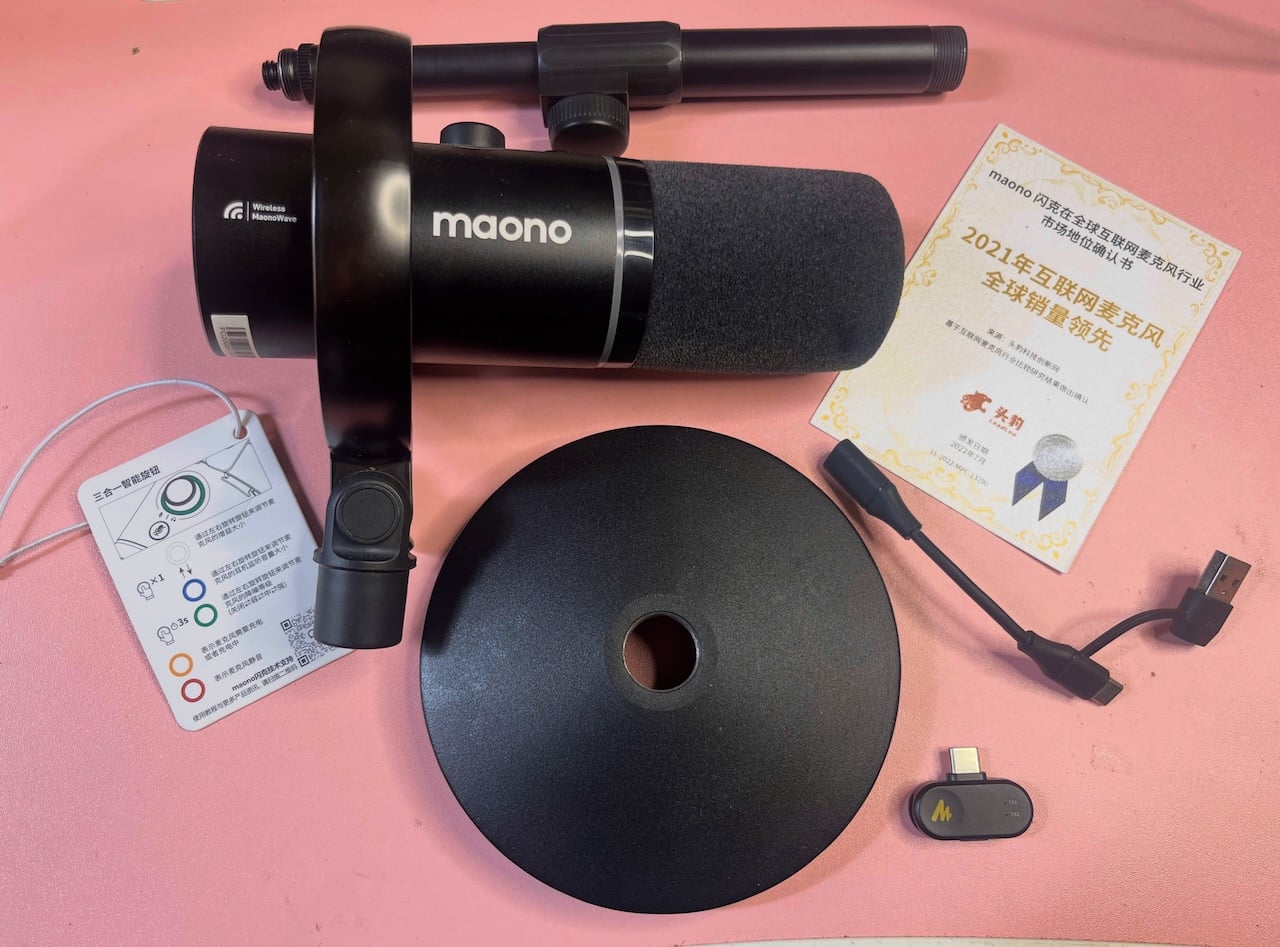
The mic itself sits in the first layer of the box, with the base and stand pole below it in a second layer. So, you want to check thoroughly down to the silica gel packet so you don't miss anything.
It's also worth noting that what's in your box depends on what you choose at checkout.
You can choose one mic or two (depending on whether you're recording with a co-host), the receiver type (USB-C only, or USB-C/Camera for more device compatibility), and the stand type (desktop, BA37 boom arm, or BA92 boom arm). Mixing and matching lets you land on a price and setup that fits how and where you actually record.
The desktop stand is the cheapest combination you can get. The BA37 boom arm bumps the price up by $20, and the BA92 increases it by $80. Both add a clamp-mounted, adjustable arm that swings and extends over your desk.
I have an Android phone and an Apple iPhone 13, and thankfully, many Lightning connectors from past reviews. So, connecting the mic receiver to it through the Lightning adapter solved the compatibility gap.
The receiver has a button stamped with an “AI” icon, and with artificial intelligence becoming the heart of every product pitch these days, you'd expect something impressively smart.
But the button is merely a shortcut for cycling through the three noise reduction levels. Pressing the button also routes audio through your device’s default output so you can hear yourself in real time.
Hardware
| Specification | Details |
|---|---|
| Microphone Type | Dynamic |
| Polar Pattern | Cardioid |
| Frequency Response | 50Hz–16kHz |
| Sensitivity | USB: -7.0 dBFS (1kHz, 94dB SPL, 0.5m); XLR: -53.0 dBV (1kHz, 94dB SPL, 0.5m) |
| Maximum SPL | 128dB |
| Gain | Adjustable, 0–36dB |
| Noise Reduction | Three levels (Weak, Medium, Strong) |
| Connectivity | USB-C, XLR, 2.4GHz wireless |
| Headphone Jack | 3.5mm monitoring |
| Headphone Output Impedance | 32Ω |
| Battery | 2,600mAh |
| Battery Life | Up to 60 hours (RGB off), 38 hours (RGB on) |
| Charging | USB-C, 5V/1A |
| Wireless Range | Up to 60m (line of sight) |
| Price | $130 |
Design
The PD200W is a dynamic microphone with a cardioid polar pattern. It mainly picks up sound from the front, where you're speaking, and ignores most of what comes from behind and beside it. The name comes from the heart-like shape it creates when you map out the sound.
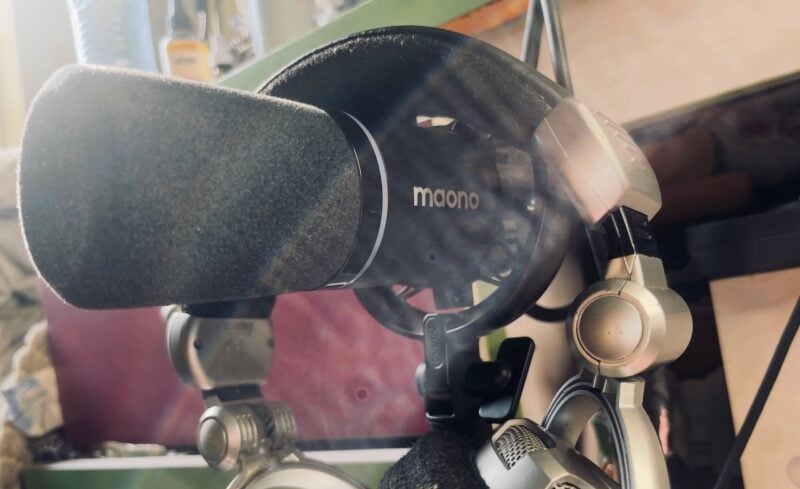
The device itself has a metal cylindrical chassis in matte black, with the brand name printed in white lettering across the body and a thin RGB ring circling the base of the foam windscreen. The windscreen pops off easily, sliding straight off the capsule end with a gentle pull. You can easily wash it when it gets grubby.
The mic glows, and you can customize the ring through the app or turn it off completely. The unit sits inside an adjustable shock mount with elastic suspension bands strung between a circular metal frame holding it still. This mount isolates the capsule from desk vibrations and handling noise.
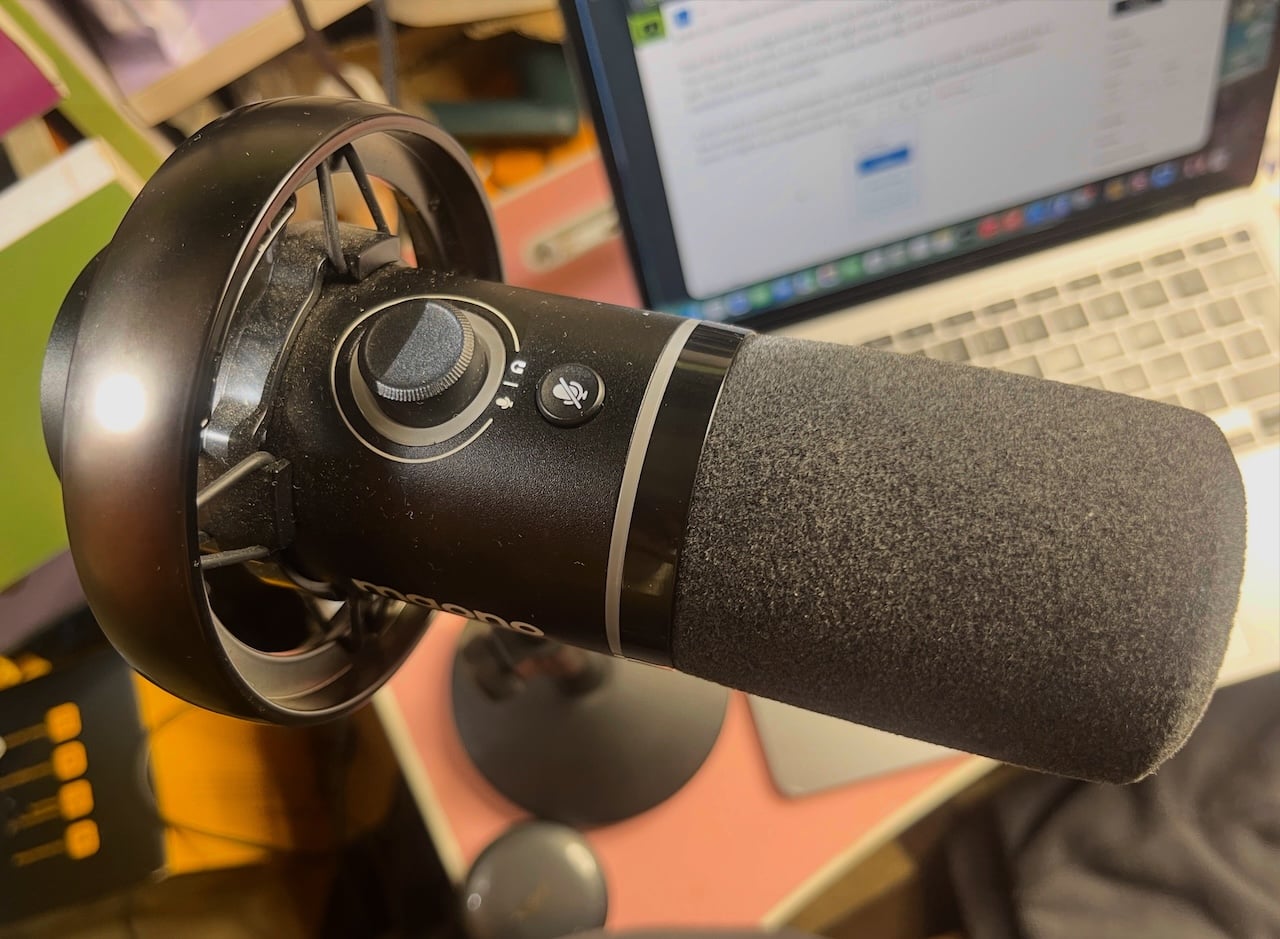
Maono also includes two extra rubber rings in the box. While I was tempted to make hair ties out of them, they're spares for the suspension bands. The rings feel tough enough that they won't snap anytime soon, though you can never be too sure.
On the rear face, the mic has ports arranged around a central 3-pin XLR output. There's a USB-C port for wired connection and charging, a combined power and RGB toggle/power button, and a 3.5-millimeter headphone jack for direct monitoring. You can also spot the certification markings, including CE, FCC, and RoHS compliance stamps.
The foam windscreen is thick and densely textured, wrapping fully around the capsule end to reduce plosives and handling pops without a separate pop filter. The shock mount's suspension bands loop through small hooks on the frame, and the whole assembly pivots within the circular cage so you can angle the capsule up or down.
The mount ring is plastic, which might disappoint anyone expecting metal throughout, given how a full metal build usually signals premium quality on pricier mics. But I don't have a reason to be disappointed. This is the first shock mount I've ever owned, and it's a great mic I received without spending a fortune, so it isn't a dealbreaker.
Near the top is a large knurled gain knob flanked by microphone and headphone icons. You can rotate it while in mic mode (light blue ring), and it increases or decreases mic gain. Rotate it while in headphone mode (blue ring), and it increases or decreases headphone monitoring volume.
A short press switches between mic mode and headphone mode. Press and hold for a few seconds to turn noise reduction on and rotate through three noise cancellation levels. It lights up progressively into a brighter green.
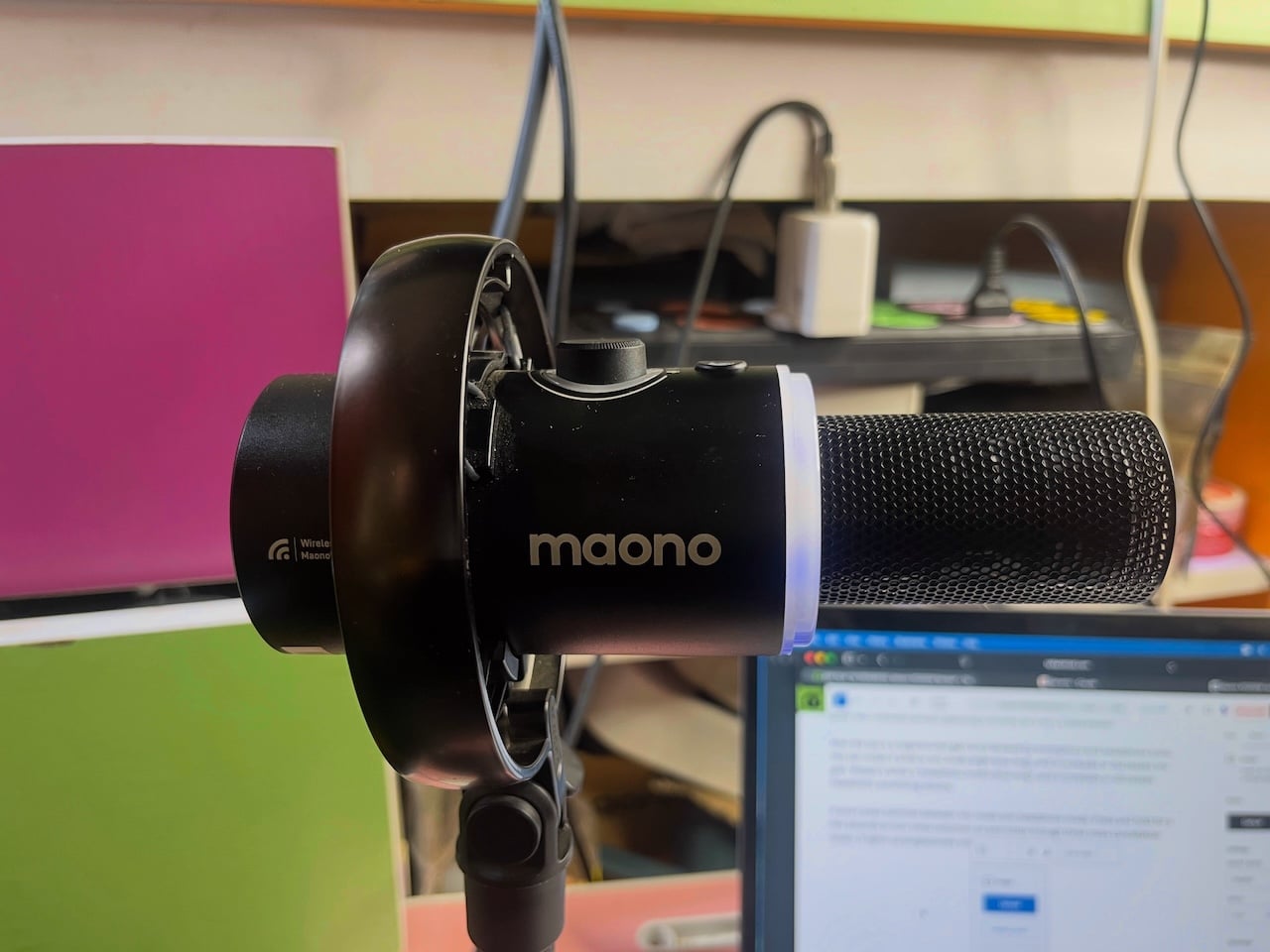
There's a mute button next to the knob that cuts your feed and blocks interruptions. It lights the ring red, although it doesn't work in XLR mode because there's literally nothing for the mute button to act on. XLR mode sends a raw analog signal directly to your interface or mixer, bypassing the mic's internal digital processing entirely.
That aside, the included mic stand is a two-piece metal design where there's a weighted circular base and a separate pole that screws into it. A thumb-adjustable knob on the pole lets you extend or retract the height, with a knurled grip texture for better control when tightening.
The mic comes detached in the box, so I had to piece it together myself. It's not so complicated that you need to channel your inner Bob the Builder. You merely need to screw the bottom pole to the base, then thread the mic's shock mount onto the top of the pole, and you're set up in under a minute.
Performance and sound quality
The PD200W dynamic microphone is different from condenser mics common in studios. It's less sensitive by design, so it won't pick up every faint sound in a room the way a condenser does.
That said, I wouldn't use it to record instruments. Its frequency response runs from 50 Hz to 16 kHz and rolls off sharply at the top end. So, top-end harmonics are cut off and instruments sound duller than they would through a mic with a wider range reaching up to 20 kHz.
Also, the device records in a fixed cardioid pattern. It only picks up sound directly in front of the capsule and rejects most of what comes from the sides and rear. If you want to capture two people around a table or a wider soundstage, you'd need the two-mic kit.
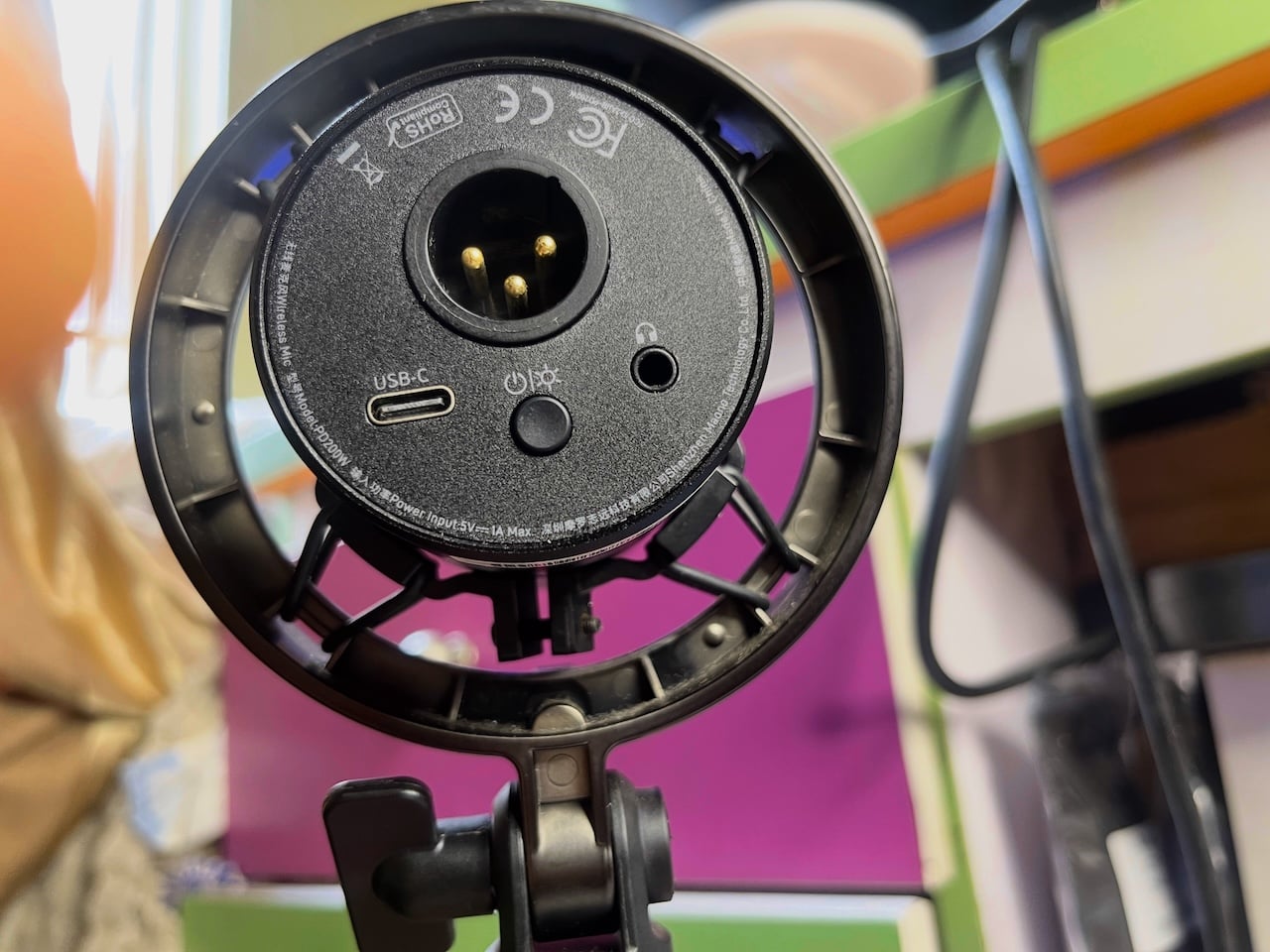
On the bright side, the PD200W has no shortage of connectivity. You can record over USB-C, plug into an XLR interface, or go fully wireless through the bundled receiver. You can even mix and match. At one point, I plugged the receiver into my phone and ran the cable from the mic to my laptop at the same time.
I used it to feed two different destinations without a splitter. Likewise, you may want to livestream from one device while capturing a clean local copy on another.
I tested the mic at three distances on Android and logged four values for each take, including peak level, RMS level, noise floor, and signal-to-noise ratio. These are the results.
Distance (gain preset matched to each distance, wireless, noise reduction off)
Maono Link offers three distance presets of 0 to 10 centimeters, 11 to 30 centimeters, and 31 to 50 centimeters.
Each one applies a different amount of gain to suit that range. Recording wirelessly through the receiver, I captured the same line at all three distances, tapping the matching preset each time, and measured every take with an Android audio diagnostic app.
| Distance | Peak | RMS | Noise floor | SNR |
| 0-10cm | -21.57 | -37.09 | -72.94 | 35.85 |
| 11-30cm | -13.82 | -32.42 | -57.89 | 25.47 |
| 31-50cm | -11.27 | -29.67 | -50.47 | 20.80 |
Takeaway: The results show that my recording is cleaner when I'm closer to the mic. At 0 to 10 centimeters, my background noise was low at -72.94 dBFS and my voice rose well above it, giving me a signal-to-noise ratio of 35.85 dB.
When I moved to 11 to 30 centimeters, the background noise climbed to -57.89 dBFS and my signal-to-noise dropped to 25.47 dB. At 31 to 50 centimeters, the noise floor rose again to -50.47 dBFS and my signal-to-noise fell to 20.80 dB, which is the noisiest of my three takes.
The mic raised the gain the farther I moved so my voice was loud enough to use. Unfortunately, it also raised the room noise along with it. The presets keep me audible at any distance, but they can't pull my voice away from the background.
Interestingly, I remember running into clipping at 10 centimeters in a previous review. My voice peaked at 0 dBFS and the recording distorted. However, in that first session, I left the gain set too high, so my voice overwhelmed the input the moment I moved close.
It makes a strong argument for controlling the gain yourself, and not assuming the mic will get it right on its own.
Maono lists an 82 dB signal-to-noise ratio for the PD200W. It is a lab measurement taken under ideal conditions and serves as a guide to everyday performance rather than a contradiction of the spec. The readings here are lower because they reflect real-world recording with real room noise.
Noise reduction (fixed at 11-30cm, wireless, fan running)
| Noise reduction | Peak | RMS | Noise floor | SNR |
| Off | -15.05 | -34.26 | -59.14 | 24.88 |
| Slight | -15.33 | -33.83 | -66.64 | 32.81 |
| Moderate | -14.14 | -34.24 | -64.52 | 30.28 |
| Aggressive | -14.93 | -33.46 | -66.88 | 33.42 |
Takeaway: With a fan running about a meter away from me, I recorded the same line four times, cycling through the noise reduction settings while keeping my distance and gain fixed.
With noise reduction off, my background noise was at -59.14 dBFS and my signal-to-noise ratio was 24.88 dB. Switching it on to Slight dropped the noise floor to -66.64 dBFS and lifted my signal-to-noise to 32.81 dB, roughly an 8-decibel improvement, and my voice level barely moved. The processing successfully cut the fan noise without touching my voice.
Moderate cancellation performed slightly worse than Slight, with the noise floor rising to -64.52 dBFS and signal-to-noise dropping to 30.28 dB.
Aggressive brought it back down to -66.88 dBFS with a signal-to-noise of 33.42 dB, marginally the best of the three but close enough to Slight that I couldn't tell them apart by ear. My room was already fairly quiet, so there wasn’t much fan noise left for the stronger settings to remove once noise reduction is on.
Connection comparison (wired vs wireless, all distances, noise reduction off)
For this round of testing, I fixed my mic’s distance at 11 to 30 centimeters. It was the natural middle of the mic's three distance presets, so it kept the test in a realistic speaking position.
There was little need for a noise reduction check because the processing happened inside the mic before the signal reaches the cable or receiver. The connection can't change it.
| Distance | Connection | Peak level | RMS level | Noise floor | Signal-to-noise |
| 0-10cm | Wireless | -21.57 dBFS | -37.09 dBFS | -72.94 dBFS | 35.85 dB |
| 0-10cm | Wired | -22.87 dBFS | -39.64 dBFS | -74.78 dBFS | 35.15 dB |
| 11-30cm | Wireless | -13.82 dBFS | -32.42 dBFS | -57.89 dBFS | 25.47 dB |
| 11-30cm | Wired | -11.39 dBFS | -33.03 dBFS | -58.42 dBFS | 25.39 dB |
| 31-50cm | Wireless | -11.27 dBFS | -29.67 dBFS | -50.47 dBFS | 20.80 dB |
| 31-50cm | Wired | -12.17 dBFS | -29.56 dBFS | -51.59 dBFS | 22.02 dB |
Takeaway: The connection makes little difference. At every distance, my noise floor stays within 1 to 2 decibels between wired and wireless, and my signal-to-noise ratio lands within a decibel.
The gaps between both connections are small enough that they come down to how loudly I spoke on each take rather than the connection itself.
The wired link has a slightly quieter noise floor at all three distances because a direct USB-C cable carries a cleaner signal than a 2.4 gigahertz wireless link. So, a lower noise floor is expected. But a 1 to 2 decibel difference is not detectable in a podcast or voiceover.
Wireless is the reason I reach for the mic, so I'm glad I'm giving up nothing worth hearing by cutting the cable. Overall, the PD200W is a truly capable mic with numbers to prove it.
To my ear, the sound quality is warm and close, the way a voice lands when someone leans in to tell you something. It flatters the low-mids, so my voice sounds full-bodied rather than thin. There's a faint texture when I stop speaking, but it's subtle enough to not be distracting.
I focused this review on Android to align with the website's central audience of Android users and mobile-first creators. But the mic performed well across every device I connected it to. Recording song covers through GarageBand on my iPhone and MacBook gave me rich vocals, and running it over XLR into my Behringer sound card yielded the same crisp result.
Mute button feedback
I tested the mute button in GarageBand and FL Studio on my computer and BandLab on my phone. I recorded a line and pressed the button in the middle of sentences numerous times.
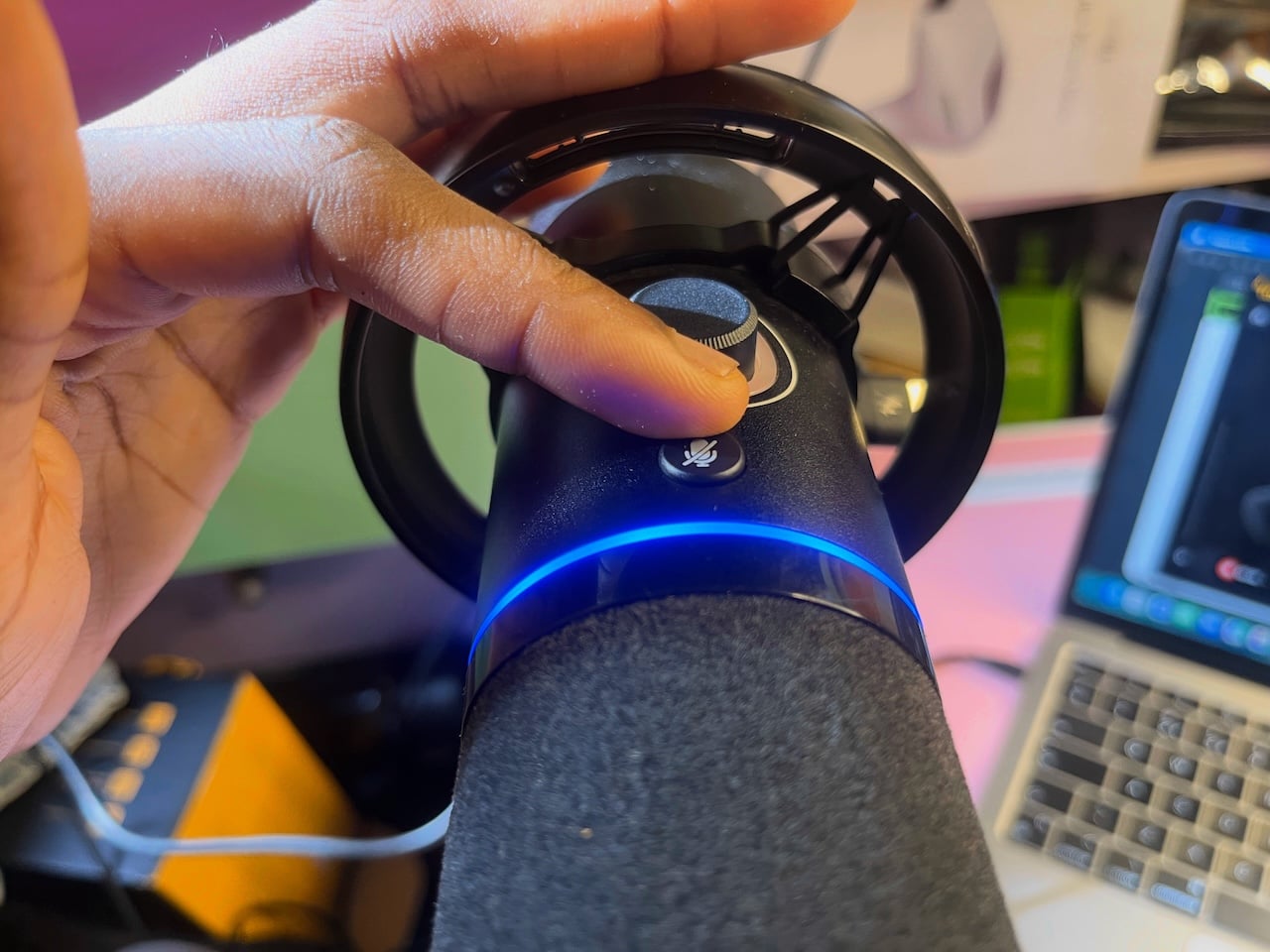
The mute feature works, but the recording does pick up the mechanical click at the moment I press the button. Post-editing will have to fish it out if you want a completely clean track.
Wireless range check
Maono rates the wireless receiver for a range of 60 meters, or roughly 200 feet, in open line-of-sight conditions. Sixty meters is a little more than half the length of a football pitch, or about the distance from one end of a basketball court to the other, doubled.
You could leave your phone on your desk, walk to the far end of your house or into another room entirely, and keep recording without the signal dropping. I put this to the test by leaving my phone downstairs with the receiver plugged in and recording with the mic upstairs. The connection held true to the claim.
Tip: If your Android phone doesn't recognize the mic over USB, enable the USB On-The-Go (OTG) switch or turn on USB Debugging under Developer Options in your phone settings.
Battery
Maono rates the PD200W at 60 hours of wireless recording, or 38 hours with the RGB ring lit on its 2,600 mAh battery. In my testing, the battery dropped from full to 92% over roughly two hours and forty-five minutes of continuous use, which works out to roughly a 3% drop per hour. It's near the original rating.
I love that I've barely thought about charging the mic. It charges over the same USB-C port it uses for a wired connection, so plugging it into my phone or laptop to record also tops up the battery.
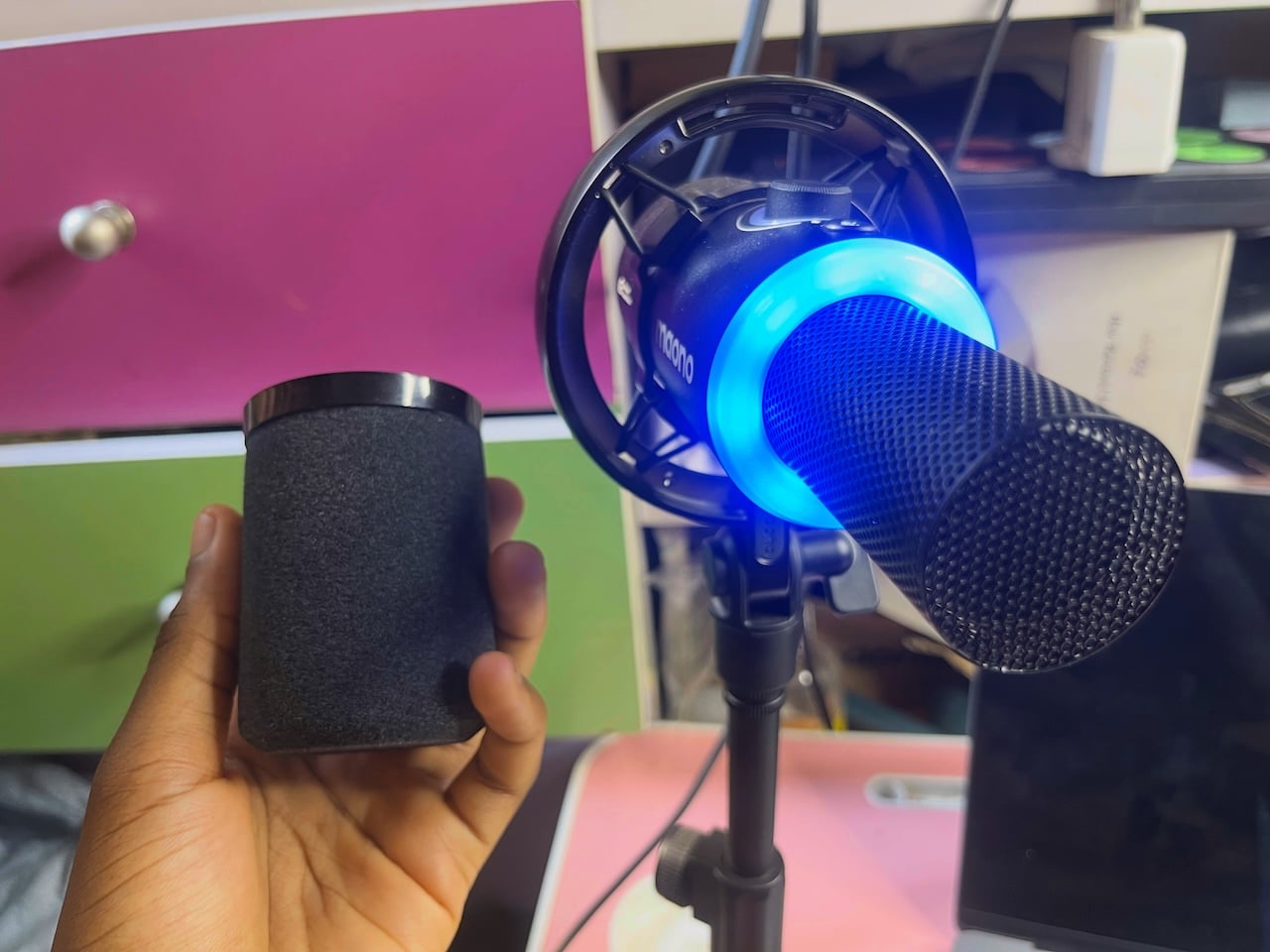
The LED ring around the gain knob tells you the charge state. While charging with the power on but not yet full, the ring glows orange. The orange light turns off or shows green when it's full.
During use, the ring flashes twice every 15 seconds once it drops below 20% to warn you the battery is low. You can also check the exact battery percentage in the Link app.
Software
Maono Link is the companion app that enables tuning the PD200W. It pairs with the mic over the wireless receiver, and the home screen shows your connected device with a live battery readout.
The main control panel shows a gain slider where you'll set your input level, and it's tied to the same three distance presets on the mic itself (0 to 10, 11 to 30, and 31 to 50 centimeters). There's also a headphone volume slider that adjusts what you hear through the monitor jack.
Below is the noise reduction option with a toggle and the three levels: Slight, Moderate, and Aggressive. The app also adds four tuning profiles, Original, Podcast, Game, and Sing, each changing the sound for its use case, and Podcast even splits into two saved variations. I kept it on Podcast for my voice work.
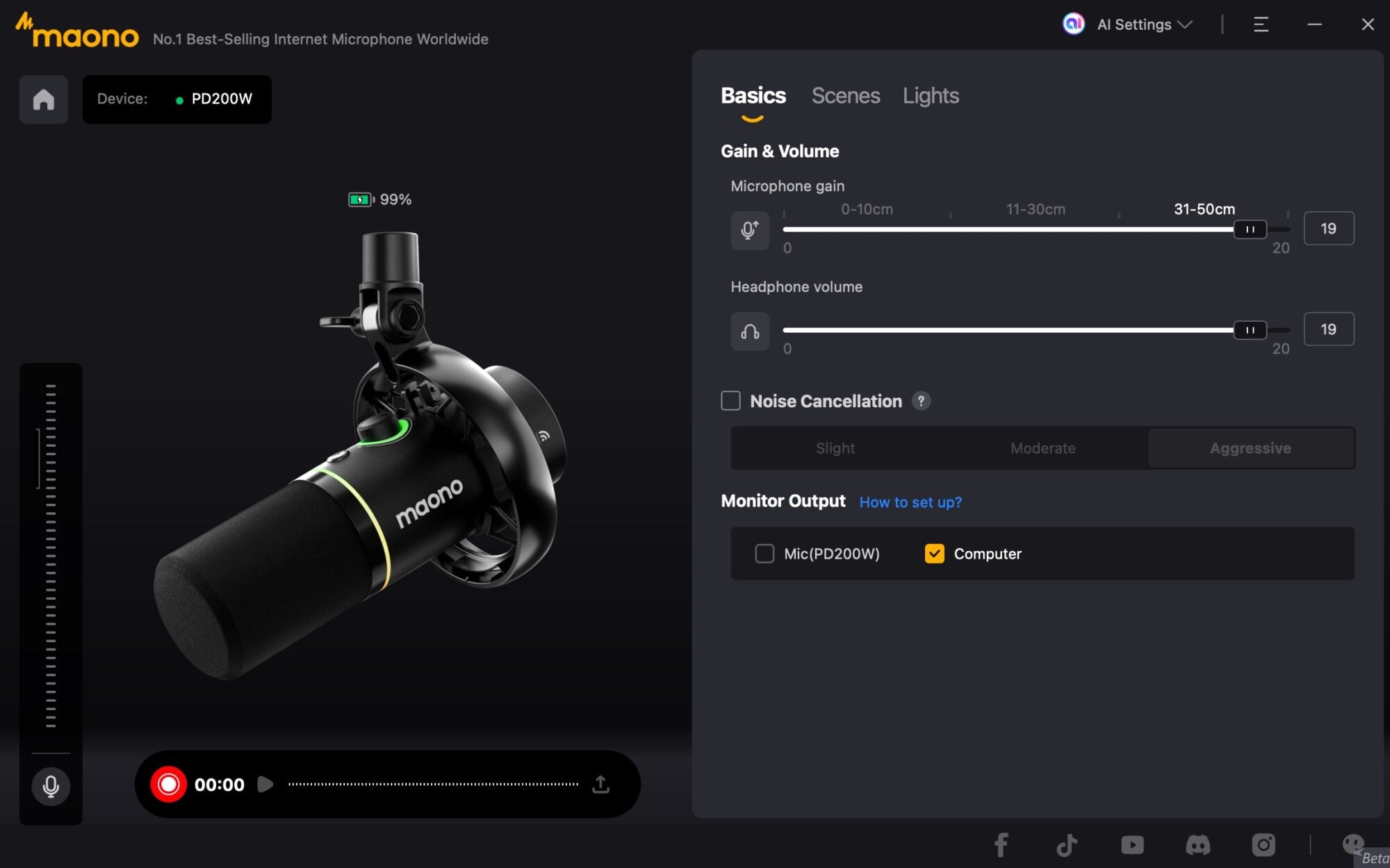
The Lights section gives full control over the RGB ring, letting me set a fixed color, adjust brightness (mine is always at 60%), or turn it off entirely to save battery. There's also an External Output toggle that routes audio through the phone's speaker, and a Monitor Output setting for choosing where you hear playback.
Maono Link is basically where control is granular, especially in the PC software. You'll see the exact numbers and options for the mic's physical controls, rather than guessing at the settings. For example, the gain knob has no defined stop, and it just keeps rotating in either direction, so you never really know where your level sits. Also, the LED ring around it only gives a rough sense of the setting.
On the PC software, you have access to a full parametric equalizer. It has high-pass and low-pass filters plus five moveable bands you can position anywhere across the frequency range. Normally, a graphic EQ has fixed frequency bands where you only adjust the gain boost or cut of each one.
The EQ’s default Original configuration is locked, so you can't edit its curve. Instead, add your own. Click the + button near it to create a new configuration and name it whatever you like. There's even a Reverberation toggle below with a 1-to-10 intensity slider to let you add echo or space to your voice.
The verdict
I think the PD200W competes with creators’ inertia more than it competes with other mics. Most people never start a podcast because setups are either expensive or annoying. Maono’s solution and achievement is that it removes the excuses between you and pressing record.
Though the fixed cardioid pattern and other features may look like weaknesses initially, they mostly just spare you from paying for things you were never going to use.
Talking is what this mic is built for, and it's what most creators do. Podcasts, voiceovers, streams, and voice notes all live within its narrow range, so its limits are rarely visible. It's worth the $130 price tag for the value.
Maono PD200W Review
Maono PD200W Review-
Performance4.5/5 Excellent
-
Battery Life5/5 Outstanding
-
Build Quality4.5/5 Excellent
-
Connectivity5/5 Outstanding
-
Software4/5 Very Good
The Good
- Excellent sound quality & wide connectivity options.
- Long wireless range & effective AI noise reduction.
- Long battery life.
- Simultaneous recording to two devices.
The Bad
- Cardioid pattern only.
- Mute button click is audible in recording.
- Not ideal for music recording.