AI tools are doing more than answering questions and writing code snippets now. Abacus AI’s Deep Agent is one example. It can take a simple prompt and turn it into a mobile-style app prototype.
For Android users, the main question is simple: can it make something useful from just one request? It can create a working starting point, but that is not the final product. The result still needs to be checked, improved, and reviewed by a developer before it can be used seriously.
What the Platform Offers
Abacus AI combines several AI tools in one place. Its ChatLLM product works like a general AI assistant where users can ask questions, generate content, analyze files, write code, and use different AI models from one interface.
Deep Agent is aimed at more complex tasks. Instead of only producing a response, it can plan a project, generate files, make changes, debug problems, and help prepare a project for preview or deployment.
That distinction matters because app development is rarely a one-step process. Even a simple app may require screens, navigation, authentication, backend logic, data handling, testing, and fixes.
A regular chatbot can explain how to build an app. An agentic tool tries to create more of the project itself.
What Is Abacus AI Deep Agent?
Deep Agent is the task-focused AI agent inside the platform. It is built to work through goals that need several steps.
For example, a standard AI chatbot might generate a code snippet for a login page. Deep Agent can attempt to create that login flow as part of a larger app project, including related files and supporting logic.
Here is the basic difference:
| Regular AI Chatbot | Deep Agent |
| Answers questions | Works through multi-step tasks |
| Generates text or code snippets | Creates files, apps, and workflows |
| Needs frequent manual direction | Can continue through a project |
| Mostly conversational | More task-oriented |
| Useful for explanations | Useful for prototyping and debugging |
This does not mean the agent removes the need for developers. It simply means it can reduce some of the early work involved in turning an idea into something visible and interactive.
Can It Build an Android App From One Prompt?
Yes, the agent can create an Android-style mobile app prototype from a plain-language prompt. Depending on the request, the result can include mobile screens, sign-in and sign-up flows, dashboards, forms, user profiles, backend services, and preview options.
However, the wording matters here.
It is not the same as generating a polished native Android APK or AAB file that is ready to publish directly on the Play Store. A proper Android release usually requires app signing, packaging, privacy checks, security testing, device testing, performance optimization, and compliance with Google Play policies.
What the tool can do is create an early working version of an app experience. For many people, that may be enough to review an idea, share it with others, or decide whether the concept is worth developing further.
For Android-focused readers, this makes the tool relevant mainly as a prototyping aid, not as a full replacement for Android development.
Example: Creating a Mobile-Style App From a Prompt
A user could start with a simple request such as:
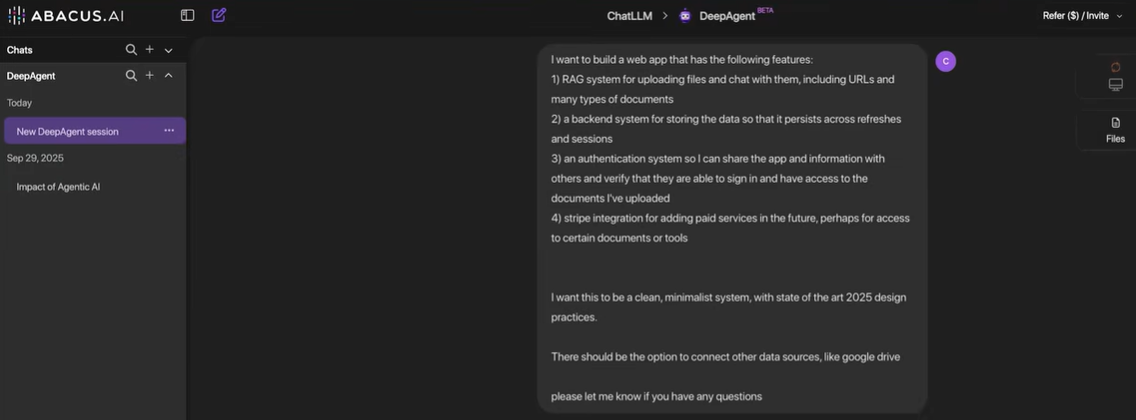
Create a mobile app with user sign-in, a dashboard, saved activity, and profile management.
From there, Deep Agent can ask follow-up questions, generate backend-related files, create authentication elements, build mobile screens, and provide preview options.
The exact app idea can vary. The same basic structure could apply to a notes app, budget tracker, study planner, habit tracker, booking tool, or internal business dashboard.
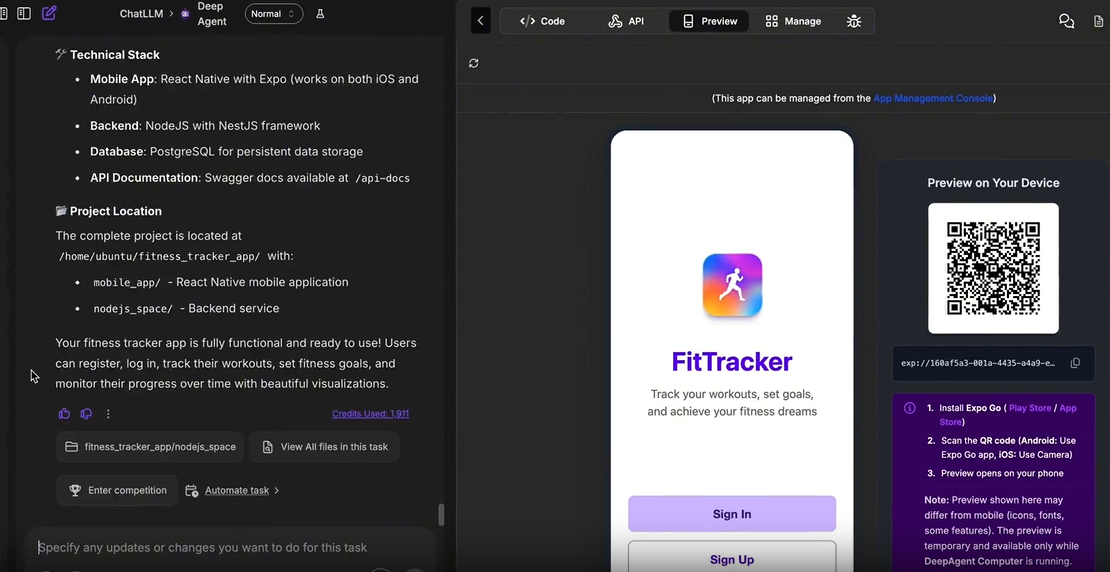
A generated app may include:
- Sign-in and sign-up screens
- Backend services
- Authentication-related files
- Data-entry screens
- Dashboard sections
- Activity history
- Progress-style cards
- User profile management
- QR/device preview
- Preview and deployment controls
The useful part is not just that the tool creates screens. It can also connect parts of the app together so users can interact with the prototype instead of only looking at a static mockup.
How the App-Building Workflow Works
The process begins with a prompt. A user describes the kind of app they want to create and includes details such as sign-in, dashboards, saved data, profiles, roles, or backend requirements.
Instead of immediately generating code based on assumptions, the agent may ask clarification questions. These can include:
- What features the app needs
- Whether users need to sign in
- What data should be saved
- Whether the app needs a backend
- What screens are required
- Whether the app should be shareable
- What design style is preferred
This step is useful because vague prompts often produce vague results. A short request like “build an app” gives the system too much room to guess. A more specific prompt usually leads to a more relevant prototype.
Once the requirements are clearer, the agent begins generating the project. The workflow can include frontend screens, backend services, authentication files, database logic, and preview tools.
What the Output Can Include
A mobile-style app prototype can include several features commonly found in real apps. The result is not just a static design mockup. It can include interactive screens where information can be entered, saved, and displayed inside the interface.
Depending on the prompt, the generated app may include:
- A mobile-style layout
- Sign-in and sign-up buttons
- User authentication flow
- Backend service generation
- Data logging screens
- Dashboard cards
- Statistics or progress sections
- User profile management
- QR code/device preview
- Preview and deployment controls
- Working form inputs
- Updated app state after data entry
That can be useful for early product exploration. A clickable prototype is easier to evaluate than a written idea or static wireframe.
Still, it should be reviewed carefully. AI-generated apps can look complete before all the underlying logic has been properly tested. Forms, buttons, authentication, database behavior, error handling, and edge cases all need checking.
Why This Matters for Android Users
Android users are used to discovering finished apps in the Play Store, but AI tools are changing how early app ideas are built.
Someone with an idea no longer has to start with a blank code editor or hire a developer before seeing a basic version of the concept. Tools like this can help create a starting point from a normal written description.
This may be useful for:
- Startup founders testing early app ideas
- Small businesses creating internal tools
- Students learning how apps are structured
- Product managers preparing prototypes
- Indie developers building MVPs
- Creators validating a concept
- Developers looking for a faster first draft
The main benefit is speed. A rough idea can become something visible and clickable. That can make it easier to decide whether the project deserves more time, money, or technical development.
However, this does not make Android development effortless. A serious app still needs design review, technical review, testing, performance checks, and platform-specific work.
More Than a Basic Code Generator
Many AI tools can generate code. That is now common. The more useful question is whether a tool can work through the broader development process around the code.
Deep Agent can assist with:
- Planning the app structure
- Generating frontend files
- Creating backend services
- Adding authentication
- Setting up database logic
- Building app screens
- Debugging errors
- Running checks
- Previewing the app
- Preparing deployment options
- Creating documentation
This makes it different from a chatbot that only provides isolated code snippets.
For example, if an app has an error, the agent can inspect the issue, make changes, and try to test whether the fix worked. That debugging loop matters because the first version of any generated app is unlikely to be perfect.
Debugging Is a Major Part of the Process
An AI app builder should not be judged only by the first version it creates. The more practical question is whether it can help fix problems after that first version appears.
Deep Agent can assist with debugging by reading error messages, identifying possible causes, changing files, and checking whether the fix works.
Generated apps can run into issues such as:
- Buttons not responding correctly
- Forms not saving data
- Authentication problems
- Layout issues
- Backend connection failures
- Missing validation
- Broken API routes
- Database errors
This is where an agentic workflow can be helpful. A tool that can continue working through errors is more practical than one that only creates a first draft.
Still, debugging may require several attempts. Some problems may also need a developer to inspect the code manually, especially if the app has complex logic or handles sensitive data.
Preview and Deployment Options
Preview and deployment support is another useful part of the workflow.
A generated app can be previewed in a mobile-style interface. QR or device preview options may also make it easier to view the app in a mobile context.
Deployment options can help make the project accessible through a shareable preview or hosted link, depending on the setup.
For Android app concepts, this can be useful when sharing an idea with team members, clients, early users, or investors. A clickable preview is often easier to evaluate than a written description.
However, a preview should not be confused with a finished Android release. Publishing a native app to the Play Store usually involves additional technical and policy-related steps.
Deep Agent vs Traditional Android Development
Deep Agent is not a full replacement for experienced Android developers. Traditional development still matters for complex, polished, secure, and scalable apps.
The agent is better understood as a tool for early-stage prototyping and development support.
| Feature | Deep Agent | Traditional Android Development |
| Starting point | Plain-English prompt | Technical planning and manual setup |
| Speed | Faster for prototypes | Slower but more controlled |
| Coding knowledge required | Lower for basic prototypes | Higher |
| UI creation | AI-generated app screens | Manually designed and coded |
| Backend setup | Can be generated by the agent | Built by developers |
| Authentication | Can be included | Manually configured |
| Debugging | AI-assisted | Developer-led |
| Deployment | May provide preview/deploy options | Requires manual hosting or app setup |
| Best use case | MVPs and prototypes | Production Android apps |
| Main limitation | Requires review and refinement | Takes more time and expertise |
For early app ideas, the agent can reduce setup time. For production apps, traditional development practices are still necessary.
Where It Performs Well
The tool has several practical strengths for mobile app prototyping.
Fast First Drafts
A plain-language prompt can become a structured app project with screens, backend files, and interactive elements. This can be useful when the goal is to create an early version quickly.
Clarifying Questions
The agent can ask questions before building. This helps reduce incorrect assumptions and may improve the relevance of the output.
Frontend and Backend Generation
The system can create more than visual screens. It can also generate backend logic, authentication-related files, and database-connected features.
Debugging Support
The agent can help identify errors, make fixes, and continue improving the app after the first version.
Preview and Sharing
Preview options make it easier to collect feedback before committing to full development.
Useful for Non-Developers
Non-technical users can describe an app idea in normal language and receive a working starting point.
Helpful for Developers
Developers may use the agent to speed up repetitive setup work, generate prototypes, or explore architecture options.
Where Human Review Is Still Needed
The tool has limitations, and generated software should not be used without review.
Potential issues include:
- The first version may contain bugs
- Some features may need multiple debugging attempts
- Generated code should be reviewed before production use
- Security-sensitive features need extra caution
- Authentication and database logic should be validated
- Complex native Android features may need manual development
- Play Store packaging may require additional steps
- Credit usage can increase during complex builds and debugging
This is especially important for apps that handle private user data, payments, business information, health data, or financial records.
The agent can create a starting point, but responsible development still requires testing, QA, security review, and human judgment.
Can It Create a Play Store-Ready Android App?
The agent can help create Android-style app prototypes and deployable app experiences, but a Play Store-ready Android app may require additional work.
A production Android app may need:
- Native Android packaging
- Play Store compliance checks
- App signing
- Security testing
- Performance optimization
- Privacy policy review
- Data handling review
- Device compatibility testing
- UI/UX polish
- Developer account setup
For early-stage app ideas, the tool may be useful. For final production release, developer involvement is still recommended.
Who May Find It Useful?
This type of AI app builder is most relevant for users who want to move quickly from idea to prototype.
Potential use cases include:
- Creating a mobile app MVP
- Building an internal business tool
- Prototyping an Android app idea
- Creating a dashboard-based app
- Building a login-based web or mobile-style app
- Testing product ideas before hiring developers
- Creating demos for clients or investors
- Learning how app architecture works
- Speeding up repetitive development tasks
In these cases, the platform can help reduce the friction of starting a project.
Who Should Be Careful?
This kind of tool should not be the only development step for high-risk or complex apps.
Extra caution is needed for:
- Banking apps
- Medical apps
- Apps handling sensitive personal data
- Large-scale production platforms
- Apps requiring advanced native Android APIs
- Apps with complex security requirements
- Apps needing strict compliance
- Enterprise systems with heavy backend logic
For these projects, the agent may still help with planning or prototyping, but professional development and review are essential.
Pricing and Credits
Abacus AI uses subscription tiers and credits for advanced tasks. ChatLLM Teams starts at $10 per user per month for Basic and $20 per user per month for Pro.
App-building tasks may use credits, especially when a project involves backend development, debugging, deployment, or repeated iterations. More complex tasks usually consume more credits than simple chatbot responses.
Users should check the latest pricing, credit rules, and feature details on the official website, as limits and product details can change.
Is It Worth Considering for Android App Ideas?
For Android app ideas, the tool may be worth considering if the goal is to create a prototype quickly. It is especially relevant for users who have an idea but do not want to start from an empty codebase.
The workflow can combine several steps:
- Idea input
- Clarifying questions
- App planning
- UI generation
- Backend generation
- Authentication setup
- Debugging
- Preview
- Deployment support
The main benefit is not that it replaces Android Studio or professional developers. Instead, it can help with the early stages of app creation, especially when users need a working prototype or proof of concept.
Final Verdict
So, can Abacus AI build an Android app from one prompt?
It can create an Android-style app prototype with mobile screens, sign-in flows, dashboard sections, backend logic, data-entry features, preview options, and deployable app experiences.
That result should be treated as a starting point, not a finished production app. Bugs, design improvements, security checks, and platform-specific Android requirements may still need human review.
For users who want to create a mobile app concept, build an MVP, or quickly turn an idea into something clickable, Deep Agent may be useful. It is not a replacement for experienced Android developers, but it can help shorten the early prototyping stage.
For TalkAndroid readers, the main takeaway is simple: this is not just another chatbot feature, but its app-building claims should still be viewed with realistic expectations. It can help create prototypes from prompts, but serious Android development still requires testing, review, and refinement.