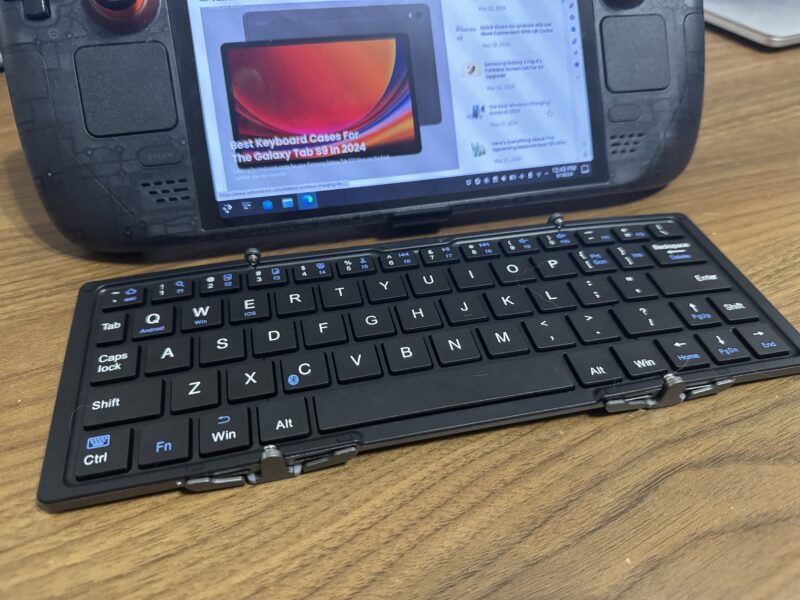
Phones are laptops have turned into crucial productivity devices, but sometimes you need a little more than a touchscreen keyboard to get the job done. Carrying around an entire keyboard isn't always convenient, though, which is where Plugable's handy folding Bluetooth keyboard enters the picture.
We're checking out Plugable's foldable Bluetooth keyboard to see if it's a worthwhile addition to your mobile setup. Keep reading to check it out.
Utilitarian design

The first thing to note about this keyboard is obviously the folding mechanisms. It's not quite a high-end Galaxy Fold, but the aluminum design with smooth hinges and included carrying case have a certain charm. It also feels fairly sturdy for the budget-friendly price of the whole package, and it folds down small enough to easily toss in a bag without adding much weight.

This does have the caveat of being a smaller keyboard, however. It's noticeably smaller than your standard keyboards, and to accommodate all of the keys you get from regular keyboard layouts you'll notice that the backslash key and backspace key have been swapped; muscle memory has made backspacing a little tricky in my experience.
Simple Functionality
It does have a full suite of extra function keys that can be accessed with the FN key, though, so you can still use home and navigation buttons, control media playback, and more even with the limited amount of keys. Small design didn't compromise the functionality of the keyboard.

Battery life is also very good, and I've never actually been able to run it dead before being able to recharge it. Plugable says it should last weeks on a single charge, and despite not having any kind of quick charging, it should get you hours of battery off of just a few minutes in a pinch. It charges via microUSB, which was probably done to save costs on the keyboard, but lack of USB-C these days definitely stings.
I primarily tested this on a Pixel 7 and a Steam Deck, although it should work on pretty much any Bluetooth device that can accept keyboard input. The carrying case also doubles as a stand, which can be useful if you're trying to cook up a pseudo-laptop workstation on the go. Unfortunately it can't do any multi-device pairing, so it won't store multiple profiles for quickly reconnecting, but a single button combination gets it back into pairing mode, so if you need to change devices often it's at least not a major headache.

Worth it?
All things considered, this fully functional, slim-sized keyboard can be had for less than $50. It has full sets of functional keys, doubles as a stand, and weighs very little. That's generally enough to make up for a few of the shortcomings, like the awkward backspace key placement and the microUSB charging port.
I wouldn't want to rely on the keyboard to handle full workloads, but for a frequent traveler or someone that needs a full keyboard in a pinch (the Steam Deck makes an excellent companion here) can make good use of this without breaking the bank, so long as you're comfortable carrying an extra microUSB cable again.