




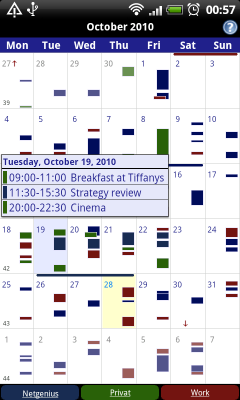

If you're anything like me, the apps you tend to search for in the Android Market are those that assist with productivity. For me, the entire point of having a smart phone is to be….productive. And one of the most used and worn out features on any smart phone I own is the calendar functionality. I have to admit however, as ancient as Windows Mobile feels to me, I do miss various aspects of the integrated calendar features. I especially enjoyed and benefited from the view that allows you to see a whole week at a time and all of the functions under each individual day of that particular week in one screen shot, something the Android calendar does not offer. Well, as former president Harry S. Truman once stated, “The buck stops here”. Business Calendar for Android, by developer Mikado Software, gives you all of those missing functions that should have been embedded in Android after the Cupcake or Donut update (1.5 & 1.6), in my opinion.

Business Calendar gives you that Google Calendar look and feel as if you were navigating through it on your PC. It seamlessly syncs with your Google calendar and offers a clean and streamlined UI. The scrolling is smooth and there are an array of options for views when in the calendar view (1-14 days). The standard month, agenda, day and events view is there but with an added UI enhancement. There is a “favorite bar” which allows you to quickly fade in and out of your calendar view. And one of the most coveted functions of the calendar is the ability to search for any event within it, which is currently not available in recent versions of Android. I'm running a Nexus One with Gingerbread 2.3 and the function does not exist apart from a third party app like Aurora, which for some reason didn't work on Froyo or Gingerbread for me. This function is now easily and seamlessly integrated into the application. In addition, there are multiple drag and drop functions along with several useful widgets for month, week agenda and day view. One of my favorite features in the app is the quick snap shot you can get when you're in your month view and you simply tap on a day, you'll get a multi-events view of your day eliminating the need to dive into the day and then dive back out to month view again for an overlook. Mikado Software also offers a free version of the app called Business Calendar Beta so you can get a feel for the app before you make the big purchase at full price. I think this is especially beneficial and other developers should adopt this tactic since the new Android Market only allows you a 15 min window to test an app. If you're ready to beef up and enhance your Android calendar, then don't hesitate to download the app and feel free to let us know what you think in the comments below.
Caveats from the developer:
Please do not move the application to the sd card if you want to use the widgets (general limitation of the Android operating system)!
The app depends on the reminders of the stock calendar application please make sure you have not disabled them if you want to get alarm messages for your events!
Does not work with Motorola Xoom at the moment!
Latest version: 1.0.0.0 (for Android version 2.1 and higher)


Love the application and works like a dream with Windows version of of Google Calender. Using Motorola Droid 3. Is there a way to enter an event on the phone and choose a color? Would be very helpful if there were.
I can’t seem to figure out how to get my calendar events to notify me “on time”. Although there is a default option for “on time”, when you enter an event onto the phone there are only choices such as “1 minute” reminders. Therefore, an event planned for 1:00PM will go off at 12:59PM. What am I missing here?
It doesn’t have GPS though does it? After using the OnTime mobile calendar I’ve become so dependent on my phone syncing with GPS!
Hi, can anyone tell me how to add an additional calendar. I have a gmail account and all it wants to sync is the mail calendar. However, under google calendars you can create additional calendars for different things. I have created one specifically for my husbands schedule and want to know how to get it to sync and appear in my calendar as well.. Help Please!!
I am used to using a Franklin planner and was disappointed with android and google stock calendars!! I found the Business Calendar for Android Beta and love it! I run it on my Samsung Epic 4G and it works beautifully!! I am ready to pay for the full version without hesitation! I add that I tried every calendar app to include Jorte and found this one to be superior! I can only imagine this application getting better with upgrades!!
Irritated Reader, we apologize for the inconvenience but our apps database is experiencing some technical difficulties at the moment, otherwise we would point you to the app. For now, just search it out on the Android Market.
Drew,
If you’ll note in this picture. The old standard windows mobile view “agenda” view gave you a week layed (mon-sun) and then as you clicked on each day, whether it be monday, tue, etc. you can see a list of events under that day while still seeing the entire week up. This is different from Android’s week view which gives you “blocks” of colors for your events.
Maybe I am not following this correctly:
“especially enjoyed and benefited from the view that allows you to see a whole week at a time and all of the functions under each individual day of that particular week in one screen shot, something the Android calendar does not offer.”
Isn’t this what “week” view does? I’m looking at my calendar right now for the entire week with all my different appointments on it within the stock android calendar…
A colossal missing feature in Google calendar–both Android and browser–is Outlook-style, easily-snoozeable reminders. I really can’t believe they haven’t done something about this.
Why can’t you give us a link? Browsing this on my phone, it would be so much more helpful to have a direct link to the app in question.
i.e.
https://market.android.com/details?id=netgenius.bizcal