



Gemini continues to take over the Android experience. Google now appears to be testing an AI-powered Setup Assistant that could guide you through setting up a new Android phone. Android Authority discovered the feature during another APK teardown of Google Play Services version 26.30.31 beta.
According to the teardown, the assistant reviews your account to add recovery information, set up Google Wallet, and enter a home address, among other things. An “Ask Gemini” input box has also been included, and should appear throughout the setup process to let you ask questions.
Will you allow Gemini set up your phone?
Google's ambition to push Gemini is becoming increasingly hard to ignore. In the past few months, we've seen the company roll out the Spark model, Daily Brief, Gemini in Chrome for Android, and other features.
It's a striking level of determination, and a stark contrast to companies like Anthropic, which have largely focused on safety research and making AI available where users choose to use it.
Google, by comparison, shows us that winning the AI race is about making Gemini impossible to avoid. It will now be embedded into the setup process when you buy a new Android phone, or perhaps even when you factory reset your current one if the feature eventually rolls out.
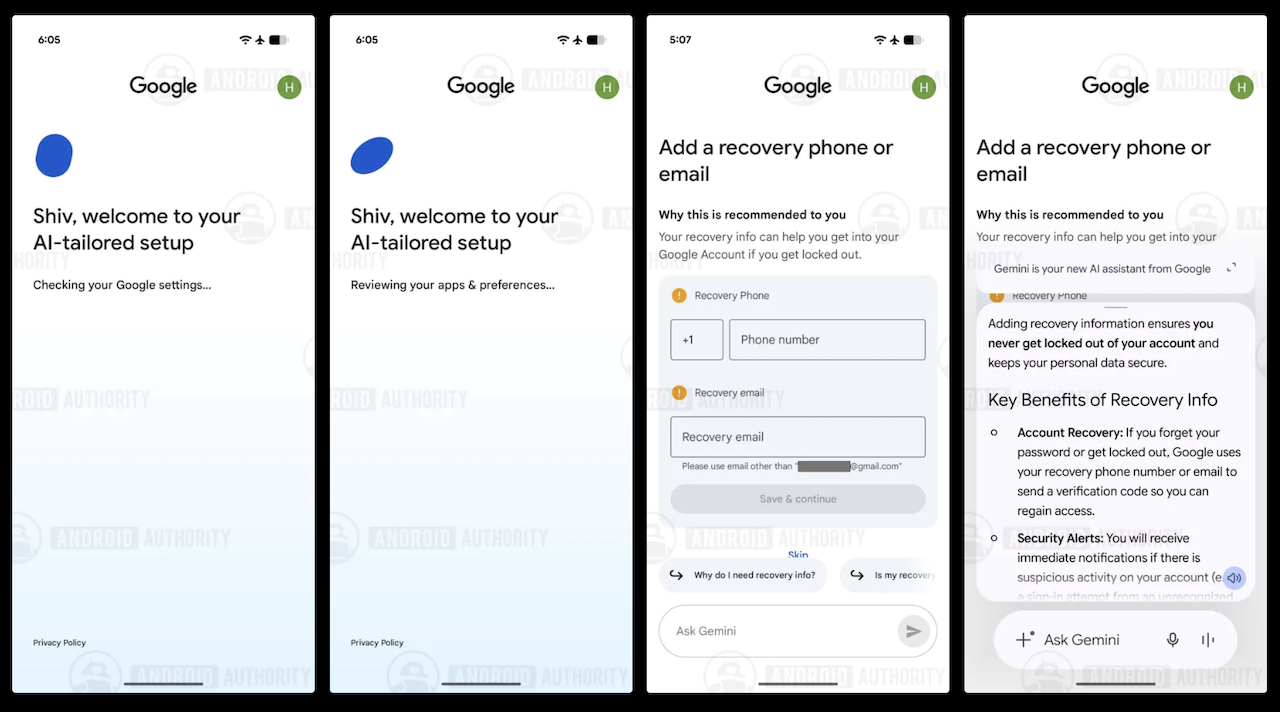
The first two screenshots show that after you sign in with your Google account, the assistant checks your account settings and reviews your apps and preferences. The third screen is the first recommendation from the analysis, where Google noticed the account was missing recovery information.

So, it recommended adding a recovery phone number and email. Below that are suggested questions such as “Why do I need recovery info?” and “Is my recovery info private?” There's also an “Ask Gemini” text box.
The fourth screen shows Gemini opened as an overlay on top of the setup screen. Similar screens were also found for setting up Google Wallet, adding a home address, signing up for Google tips and updates, and installing app recommendations based on your Google account.
Gemini has also advanced inside Google Docs
Google has expanded what Gemini can do inside Google Docs. Previously, Gemini could help write, summarize, rewrite, or generate content, but it largely ignored the comment system where collaborators leave feedback. A recent update enables it to read every comment attached to a document and summarize the overall feedback.
It can also identify action items and unresolved issues. For example, one editor may ask for more sources and another may ask for a clearer introduction. Gemini can highlight each as outstanding tasks. If someone asks a question in a comment, it can write a response for you, and even reference relevant files from your Google Drive when composing replies.

You'll get suggested edits to the document based on the comments, allowing you to incorporate specific feedback and prepare revisions to simplify the text.
Google assured users that the AI will not automatically publish anything without your approval. You can access its capabilities through the Gemini side panel in Google Docs and through the Gemini button at the bottom of the document.
Although the rollout began on July 29, 2026, Google said it could take up to 15 days before every eligible account receives it. It's available for Workspace Business and Enterprise customers, Education Plus users, Google AI Pro subscribers, Google AI Ultra subscribers, and several AI add-on plans.