




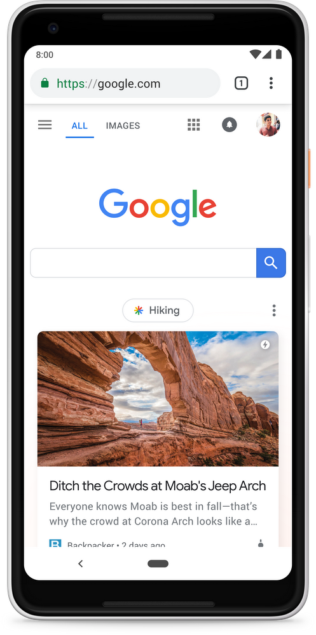
Over the past few weeks users of the Google Feed may have noticed several changes taking place. The modifications have now congealed into a single whole with Google's announcement that they are rebranding the Feed as Google Discover. There are several pieces to this update and new direction for Google that go beyond the new name, including a refreshed interface and updates to features that are available.
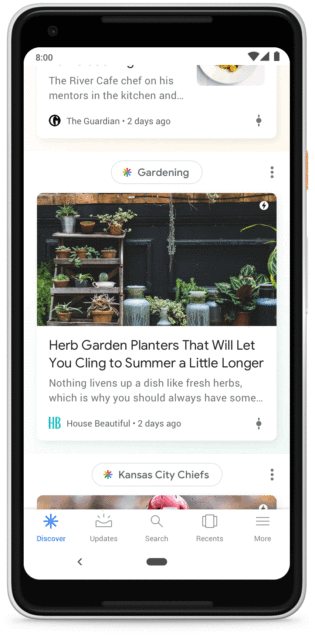
Probably the most glaring change to the newly rebranded Feed is the presence of “topic headers” at the top of the items appearing in the feed. These are supposed to indicate to users what category or topic a particular item is part of and why it is showing up on the display. The headers are clickable and will take you to additional information on the topic along with an option to start following that topic. The multi-color star icon next to the name of each topic is called the “Discover icon” and ties in with the Discover button on the bottom navigation buttons.
According to Google, the content being delivered via Discover will be fresher than it has in the past. Google says there will be more of a focus on visual content, including videos. Google also says they will start delivering more content that they think you have not seen even if it is older content. They wryly call this “evergreen content”. Presumably using their AI technology and access to other content on their platforms, Google will also provide information related to things like upcoming trips even though you may not have specifically established that as a topic you wanted to follow. Google also says they will using information in the Knowledge Graph they maintain for each user to help serve up information that they deem is appropriate for your skill level on any given topic. Google says Discover will be “one step ahead” when it comes to anticipating your information requirements.
On the bottom of the cards displayed in Google Discover users will spot a new slider switch. This can be used to tweak the amount of content provided by Discover on a topic. Tapping on the slider brings up switch so a user can ask for more or less information on a topic.
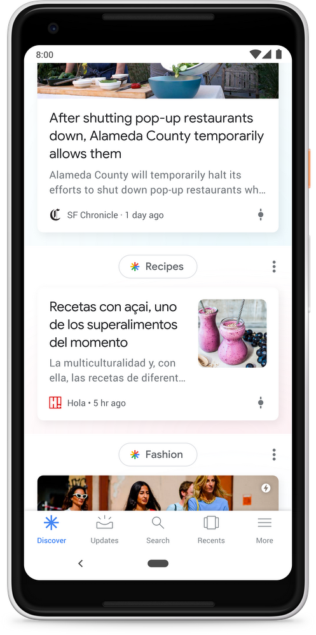
Google says the new Discover is also able to accept language preferences on a per topic or interest level. As an example, they mention recipes being served up in Spanish while sports reports are provided in English. This dual or multi-language support is currently limited to just Spanish and English and only in the U.S. market, but should be expanding to other languages and locations soon.
Besides making this new Discover page available through the app on mobile phones, users who open their browser to the default google.com homepage will find the Discover feed is served up there as well on mobile devices.
Google has been rolling out the different pieces of this new initiative over the last few weeks, so you should have access to all of it now if you launch the old Google Feed app. The
source: Google
