

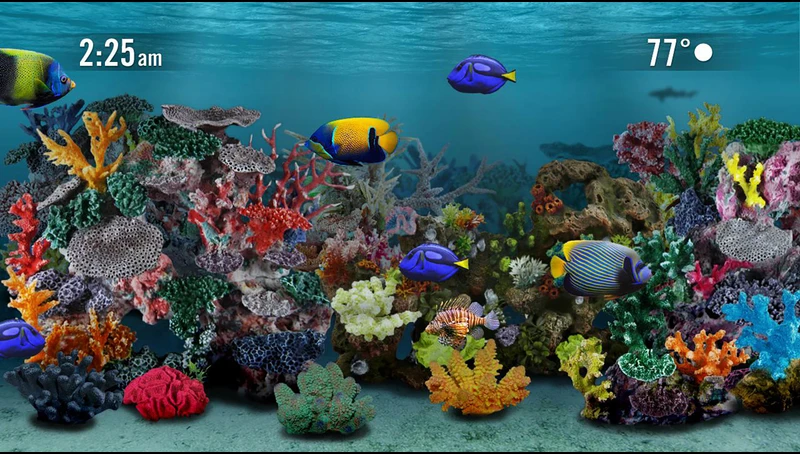
If your Roku turns your TV into a saltwater fish tank whenever you step away, enjoy it while it lasts. Roku is retiring its free Aquatic Life screensaver on December 1, and devices that use it will switch to Roku City instead. Here’s what’s changing, why it may be happening and what you can do before the fish swim away.
In Short
- The free Aquatic Life screensaver, offered on 4K Roku devices, goes away on December 1, 2026.
- Roku devices set to Aquatic Life will switch to Roku City, which carries ads.
- You can pick another screensaver now, and the same aquarium still exists as an Android app.
What’s Changing on December 1
Some Roku owners are already seeing a notice on their TV: “Starting Dec. 1, 2026, the Aquatic Life screensaver will no longer be available, and your screensaver will switch to Roku City.” Roku’s own support page describes Aquatic Life as a free screensaver available only on 4K devices, so that’s who’s affected.
Roku City is the animated cityscape Roku introduced in 2017. It now includes ads, and Roku has opened it to brands such as McDonald’s, Mattel and Carnival Cruise Line, according to its 2023 annual report. Other screensavers, including Jungle, Nautical, Star Trek: The Original Series and several holiday options, aren’t showing the same notice.
More on This Topic: Samsung Is Shutting Down Its Sound App. Here’s What Soundbar Owners Should Do
Why Roku Is Dropping It
Roku hasn’t explained the decision. According to reports, the screensaver’s creator, digital artist Jim Sachs, may have pulled Roku’s license after Fox agreed in June to buy Roku in a deal valued at about $22 billion. That deal still needs regulatory approval and is expected to close in the first half of 2027. Nothing official links the two.
Fans aren’t thrilled. At least three Change.org petitions asking Roku to keep the screensaver had gathered nearly 800 signatures by November 3.
How to Pick a New Screensaver Before December 1
If you’d rather not wake up to Roku City, you can choose your replacement yourself. Here’s the path, according to Roku’s support page:
- Press Home on your Roku remote.
- Go to Settings, then Theme, then Screensavers.
- Under My screensavers, highlight one and press OK.
- Select “Set as screensaver.”
Want something new? More screensavers are available in Roku’s store. Free ones show a “Get screensaver” button, while paid ones show “Buy” with the price. You can also change the screensaver wait time from the same Theme menu, or turn the screensaver off entirely.
More on This Topic: Google Home Is Getting a Major Update for Nest Cams and Speakers. Here’s How to Get It
Want to Keep the Fish?
Here’s the twist for Android fans. Aquatic Life was licensed from SereneScreen, the company behind the Marine Aquarium screensaver, and Marine Aquarium 3.3 is still on Google Play. It’s free to download, with a $2.99 upgrade, and its listing says it can run as an Android screen saver on phones and tablets, complete with optional clock and bubble sounds.
It won’t bring the fish back to your Roku, but it can turn an old tablet on a charging stand into a tiny aquarium.
The Limit
Roku hasn’t commented, so the reason behind the removal isn’t confirmed. The Android app was last updated in July 2020, and Google Play doesn’t list Android TV support, so results may vary on newer devices. And if you don’t touch your settings, your Roku will make the switch to Roku City on its own.
Say goodbye to the fish, or give them a new home on your old tablet!