


Since video is one of the most important components of digital communications, it can be utilized by various organizations for product promotion, education for teaching challenging content, and entertainment for content producers. Traditionally, production of good quality videos was a complex process that required careful planning, appropriate filming equipment, technical skills, and considerable amounts of time. Fortunately, nowadays, with the advent of AI technologies, the process became significantly simpler – you can produce great videos using your ideas, pictures, and scripts.
The Growing Role of AI in Video Production
The use of artificial intelligence is becoming a key part of current creative workflows. Intelligent software can be used to complete various tasks that would take a long time to complete by hand. This includes: script generation, choosing appropriate visual content, voiceover creation and video scene organisation.
This can be extremely helpful for people who regularly produce digital content. A large number of small businesses, independent creatives and marketing teams will find themselves working on tight deadlines and budgets. With the help of AI tools, these companies can optimize their workload, allowing them to concentrate on crafting a brilliant story, strategy and message. Although these technologies do not completely eliminate traditional video production technologies, they do provide their fair share of opportunities for speeding up and enhancing the overall process.
How AI Video Generators Work
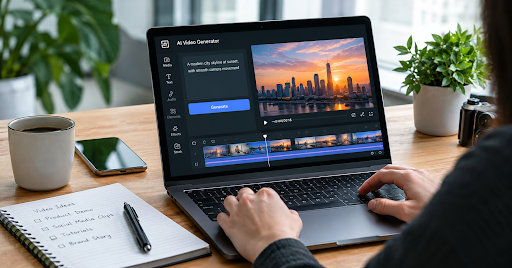
AI video generation tools use machine learning algorithms to understand what you want in your video. You can either type in a description, upload an image or script to begin with. The information will be processed by the system and video scenes created based on your concept. Some platforms can even help you choose background music, generate a voiceover, include captions and transition between scenes.
A good example of creating a short educational video would be by typing in a brief description of something relating to science. An AI system will then take this input and create an image sequence to help explain your topic. You can then make changes to help make it more to your liking and upload it! Those looking at using an ai video generator free can use AI creation tools to play around with some ideas and get an understanding on how automated video creation can fit into their workflow. A key point to remember is to look over the created content.
Practical Uses of AI-Generated Videos
AI video technology has applications across several industries. Its flexibility makes it useful for different types of communication, from short social media posts to educational presentations.
Social Media Content
Social media needs frequent content. Thank goodness we have AI video tools that make creating quick videos, ads and informative content easy.
Using various styles and formats means you can create content without filming everything. This makes it easier to keep up with frequent content production and be creative!
Education and Online Learning
Educational videos can be used as a way of teaching complex topics. Teachers and Online Tutors can use AI to create exciting videos, introductory videos and extra videos.
A History teacher may create a short video showing an important historical event, whilst a language tutor may create videos containing new vocabulary, examples and pronunciation advice.
However, the content of the educational videos should still be researched and factual. The visuals should simply be used to provide accurate information.
Business Marketing
More businesses are turning to video to help explain their services, show what they offer, and contact potential customers. However, professionally produced videos can be costly to produce. Artificial intelligence can be used to create basic marketing content. You can create demos of your products, announcement videos or short introductions using your existing images and text. This will give you an end result that still represents your brand, has accurate information and is consistent.
Benefits of Using Artificial Intelligence for Video Creation
One key benefit of Video AI is that it can save time. Often tasks can be done on a single platform, meaning you don’t have to go through multiple stages of editing. This will save you time overall when creating your content.
It is very beginner-friendly. If you don’t have much experience editing, then this is a great way to get into video creation. The easy-to-use features and automated functions mean it is easy to get started.
Independent creators or small businesses may not have the resources to pay for professional video creators. Using AI can help creators create certain content themselves. But if you want to go further, you may require some professional equipment and skills. AI can help you test different videos. Try out various concepts, styles, and forms to figure out which one suits your message the most.
Important Limitations to Consider
AI-generated videos can have drawbacks. There can be issues with the visuals in the scenes, for example, if they are not realistic, have strange movements or don’t match what was asked for. Factual errors can appear in the AI-generated content. The AI can create realistic-looking content with incorrect information. This is an issue if you are creating educational, scientific, financial or news-related videos. Think about copyright. Make sure you understand the rules of whatever platform you’re using, and that you have permission to use any images, audio, logos, etc. that you upload.
Now, privacy. Avoid uploading business-critical documents, private data or personal recordings unless you’re happy to use the platform in the way the service provider will store and use your data. You'll also need to verify the content, even if it was the AI that produced it.
How to Get Better Results From AI Video Tools
It would be helpful to first brainstorm an idea before you get to test drive the video AI maker. You should have your target audience in mind and have a message to pass across to them. The more information you include in the commands to pass to the system when creating your sequences, the more appealing your sequence will be. Think about the core message, desired setting of the video, visual style and tone.
Keep it short. In general, the video should be kept short but with lots of sections (an introduction, a body, and a conclusion). Once you've finished making your video, you have to make sure that your footage fits in with the comments for each scene.Are the captions easy to read? Does it flow well? Make sure any parts that don’t help your main message are edited.
Consider what platform you are going to be using your video on. If you are creating content for mobile-based social media, then a vertical video may be better. Whereas if you are making a presentation or educational video, a horizontal video may be better.
The Future of AI-Assisted Video Creation
AI will likely play a bigger part in creative software in general. Improvements in image generation, natural language processing, animation and editing can make it easier for creators to have control over their visual storytelling. This doesn’t mean that using technology will help everyone effectively communicate. Having good ideas, meaningful information, creativity and knowing your audience will still be key.
AI video generation tools should be viewed as an aid for creativity. When done right, these tools could help find solutions to problems by providing a test ground for the ideas, as well as enabling the expression of many users in the form of movies. The ideal implementation of the tools combines technology with creativity, editing, and storytelling.