




There's only one messaging app that I've been using the entire time that I've had an Android phone, and that's WhatsApp. While it might not be that big in North America, it is still the biggest messaging app in the world, by quite a substantial margin.
However, one thing that I've never really liked about WhatsApp is that you can only initiate a chat with someone if you save them as a contact. WhatsApp relies a lot on the contacts on your phone, and that comes with several downsides. However, things are about to change: WhatsApp is about to get its own contact manager.
A Contact Manager In WhatsApp Means You Can Add Contacts From Your Linked Devices
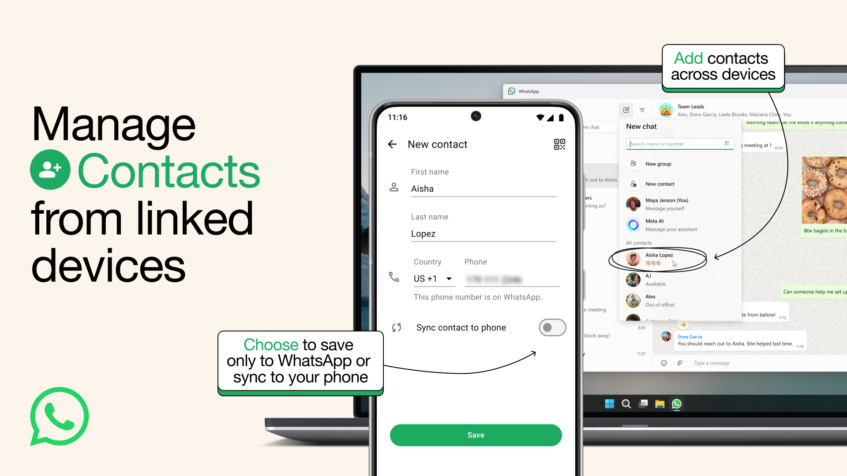
If you've used WhatsApp, you'll know that the typical way to start a conversation with someone on WhatsApp is to add their number as a contact on your phone. Only then will they show up in your list of contacts on WhatsApp. Sure, you can scan a QR code or click a chat link, but they have to set that up themselves.
There are a lot of instances where this proves to be very inconvenient. I've had instances where I've wanted to reach out to a business to make a simple inquiry (and potentially never speak to them again) but I need to save their number beforehand. That's annoying. At the same time, it also means that if you're using WhatsApp on your computer without your phone nearby, you can't initiate a conversation with anyone not in your contacts.
Thankfully, WhatsApp has announced that you'll soon be able to manage contacts from the Windows app and WhatsApp Web, adding some extra flexibility to the messaging app's capabilities.
The New Change Also Brings The Option Of Saving Contacts Directly To Your WhatsApp Account

I have never felt the urge to add a contact to WhatsApp when I'm using the application on my computer. That doesn't mean that nobody else has though. However, what I find more appealing is the fact that you'll now be given the option to “Sync contact to phone”, which means contacts can finally be saved directly to your WhatsApp account!
If you don't know why I consider this huge, it is because it means that losing your phone doesn't mean losing any of your contacts. So whether your device is stolen or gets run over by an 18-wheeler, your WhatsApp contacts will remain safe.
And in case you have multiple WhatsApp accounts on your device or you share your phone with another person, it provides a way to keep those contacts attached to one account, instead of generally accessible simply because they're in your phonebook.
WhatsApp Confirms That Usernames Are Coming Too
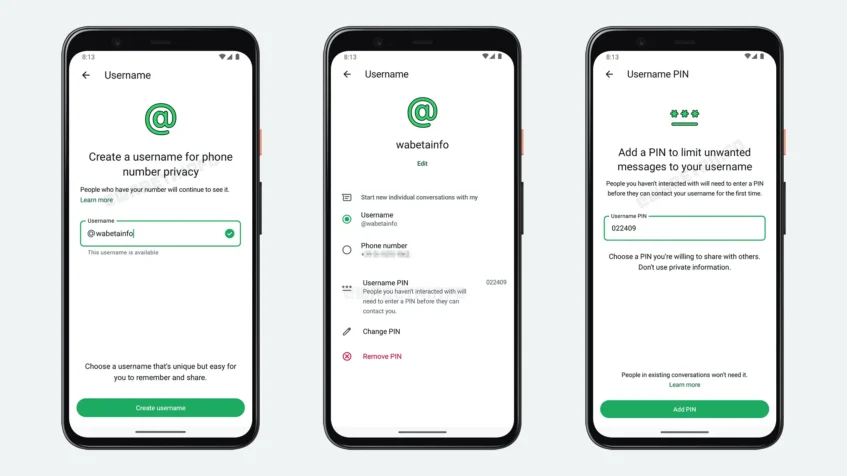
Plus, this contact manager is a necessary step before WhatsApp brings in username functionality. We reported on this earlier, but now, WhatsApp has actually confirmed its plans in this regard.
Having usernames on WhatsApp will give people the opportunity to add you without needing to compromise your phone number. That's a major boost for privacy.

