




Everyone needs to keep track of important events in their lives — we could all do with one less missed anniversary/birthday and the turmoil that follows. Thankfully, with smartphones everywhere, there's no excuse not to keep tabs on things as the days roll by.
Google Calendar is the most popular calendar app option for people with Android devices, considering it is the first-party option. It doesn't hurt that it syncs with your account either. Google Calendar can be embedded on webpages, and those embedded variants are about to see a design change and new accessibility features.
Embedded Google Calendar Objects Are Going To Get A Visual Change To Align With Material Design
Google has always tried to be consistent with its design language across its very apps and even the entire Android operating system. In 2021, the company announced Material Design 3. While stock Android has been in line with the new design language for quite some time now, it seems that embedded calendars got forgotten in the pile.

Thankfully, that has just changed and you'll notice that embedded Google Calendars now have a fresh new look to them. Google has also improved the spacing between individual objects on the calendar, which makes it look cleaner and easier to read compared to before.
Accessibility Features Like A Screen Reader And Keyboard Shortcuts Are Coming To These Embedded Calendars
We might not think about it in daily life, but if you're somebody who lives with a disability or has someone close to you who does, you'll realize how absolutely important accessibility features are when it comes to developing software. Embedded Google Calendars lacked some pretty important accessibility features previously, but the good thing is that is about to change.
You'll now be able to use Google Calendar with a screen reader, which is a big win for the visually impaired. Now their screen reader software will be able to go over the calendar's layout and let them know what important events they might need to keep in mind in the coming days or weeks. On top of that, it also brings support for keyboard shortcuts, which will make navigating those flooded calendars a whole lot easier.
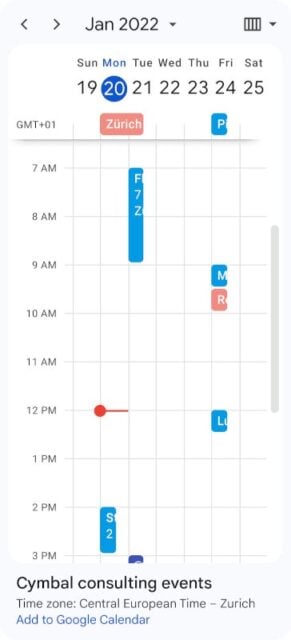
Google has also made sure that the layout of the new embedded calendars is now a lot more responsive to the type of device that it is being used on. So whether you're checking the calendar out on a smartphone with a narrow portrait screen or a massive tablet like the Galaxy Tab S9 Ultra, you should still be able to see the calendar layout in a way that is still usable.
Google Is Rolling Out These Changes To Essentially All Google Accounts
This seems like a feature that might be targeted more toward Google Workspace users, but thankfully, Google isn't limiting the rollout to them alone. Whether you use Google Workspace, are subscribed to Google Workspace Individual, or simply have your own personal Google account like the rest of us, you should start seeing these design and accessibility improvements.

