The life of an older person can be tough. Physical health declines with age and makes those daily tasks you normally breeze through difficult. Gradually, you lose independence and need assistance for certain activities. If you don’t have the luxury of someone nearby to attend to your needs all the time, having a smartphone is beneficial.
Today’s phones make it possible to download health monitoring applications, contact emergency services, make video calls, and participate in social media—all of which are helpful features when mobility is an issue.
But smartphones can be confusing for anyone who’s not used to technology. Luckily, there are phones designed specifically for seniors with larger buttons, simplified interfaces, and emergency features. If you don’t want all the noise of trendy flagships, those are the phones to aim for. Here’s our short review of the best ones to help you make wise buying decisions.
The best phones for seniors at a glance
- Best phone overall: Google Pixel 8a.
- Best value phone: Samsung Galaxy A14 5G.
- Best accessibility features: Lively Jitterbug Smart4.
- Best phone with a physical keyboard: Nokia 2780 Flip.
- Best budget phone: HMD Vibe.
Google Pixel 8a
Pros
- Advanced AI features.
- Long OS support.
- Stock Android experience.
- Impressive camera setup.
Cons
- Slow charging.
- Heating issues.
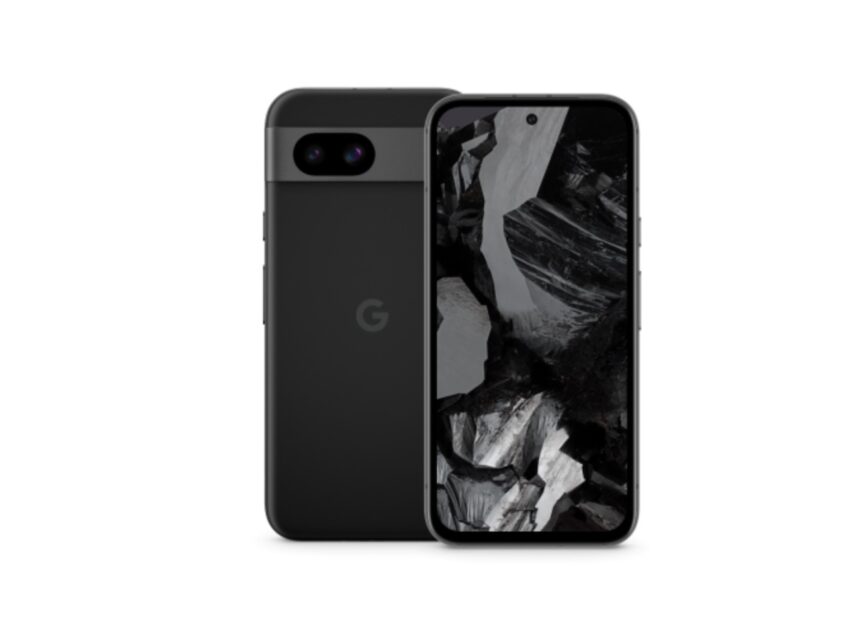
The Pixel 8 series is Google’s latest release, and the Pixel 8a phone is the more affordable model. It has the luxury of longer software support and features that aren't widely available on other devices. Plus, its AI-powered features cut across different functionality, from the camera to Search. For instance, Live Translate helps you to communicate with someone who speaks a different language in real time.
So, when you're traveling abroad or talking to foreign doctors or healthcare providers, your phone can instantly translate what they're saying. It will also convert what you say to their language so that they can understand you. Live Caption features also extend to phone calls, so that you never miss important bits of the conversation.
| Component | Specifications |
|---|---|
| Processor & GPU | Google Tensor G3, Arm Immortalis-G715s MC10 |
| Display & refresh rate | 6.1-inches OLED, 120Hz |
| Resolution & brightness | 1080 x 2400 pixels, 2000 nits |
| OS | Android 14 |
| RAM & storage | 8GB + 128GB, 8GB + 256GB |
| Cameras | 13MP ultrawide (selfie), 64MP wide (main), 13MP ultrawide |
| Battery | 4492mAh |
| Earphone jack | None |
| Price | $499 |
HMD Vibe

Pros
- Affordable.
- Easy to use.
- Face recognition security feature.
- Decent battery capacity.
Cons
- Limited RAM & storage options.
- Not the best smartphone features.
- Connectivity is stuck at 4G.
The Vibe phone screams “new.” HMD just launched it, making it one of the latest smartphones on the market. It focuses on the essentials, including calling, texting, and browsing the internet, at an affordable price of $150. Its 4000mAh battery can last up to two days and requires less frequent charging.
There's a 13MP rear camera and a 5MP front camera. These are decent for capturing simple photos and videos, but not the best quality if you're aiming for professional pictures. It uses the latest Android 14 OS version and even supports facial recognition as a security option.
| Component | Specifications |
|---|---|
| Processor & GPU | Qualcomm Snapdragon 680, Qualcomm Adreno 610 |
| Display & refresh rate | 6.5-inches LCD, 90Hz |
| Resolution & brightness | 720 x 1612, 600 nits |
| OS | Android 14 |
| RAM & storage | 4GB + 128GB |
| Cameras | 5MP (selfie), 13MP wide (main) |
| Battery | 4000mAh |
| Earphone jack | 3.5mm |
| Price | $150 |
Samsung Galaxy A14

Pros
- Affordable.
- Large battery capacity.
- Aesthetically pleasing UI.
- Impressive main camera.
Cons
- Slow charging speed.
- Poor screen brightness outdoors.
- Weak macro & depth cameras.
The Galaxy A14 phone offers a way to own a Samsung phone without going overboard in spending. It's a budget-friendly device with a large, bright 6.6-inch LCD display that makes it easy to see texts, icons, and other elements. It comes in over 10 different models, but we'll look at the SM-A146U variant because it's available in the USA.
If you're serious about storing memories with your loved ones, you'll find the 128GB storage space sufficient. It'll also prove useful for installing your health apps and other useful programs. If you don't need all that right away, there's a base memory option of 4GB RAM and 64GB storage.
The phone runs Android 13 out of the box. It's not the latest OS, but Samsung has overlayed its user-friendly One UI 5 system software on it. It's easier to navigate and you can customize it to great lengths compared to the stock Android version on Pixel phones. If you save a few extra dollars, you can upgrade to the A15 phone with slightly better features.
| Component | Specifications |
|---|---|
| Processor & GPU | Mediatek Dimensity 700 MT6833, |
| Display & refresh rate | 6.6-inches LCD, 90Hz |
| Resolution & brightness | 1080 x 2408 pixels, 500 nits |
| OS | Android 13 |
| RAM & storage | 4GB + 64GB, 6GB + 128GB, 8GB + 128GB |
| Cameras | 13MP wide (selfie), 50MP wide (main), 2MP macro, 2MP depth |
| Battery | 5000mAh |
| Earphone jack | 3.5mm |
| Price | $200 |
Lively Jitterbug Smart4
Pros
- Simple user interface.
- Affordable.
- Emergency features.
- In-built device guide.
Cons
- Costly plans & charges.
- No major difference from Jitterbug Smart3.
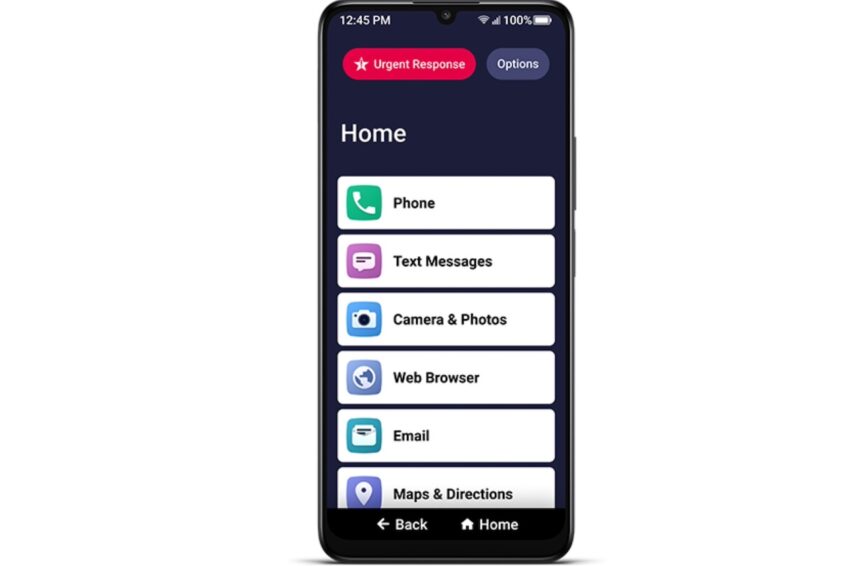
The Lively Jitterbug Smart 4 is designed specifically for seniors. It features a simple list-based menu instead of the more complex grid app setup seen on other phones. Throughout the user interface, you'll see large, legible letters that make it easy to read text without assistance. You can also use your voice to type or the urgent response button on the Home screen to access immediate help from experts during emergencies.
It has an M3/T4 hearing aid rating, which means the phone is compatible with hearing aids when held next to your ear, and there's a low chance of static or buzzing sounds. The basic subscription plan starts at $19.99 per month unlimited talk and text, support, and scheduling a Lyft ride without downloading the app.
| Component | Specifications |
|---|---|
| Processor & GPU | – |
| Display & refresh rate | 6.7-inches |
| Resolution & brightness | – |
| OS | – |
| RAM & storage | 4GB + 32GB |
| Cameras | 8MP (selfie), 13MP (main), 2MP, 2MP |
| Battery | Up to 37 hours (talk time), Up to 4 days (standby time) |
| Earphone jack | 3.5mm |
| Price | $120 |
Nokia 2780 flip
Pros
- Good call quality.
- Great accessibility features.
- Dual display.
- Affordable.
Cons
- Doesn't have the latest phone features.
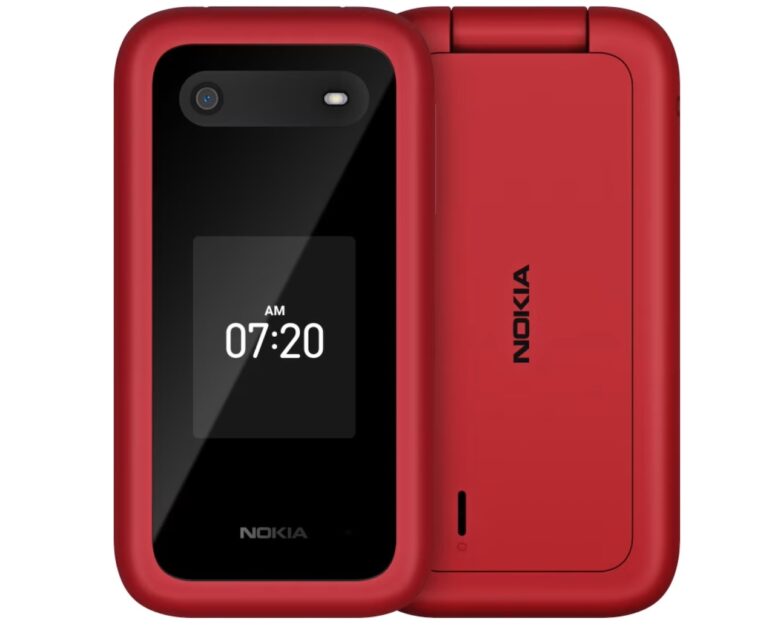
This classic phone is among those we recommend for kids and any fans of a minimalist experience. It doesn't have a touchscreen, which eliminates accidental presses and makes the phone generally easier to use. When expanded, it has big buttons that anyone having trouble seeing will find helpful.
Its other accessibility features include sending Real-Time Text (RTT) while a call is ongoing. This allows you to communicate in more than one way when hearing becomes difficult or there's a bad connection. The phone also has a small display on the outer cover that shows the time and caller IDs. You don't need to flip open the phone every time to check who's calling.
| Component | Specifications |
|---|---|
| Processor & GPU | Qualcomm QM215 Snapdragon 215, Qualcomm Adreno 308 |
| Display & refresh rate | 2.7-inches (internal), 1.7-inches (external) LCD |
| Resolution & brightness | 240 x 320 pixels |
| OS | KaiOS 3.1 |
| RAM & storage | 4GB + 512MB |
| Cameras | 5MP main camera, no selfie |
| Battery | 1450mAh |
| Earphone jack | 3.5mm |
| Price | $90 |
Enjoy simple phone choices with big benefits
A phone that's difficult to use will not only frustrate you but even contribute to your social isolation. Keeping this in mind, we researched and selected only devices that offered ease of use above all else. While flagships like the Galaxy S24 Ultra were tempting, we opted for more specialized and affordable options like the Lively Jitterbug Smart 4.
Now that you have an idea of the good options, consider their compatibility with your preferred mobile carrier. Many carriers offer special plans for seniors with features like unlimited calls to specific numbers or discounts on data plans. Meanwhile, some manufacturers, like HMD, offer free 15-day returns if you're not satisfied with your purchased device.