


Every year, without fail, a new major version of the Android operating system gets released. With each update, we tend to get security updates, some design changes, new features, and sometimes improvements to power efficiency.
This year is Android 15's turn, and we're expecting the release version to grace our smartphones much later in 2024. However, before the final version of Android 15 launches, we get to taste the developer preview, and it seems we may be getting that as soon as tomorrow.
The Android 15 Developer Preview Might Be Available Very Soon
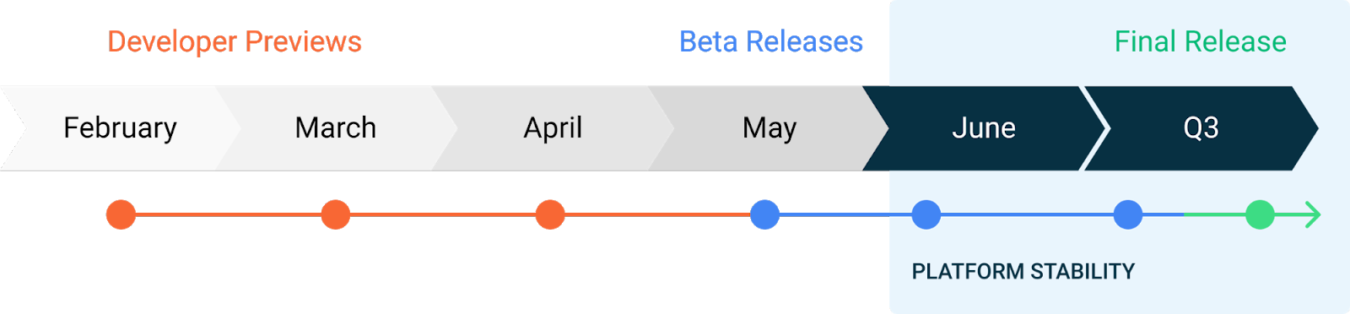
For the most hardcore Android enthusiasts who aren't developers, Android Developer Previews allow them to change up the feel of their devices and try what will soon be the latest in terms of Android software. Android 15 is the next OS update in line from Google, so it is next in line for a developer preview.
Well, according to a comment posted by a Google dev on an Android Open Source Project page (you'll need to have an account), the Android 15 Developer Preview may be available as early as tomorrow, February 15th! This sounds about right, considering last year's preview was available much earlier in February. Plus, there isn't much need for fanfare around the release of a developer preview, so this might be accurate.
So, if you have a Google Pixel and you're interested in giving the potential future of Android a test run, keep your eye on the Android Developers website to see if the Android 15 page will show up tomorrow.
What Features Can We Expect To See In Android 15?

Not every Android OS update comes with breathtaking changes over its predecessors, but there's usually enough to improve the general experience of using the operating system. There's no definitive list yet, but here are some of the things we're expecting to see:
- Private Spaces: This will provide a way to prevent some applications from showing in your app list. You can currently hide apps and stop them from appearing in the App Drawer, but this will supposedly take it a step further and hide them from search and the Settings > Apps section.
- Lock Screen Widgets: Android has been big on widgets, and back in the days of Android 4, you could put widgets on your lock screen. For some reason, that feature got dropped, and only recently One UI and iOS reintroduced them, but they aren't available for Pixels yet. We might see them come back though!
- Manually Archive Apps: When you don't use an Android app at all for weeks, the OS can automatically disable it to improve performance. However, there's no way to do this manually. Android 15 may be bringing that feature along with it.
Remember that not all features seen in a developer preview will make it to the final version, so if some of these show up in the Android 15 Developer Preview, but not the release version, you know why!
What Is The Purpose Of An Android Developer Preview?

An Android Developer Preview serves as a way for app developers to test their applications against the new version of Android well before it launches. It allows them to troubleshoot, do bug testing, and integrate new features into their software ahead of time.
Of course, if you just like to try out new things and you have a Google Pixel, you can download the preview too!