



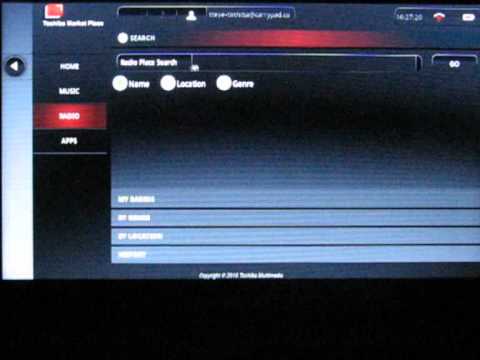
Don't ask me what a smartbook is folks, because I'm still trying to figure that out. But, what I can tell you is that the Toshiba AC100 is now running Froyo (2.2) for your viewing and drooling pleasure. You may now unbuckle your seat belts and move about the world of “flash”. The update was promised back in the fall, and it's finally arrived. And according to the folks over at Carrypad, users can expect to experience a “noticeable performance boost”. In addition, you can view Toshiba's own application store on the device, dubbed the “Toshiba Market Place”. Furthermore, if you've been hesitant or reluctant to purchase the device, take note that the smartbook has recently dropped in price and you can even purchase a WiFi only version of the device for about $275.00 US currency. Add another $50 bucks and you can get the 3G version. Check out the video below of the device in action and let us know what you think of it in the comments below.
[via engadget]


How do I get android apps for this machine? None of the stores recognise it – they all look for phones.
Am I navigating the wrong sites?
For example, Docs to Go is a free bundle on the machine – when you upgrade (and pay) you discover when downloading that it doesn’t recognise the file – it’s for a phone!
Any help would be gratefully received.
Alan
I just could not leave your website before suggesting that I extremely loved the standard info an individual offer to your visitors? Is gonna be once more regularly in order to investigate cross-check new posts
Hey I have a Smartbook . It’s great. I got it in february (2011) before the flash/2.2 was available. I loved it even back then – although the lack of flash was difficult, I managed to acquire some useful apps for youtube which made that possible. I was really REALLY happy when the 2.2 update arrived, and since then it has been brilliant. Obviously there are limitations in comparison to a windows netbook or something like that. However, I feel this machine is a lot stronger in other areas.. It’s fast!. This is what I find important, so if you get this machine maybe try to find these:
Skyfire Web Browser (beat oprah and the default browser)-although the default is still very useful for some tasks.
[Maxthon browser is also quite handy]
‘Bluetooth File Transfer APK’ – This is quite important.
There are loads more I could add , but these are the ones I felt were very necessary just for overall functionality.
I’m looking forward to the new updates toshiba has planned for this machine!
Hello! I just would like to give a huge thumbs up for the great info you have here on this post. I will be coming back to your blog for more soon.
Nice one. you make it look easy!! Been trying to get my head around what this computer was made for as apps for smart phones didn’t work! Didn’t say on the tin that you had to update the software…. hum technology hey.. always something round the corner. Any way if you have more helpful tips please send a link. Thanks.