




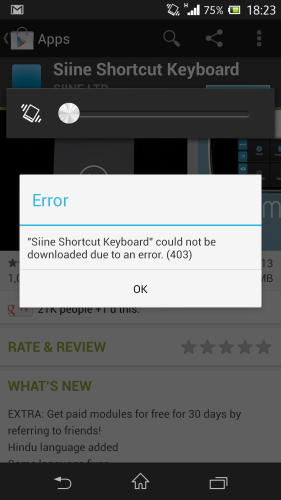
If you've been receiving an error 403 while downloading or updating apps, you're not alone. Some users have reported that they are receiving an error 403 whenever they try to download an app from the Play Store.
What does Error 403 exactly mean? A 403 error means that your request was “Forbidden”. This means that your request was sent but the server chose to deny it.
Unfortunately, at this point, users can't do anything other than wait for Google to fix this issue. Some people have posted a workaround solution but it might lead to yet another problem. Some were lucky to get it to work again by re-adding their Google account but others faced more problems using this method. The best solution is to wait and let Google fix this error.

Just a note to help someone else with this on a Samsung S5 LTE
could not be downloaded due to an error. (403)
Everything was going great with my brand new S5, until I turned on the Download Turbo.
Note, prior to turning on the booster, I was installing apps successfully over a WiFi connection.
I turned on Download Booster : hoping to install apps from previous phone quicker.
Natural enough thing to do when you have 30 apps to get through, wouldn’t you think.
All of a sudden I couldn’t download anything from Google playstore.
Oddly, The Galaxystore (a wierd EXTRA playstore that comes with Galaxy Phones) worked, but most of my apps were not there, and those that were did not know I had purchased them… problem :-{
After perusing the web, and resetting things & changing google accounts etc etc, I finally tried turning of my WiFi connection, and switching to only 4G mobile data.
Of course the S5’s Download Booster was off now.
As if by magic, everything in google playstore started working again!
OK: So maybe something in the Download Booster tries to make multiple connections to the google playstore server, and it doesn’t like that:
So I turned off download booster, and turned on the WiFi, and turned off the 4G mobile data connection. Back to plain WiFi, as per the data connectivity configuration that was working in the beginning…
Alas, google playstore would not work again (same error), even with ONLY WiFi on now.
Back to 4G, switch off WiFi, everything works on google playstore again… consternation!
In summary:
If you have a S5 & you turn on the Samsung 4G + WiFi Booster & connect to Google Playstore, kiss your connectivity to Google Playstore via WiFi goodbye forever.
You can still connect with just 4G Mobile Data (as long as WiFi is OFF).
It’s almost as if the Google Playstore server remembers indefinitely that you ‘once’ tried to connect with WiFi & 4G together, and forbids your WiFi connectivity henceforth.
i face this error, when i restart my phone its gone and able to download apps
I have that error after I clean up my phone using Clean Master, and until the next reboot. I suppose it deletes some Google Play files that are needed for the authentication but are mistakenly marked as “junk files”…