




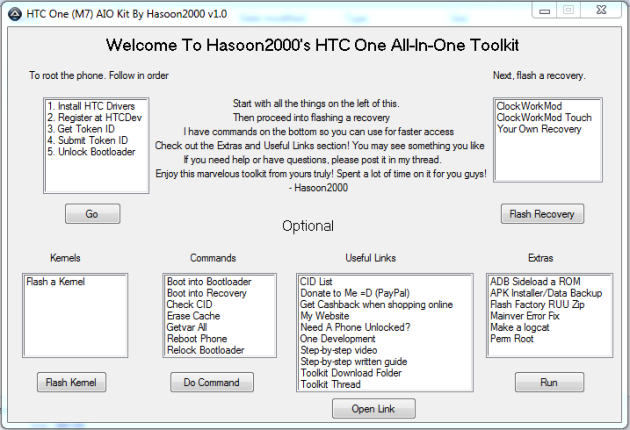
Well that didn't take long at all. If you're looking for a very simple and quick way to unlock and root your AT&T or Sprint HTC One, you can do it now thanks to hasoon2000 over at XDA. He already posted a toolkit for the international version a month ago, so this is very similar. This desktop application will install HTC Drivers, unlock the bootloader, and flash your own recovery. You want to make sure you grab the correct download that matches the carrier version of your phone so hit the appropriate source link below for instructions.
sources: XDA – Sprint version / XDA – AT&T version / XDA – International version

Hi, I have HTC One x running 4.1.1 stock rom, Unlocked boot loader, CID_044, S-On with CWM Installed. Im trying to install 4.2.2 via OTA but it always restart in the recovery mode. I have also tried to install zip from SD Card via Recovery but failed. I have lots of apps and i dont want to lose them. Kindly Help how can i update my phone to 4.2.2 without erasing my apps/user data…..
i only have one question..the “unlock” being referred to in these posting are sim card unlock right ?..meaning i can use this to turn the sprint phone to a gsm world phone right ?
nothing seems to work with the sprint version of the HTC one! I tried everything and get that dam error message “error cannot load unlock_code.bin”
So does this simunlock or just bootloader unlock ?
So this will sim unlock? For the sprint HTC one since it has all gsm bands and SIM card?
Once unlocked can I use this phone overseas with a sim card?
Will this void my warranty?
Yes
Yes, BUT if you factory restore your phone there is no way the manufacturer or ATT can check to see if you rooted before.
Not technically true… Re-locking the phone doesn’t restore the factory lock, but it prevents additional changes to the device’s bootloader. In addition, the **TAMPERED** moniker stays in the bootloader permanently (unless someone’s found a way to remove this?).
i just performed this step by step this morning and it did work perfectly.
i then followed a guide from xda on locking the bootloader
and clearing the tampered with message in recovery. That also
worked perfectly. Then after a factory reset, i just swapped it at a Sprint store for the Note 2 that i should have just stayed with in the first place without any questions or issues.
Yeah, I restored mine using an RUU so I could update it (and I don’t really use anything that requires root anymore). It removed the **TAMPERED** moniker, but the **RELOCKED** moniker was there.