



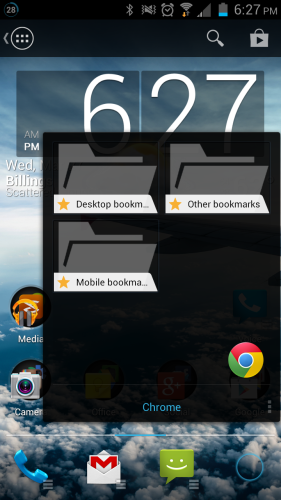
I'm very particular when it comes to the launchers that I use. I've been perfectly content in my Nova Launcher set up for over a year now. It looks like this is going to change however, as Chris Lacy released an update for Action Launcher today with a killer new feature. In this update, the Covers feature is taken a step further. Covers brought you your most accessed destinations quickly with the swipe of a finger and Action Launcher's new Shutter feature looks to do the same with widgets. For example you can slide your finger up on the Gmail icon and it displays the Gmail widget, giving you quick access to your email. Chrome gives you quick access to your bookmarks (see below). Most apps with widgets have this ability and I particularly liked being able to skip tracks in the Play Music App right from the icon.
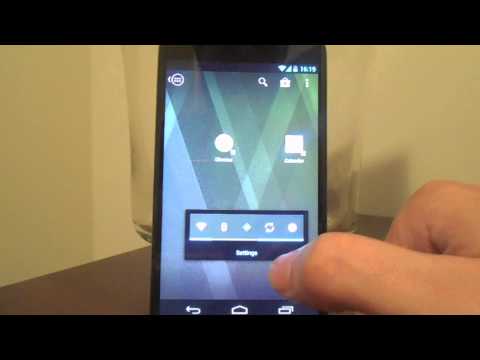
If you're looking for a new launcher to try, I can't recommend Action Launcher enough. Not only is it fast, clean, and polished it will make using widgets cool again. Even if HTC's Director of User Experience, Drew Bamford thinks otherwise. This Shutter feature alone makes it well worth the $3.99 you'll pay for the pro version. If you're skeptical though, you can check out Chris Lacy's video run through of it below. Otherwise you can scroll past that to get your QR code and download link. I don't know about you guys, but it looks like Nova's getting put up on the shelf for a while as I have a new launcher to play with.
Play Store Link
source: Chris Lacy – Google+

I would be tempted more if there was a free version to try. Sorry but before I put down $3.99 for only a 15 minute trial, I want to know more about what I’m spending money on. If Google had not done the 15 minute crap I’d be more likely to try out more fee based apps, but I’m super picky about what I spend money on. The way I have Nova and TSF setup, I can’t imagine needing the ability to swipe up on an icon to get access to a widget being worth the price. That’s just me though, I do like that they’re coming out with twists on this however. I’ll definitely keep an eye out on this one.