




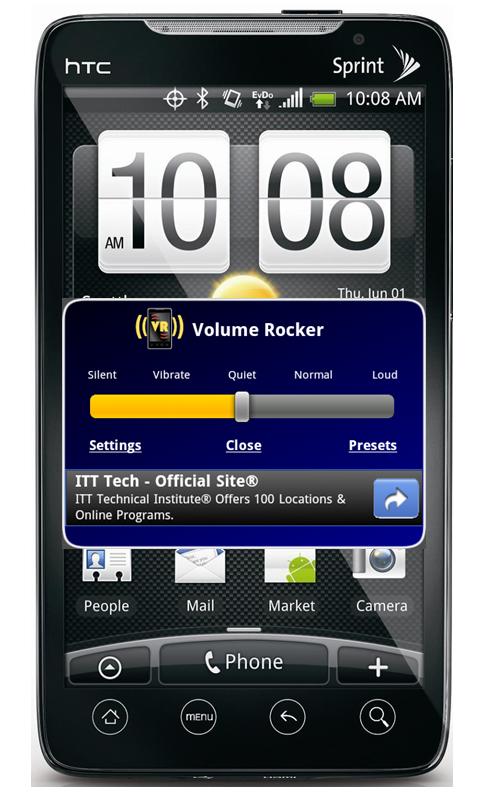
If you've been looking for a decent volume manager for your Android smartphone, look no further. Volume Rocker for Android supplies you with all of the functionality you need when accessing and managing your volume profiles. The developer touts that the application has recently been updated and offers a simple, fast and clean interface. The app allows you to preset five different volume levels that you can access with just one click. The app and volume settings are fully customizable and allow you to adjust settings exactly the way you like. Access to your preset volume levels can also be gained easily in your notification/task bar, offering a quick glance at your current settings. In addition, you can enable or disable your settings from there as well. Furthermore, you can choose from a large selection of colorful and/or transparent themes for an added pizaz. Check out the details from the developer and don't forget to check out all of the screen shots to see what the app looks like as well. Download link and QR code available after the break.
From The Developer:
– Five presets: Silent, Vibrate, Quiet, Normal, and Loud
– Customize the volume levels for all five presets
– Volume control and levels for each preset includes:
– Ringer volume and vibrate settings
– Notification volume and vibrate settings
– System volume
– Alarm volume
– In call volume
– Media volume
– Enable Volume Rocker task bar icons for quick view of selected presets
– Enable or disable default system task bar icons for silent mode
– Select custom themes and colors for cool appearance
– Easy to use menu and preferences




Android Market Link


Be careful with this app…it messes with vibration settings too. I uninstalled and then when I would try to set my phone back on “Vibrate Always” it still would not vibrate. I had to reinstall the app, set vibration to always, and then uninstall again.
This app is certainly useful to phones who features good music like HTC Sensation XE