





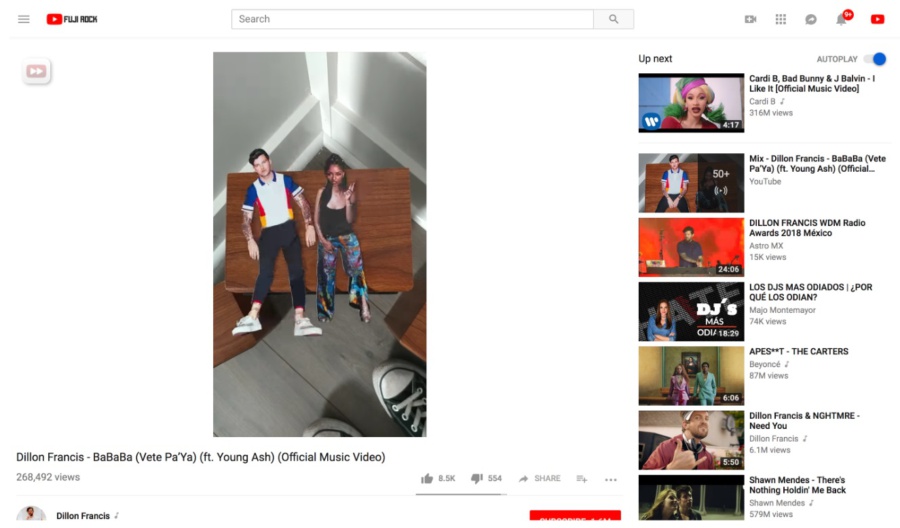
If you use YouTube on the desktop through a web browser, you may notice some changes that rolled out this week. Google says they are updating the interface so that videos are adjusted to better fit the aspect ratio of the device one is using to view a video no matter what aspect ratio the source video was shot with. The changes will include videos posted in a variety of odd sizes including the dreaded vertical videos. Oddly enough, it appears some standard 16:9 videos are being impacted.
For vertical videos, the primary change that YouTube is implementing is replacing the black bars to either side with white space to fill the extra space. Overall this makes it less noticeable that a vertical video is not using up all of the available space. A more controversial change being made is a new “enlargement” process that YouTube is implementing on non-standard size videos. According to YouTube, the process of enlarging a video is not supposed to cause any degradation of video quality.
That latter point may be questionable though as it appears there are many video viewers out there complaining about this change. The complaints seem to mainly fall into two primary categories – cropping issues and quality issues. Some users have noted that the resizing of videos is causing cropping that results in portions of the video not being visible. Others are saying the video quality after the enlargement process is introducing deformations into videos that are not there when viewed at their “normal” size.
Although these changes may seem to be minor, they are part of some ongoing efforts by Google to improve consistency across platforms. Similar changes to YouTube were issued back in March for their mobile device app. This latest update brings that experience to the desktop.
source: AndroidHeadlines
