



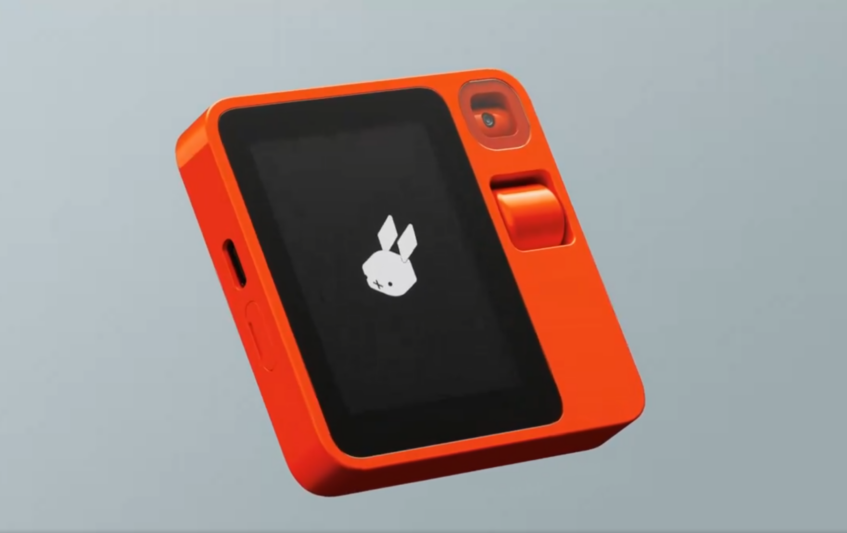
When is a device with a SIM card, a display, and a camera, not a smartphone? When it's a Rabbit R1, which the brand says is a ‘leap towards an app-free online experience'. Running on Rabbit OS, the first operating system to be built on the Large Action Model (LAM), the R1 aims to learn the users' intentions and behavior when using apps and then mimic them. It's an unusual device that packs a 2.88-inch touchscreen, a rotating camera, and an analog scroll wheel for navigation.
What is the Rabbit R1?

Powered by OpenAI's ChatGPT, the Rabbit R1 uses AI to perform tasks initiated via vocal commands. So, instead of pulling out your smartphone to open up an app, you press the push-to-talk button and tell the Rabbit R1. The device doesn't use traditional APIs, with Rabbit saying it learns directly from how humans interact with apps.

Everything is managed by the Large Action Model (LAM), and thanks to Teach mode, it can learn new tasks in just 30 seconds. The R1 remembers the task you performed in an app, learns by demonstrating it, and then replicates it. Rabbit says the R1 has been trained in multiple sequences for many popular apps.
“We’ve come to a point where we have hundreds of apps on oursmartphones with complicated UX designs that don’t talk to each other. As a result, end usersare frustrated with their devices and are often getting lost. rabbit is now building towards anintuitive app-free experience with the power of AI. Our Large Action Model takes it one step further: it doesn’t just generate text in response to human input – it generates actions on behalf of users to help us get things done.”
Jesse Lyu, Rabbit Founder and CEO
What Can It Do?
Interaction with the R1 is done by pressing the push-to-talk button and issuing a voice command. The Rabbit OS will then act upon your request, whether it's to play music, send a message, check your emails, or even ask what Coca-Cola's current stock price is.
There's no need to open multiple apps to schedule a forthcoming trip, tell the R1 to book the cheapest non-stop flights for two adults with grouped seating, pick a hotel with ocean views and reliable WiFi, a selection of water-based activities, and some sight-seeing locations and the little gadget will create an itinerary for your to confirm or alter.
Think of it as something like the Google Assistant or Siri on steroids in your pocket. The Rabbit OS will learn what an app icon looks like, where the menu is, and how to perform tasks.
The Hardware
Sporting a 2.88-inch touchscreen color display, the Rabbit R1 is powered by a MediaTek processor with 4GB of memory and 128GB of built-in storage. A USB-C port for charging and LTE/WiFi connectivity is on board. A rotating camera is present for taking video and still photography, and there's an analog scroll wheel for navigating the UI.
The Rabbit Hole

The Rabbit Hole is a web portal where you can manage the apps and services you use the R1 to control and use. You can log in to the app or service on the Rabbit Hole, set your preferences, view past interactions or images, and factory reset the R1 if necessary.
How Much
The Rabbit R1 is listed at $199, but the bad news is that the first batch of 10,000 units has already sold out. The good news is that a second batch is available to pre-order, with orders expected to ship around April/May this year.