


![Featured Android App Review: Share Where Location Sharing [Travel & Local] 2](https://www.talkandroid.com/wp-content/uploads/2013/07/Share_Where_Location_Sharing_Featured_Small.jpg)

With Latitude going away, I know a lot of you are looking for alternatives. You might want to try Share Where Location Sharing from Ola Bjuremo. It's probably the quickest way to share your location with friends and family. Texting or emailing your location isn't anything new, but Share Where has a lot of extra features that make it a must have tool for your location sharing needs.
If you want to share your location with someone, you can quickly do it from within the app. Just select someone from your contacts or manually type a phone number (for SMS) or an email address. You can send your location to multiple people at the same time as well. You can even add text such as “I am here”, “Meet me here”, or “I need help.” Then simply tap the “Send” button and your chosen contacts will receive a message via SMS or email with your message (if you included one) and a Google Maps link showing your current location.
As I mentioned there are a few apps that do similar things in the Play Store, but Share Where takes things a step further. Lets say you are traveling and you want to give regular updates on your location. You can simply choose a repeated time interval (ie 5 minutes, 10 minutes, etc) and your contacts will get a message at each specified interval. Furthermore, if you have Android Jelly Bean 4.1 or higher, you can see the status and amount of time left until the next message is sent in your notification area. You can even cancel any future sharing through the expanded notification.
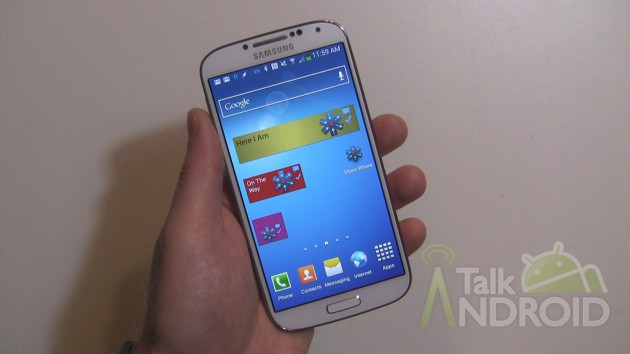
The included widgets are where things get really snazzy because you can setup predefined terms for a number of instances. For example, lets say that when you leave work, you like to let your spouse know when you are heading home. You can create a widget with your spouse as the contact along with “I'm heading home” as the message and set it to send a message every 5 minutes. This way, your spouse can tell if you might be stuck in traffic. Also, by setting up the widget, you won't have to open the app everyday and set all these parameters. You just simply tap on the widget and hit “Send.” You are even give the opportunity to quickly change any parameters if you want. There is no limit to the amount of widgets you can set up. You can set another one up for your weekend outings so all your friends always know where you are. These widgets are not only efficient, but they are perfect for kids and emergency situations. Kids can quickly update where they are and if they are in an emergency situation, a quick tap of their finger on the widget will let loved ones know exactly where they are.
Again, you only share your info when you want and with whom you want. However, if you do want to share your info to the world, you can do so via Facebook, Google+, Twitter or many other apps via the Shared services in Android.
What I like most about Share Where is not only is it very quick and easy to use, it's not a battery hog like other apps that share your information every second such as Glympse. Most people don't need to watch where you are every second. Updates once in a while is more than enough and Share Where gets the job accomplished.
Ola is offering two versions of the app. The lite version includes ads and limits the amount of people you can send a message to. It also limits you to just email and sms. If you need to send out your location to more people at the same time and would like to utilize social sharing, you can grab the Pro version for $1.54. It also gets rid of ads and allows you to setup the automatic repeating messages that I mentioned. That's chump change when you consider how easy and flexible Share Where Location Sharing is.
Check out my hands on video below and hit one of the download links to get started. As always, let me know what you think.
![Featured Android App Review: Share Where Location Sharing [Travel & Local] 3](https://www.talkandroid.com/wp-content/uploads/2013/07/Share_Where_Messenger_06-384x640.jpg)
![Featured Android App Review: Share Where Location Sharing [Travel & Local] 4](https://www.talkandroid.com/wp-content/uploads/2013/07/Share_Where_Messenger_08-384x640.jpg)
![Featured Android App Review: Share Where Location Sharing [Travel & Local] 5](https://www.talkandroid.com/wp-content/uploads/2013/07/Share_Where_Messenger_07-384x640.jpg)
![Featured Android App Review: Share Where Location Sharing [Travel & Local] 6](https://www.talkandroid.com/wp-content/uploads/2013/07/Share_Where_Messenger_05-360x640.jpg)
![Featured Android App Review: Share Where Location Sharing [Travel & Local] 7](https://www.talkandroid.com/wp-content/uploads/2013/07/Share_Where_Messenger_04-360x640.jpg)
![Featured Android App Review: Share Where Location Sharing [Travel & Local] 8](https://www.talkandroid.com/wp-content/uploads/2013/07/Share_Where_Messenger_03-360x640.jpg)
![Featured Android App Review: Share Where Location Sharing [Travel & Local] 9](https://www.talkandroid.com/wp-content/uploads/2013/07/Share_Where_Messenger_02-384x640.jpg)
![Featured Android App Review: Share Where Location Sharing [Travel & Local] 10](https://www.talkandroid.com/wp-content/uploads/2013/07/Share_Where_Messenger_01-360x640.jpg)


Play Store Download Link – Free

What is missing with “send by request” is to have ability to enable gps if it is disabled.
So when sms is received phone turns on gps waits for location and then sends really accurate location data.
Great review, got to try this app/widget
Gonna give this a try. Thanks.