

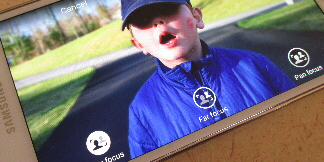


The Bokeh effect has become a big thing in smartphones over the last few months. If you're not familiar with the Bokeh effect, it is the process of de-focusing certain areas of a picture, usually the background. HTC went as far as adding a second lens for this effect and Google just added it to their stock Camera app. Now, Samsung has added “Selective Focus” and “Out of Focus” options to the Galaxy S 5. They both do the same thing, but act completely different.
“Selective Focus” is for when you know in advance of taking your shot that you want to apply this effect, and “Out of Focus” is for those times when you didn't know. You can make changes after the fact with both methods, but they can be a little confusing in how they save the images as well as exactly when they work.
In this video, I will walk you through both options and how they work. Hit the break for the video and be sure to check out all our other Galaxy S 5 guides.


I can see the option, but it is completely greyed-out.
I’ve reset the camera both front and back, and also put the phone in simple mode, and then back. Also enabled and disabled all of the other features to see if this was having an impact, however it’s still not selectable.
Any ideas on how to remedy this?
Cheers, Mike.