





WhatsApp screenshots serve as a reference or helpful reminder. You may want to keep conversations containing key details, like a house address, an agreement, or thoughtful compliments.
You're probably worried that you'll get caught in the act, considering apps like Snapchat notify the other party of screenshots. Instagram does it too, but only for vanishing messages. Lucky for you, WhatsApp doesn't notify another user when you screen capture their messages.
WhatsApp keeps quiet about in-app screenshots
WhatsApp won't notify anyone when you take screenshots of conversations, statuses, or any other content on the interface. It stays mute even when you're using disappearing messages. Likewise, you won't get a notification when the other party screenshots your texts. Meta is also restricting screenshots of user profiles, but it only applies to the app's beta version for now.

The company designed the app to prioritize user privacy, so it won't disclose what you do to keep the other party from feeling uncomfortable. If they knew how often you took screenshots of the conversations, they may not want to chat freely with you.
It’s quite comical that the app is pro-privacy, yet screenshotting is a violation of that privacy (sort of). If it worries you, you can use its view once feature.
View once mode blocks screenshots
WhatsApp's view once feature enables you to send someone an image, video, or voice message, which they can only open once. When they do, they can't replay it. Even better, you can't screenshot or forward View once contents. If you try to, you'll see a message saying “This app doesn't allow screenshots”.
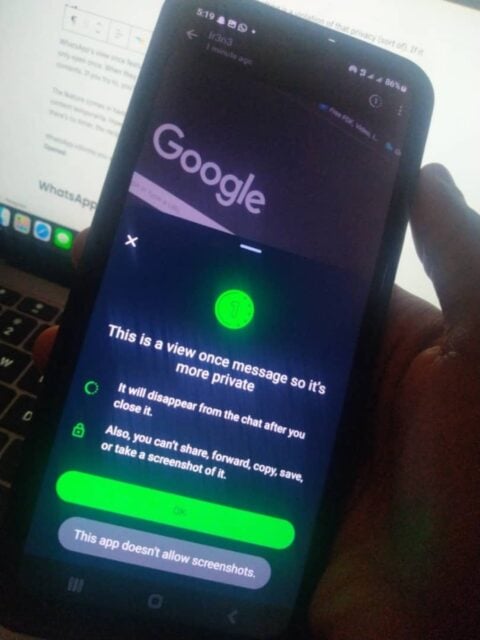
The feature comes in handy when you need to send handwritten information, silly photos, and other sensitive content temporarily. However, a persistent person can capture them using another phone's camera. Since there's no timer, the recipient can keep the image or video open long enough to snap it.
WhatsApp informs you when the receiver has opened your View Once content. Its Status changes from Photo to Opened.
WhatsApp sells you out in other ways
When you view someone's WhatsApp status, they'll know. There's an eye icon at the bottom of the status with a number count. When they swipe up, they'll see the names or phone numbers that have checked it.
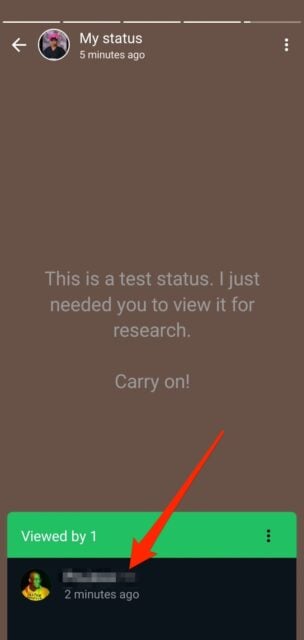
When you read someone's messages with the app's default settings, the sender sees two blue ticks beside them. If you turn off read receipts, your name no longer appears When you view someone's status. Also, blue ticks indicating read messages will remain gray.
However, you'll no longer know who viewed your status as the app deactivates your status views. You equally won't know when someone has read your texts until you turn on read receipts.
Don't get greedy with WhatsApp screenshots
WhatsApp may not report your screenshot actions, but that's no excuse to misuse your freedom. You may take them as reminders, keepsakes, or evidence of harassment and similar situations. When possible, seek the permission of the other party before taking the screenshots and sharing them. This way, you don't violate their privacy and break their Trust when they find out.

