




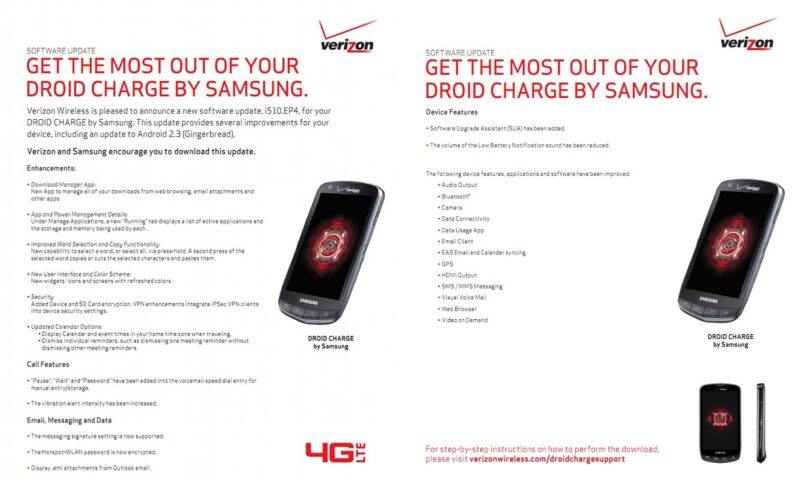

Just yesterday, Verizon announced that the official Android 2.3 Gingerbread update for the Droid Charge was ready and will be pushed out sometime in the near future. Although Big Red made the announcement, they failed to include a changelog to give us an idea what to expect, until today. Verizon posted the full changelog this morning and it looks like the Gingerbread update will do the Charge some good.
The update should improve the device immensely and a few noticeable differences will be a couple of UI tweaks and improved speed and stability. The changelog says that improvements have been made to the GPS so I am hoping the device will not take 5 minutes anymore to lock on to a signal. A new download manager, “running apps” tab, and visual voicemail has also been added as well as improvements to the phones camera and sound output. Overall, if you have been having issues with your DROID Charge, I think this update will suit you well.
The new build is number EP4 and according to the rumor you can look for the update beginning November 29th. I have a feeling this will roll out over a short period of time so be patient, I too have a DROID Charge so I will be keeping a close eye on this one and will let you know as soon as the update rolls out.
Go here for more official details and you can check out the full changelog after the cut.
Samsung Droid Charge Android 2.3 Gingerbread update
Enhancements:
- Download Manager App: New App to manage all of your downloads from web browsing, email attachments and other apps.
- App and Power Management Details: Under Manage Applications, a new “Running” tab displays a list of active applications and the storage and memory being used by each.
- Improved Word Selection and Copy Functionality: New capability to select a word, or select all, via press-hold. A second press of the selected word copies or cuts the selected characters and pastes them.
- New User Interface and Color Scheme: New widgets, icons and screens with refreshed colors.
Security:
- Added Device and SD Card encryption. VPN enhancements integrate IPSec VPN clients into device security settings.
- Updated Calendar Options: Display Calendar and event times in your home time zone when traveling. Dismiss individual reminders, such as dismissing one meeting reminder without dismissing other meeting reminders.
- Call Features: “Pause”, “Wait” and “Password” have been added into the voicemail speed dial entry for manual entry/storage. The vibration alert intensity has been increased.
- Email, Messaging and Data: The messaging signature setting is now supported. The Hotspot-WLAN password is now encrypted. Display .eml attachments from Outlook email.
Device Features:
- Software Upgrade Assistant (SUA) has been added.
- The volume of the Low Battery Notification sound has been reduced.
The following device features, applications and software have been improved:
- Audio Output
- Bluetooth®
- Camera
- Data Connectivity
- Data Usage App
- Email Client
- EAS Email and Calendar syncing
- GPS
- HDMI Output
- SMS / MMS Messaging
- Visual Voice Mail
- Web Browser
- Video on Demand


![HTC G1 Gets Android 4.0 Ice Cream Sandwich Port [Courtesy of XDA] 4](https://www.talkandroid.com/wp-content/uploads/2011/11/G1ICS-380x250.png)