


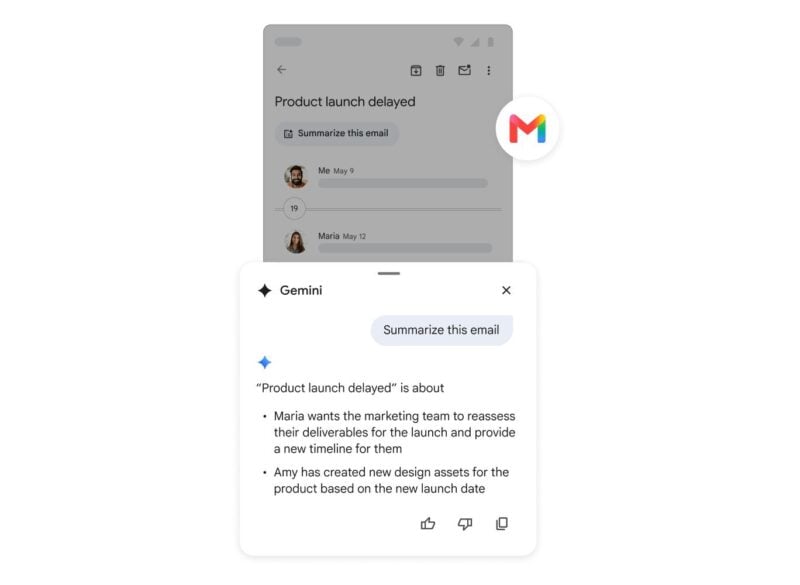
Google is bringing two Gemini features in Gmail to all Google Workspace users aged 18 and older. AI Overview summarizes long email threads, and Help me write drafts or rewrites emails. Until now, people who use Gmail through a work or school account got these tools only on certain Workspace plans. Now they'll show up in Gmail on Android and everywhere else.
In its Workspace Updates announcement, Google said the features were previously limited to consumer accounts and specific Workspace editions. Google is now making them part of the core Workspace experience, which means all Workspace accounts are covered, including school and business accounts.
What's coming to Gmail
Eligible users will get two tools:
- AI Overview conversation summaries: A Gemini-generated overview appears at the top of long email threads. It pulls together the key points and replies so you don't have to scroll through every message.
- Help me write (non-personalized): Write a short prompt and Gemini drafts a complete email, or have it refine text you've already written. Google's example prompt asks for a professional follow-up and thank-you note after a job interview.
Google labels this version of Help me write “non-personalized.” That suggests it works from your prompt alone and doesn't draw on your other emails or files to shape the draft. As with any AI-written text, check the draft before you hit send.
Google says the features are meant for educators, students, and professionals who have trouble keeping up with a crowded inbox and writing polished replies.
Rollout, availability, and controls
The rollout started on November 10, 2026, for both Rapid Release and Scheduled Release domains. Google says it may take up to 15 days for the features to reach everyone. If you don't see them yet, they should show up by around November 25.
Google lists these groups as eligible:
- All Google Workspace customers
- Workspace Individual subscribers
- Personal Google account users
In every case, the user must be 18 or older and have Gmail's smart features turned on.
Both features are on by default for end users, who can turn them off. Workspace admins can also turn off Gemini features in Gmail for their organization. People with a work or school account may not see the tools if their IT department has opted out.
Google hasn't said whether more Gemini features in Gmail will reach all Workspace users. For now, watch for the AI Overview at the top of your longer threads and the Help me write option in the compose window over the next two weeks.