



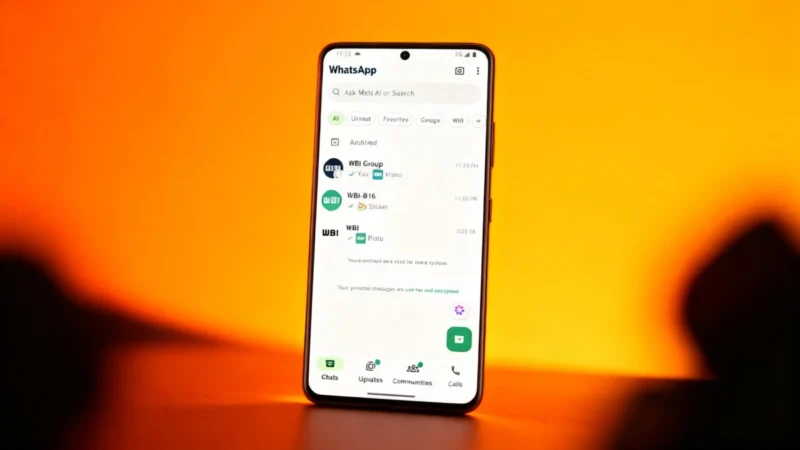
Good news for WhatsApp users: finding shared photos and videos in your chats has become much easier, and much more visually appealing.
A More Visual Chat List
WhatsApp now displays previews—small thumbnails—of media files directly in your conversation list on the app’s home screen. You’ll see images, videos, and stickers right where your chats are listed. Previously, WhatsApp only showed labels like “Photo,” “Video,” or “Sticker” when these were the most recent messages in a conversation, making it tough to hunt down that specific photo or video in a crowded chat feed.
With this new approach, the app now gives you a visual cue. The familiar chat list stays just as compact, showing the same number of conversations as before, but you can more quickly spot the chat where you received that memorable photo or clip. For videos, the preview helps you identify the chat, though you’ll still need to open it to watch the video itself.
How Media Previews Work
When someone shares a photo, WhatsApp now shows a small thumbnail next to the word “Photo” in the chat list. This gives you an instant glimpse of the latest shared file without opening the chat. The compact design keeps your chat list organized and easy to scan. The same goes for videos and stickers: previews help you spot what’s new while keeping things tidy.
A Smoother User Experience
This update might seem minor, but anyone who gets lots of media in WhatsApp chats will notice the difference. Where conversations used to fill up with generic labels, now you get a much more useful—and visually pleasing—way to stay organized and find what you need.
Trying the Feature
This feature became available through WhatsApp beta version 2.26.32.11 for Android, as noted by WABetaInfo. Joining WhatsApp’s beta program can be done directly via the Google Play Store, but not all beta users had access to the feature at first. The timeline for the stable rollout was unconfirmed, so general users may have had to wait to see it in action. If you use WhatsApp regularly to share photos and videos, it’s a feature worth watching for.