Google has made it easier to find and install apps on Android with Artificial Intelligence. The company announced that Google Play is now available as a connected app inside Gemini on the operating system. Now, you can discover, download, and make purchases through the assistant. Here's how it works.
Tell Gemini what you really, really want
Natural conversation seems to be key to anything in tech these days, and it's now deeper on Android. Google announced it in a recent blog post, and it should make app discovery easier.
They've launched the Google Play connected app for Gemini, although it's not a standalone app you download. It's an integration that connects the Play Store into your Gemini conversation.
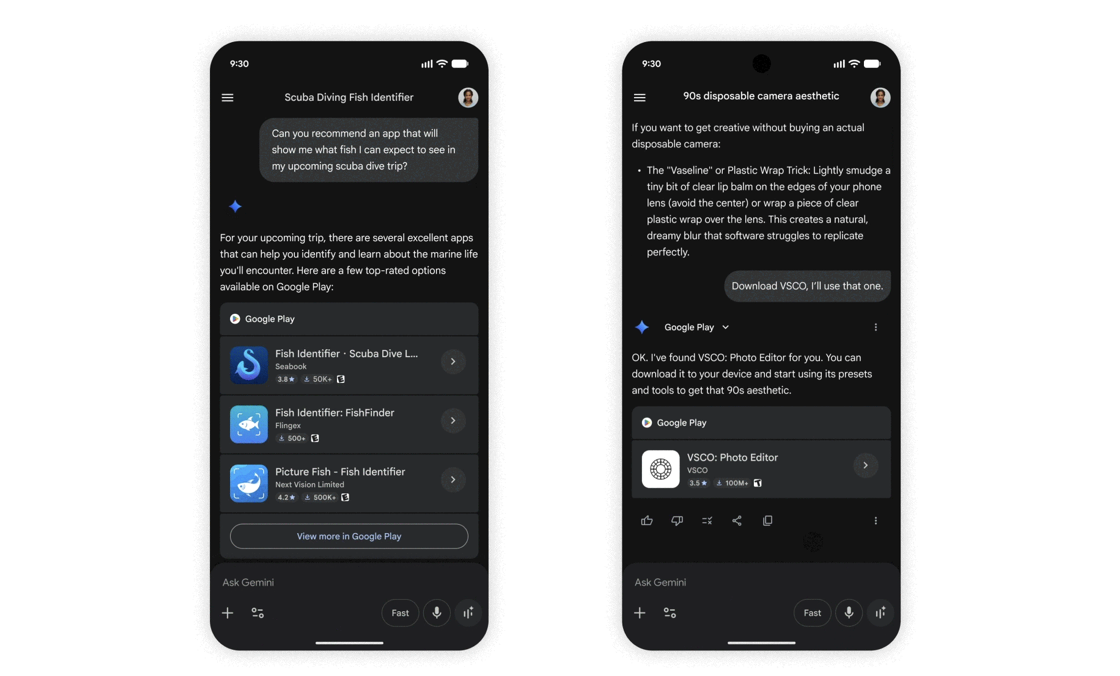
The change fixes a major problem where the store's search and recommendation system is heavily influenced by download numbers, ratings volume, and ad spend. Large, well-funded apps dominate the top results regardless of whether they're the best fit for what you need.
Smaller apps with useful functionality under 1,000 downloads rarely surface unless you stumble onto them. With Gemini now handling the search conversationally, you can describe your exact needs. A prompt like “find me a navigation app that supports offline maps and doesn't need an account” gives the tool enough context to narrow the field.

If you already know the app you want, you can ask Gemini to install it accordingly. It can also show you available in-app purchases for existing apps on your or even buy a Google Play gift card.
Gemini will alert you when the feature is ready
The Gemini app should prompt you to connect Google Play when it's available, and also walk you through the setup. Once connected, Gemini pulls results from the Play Store directly in the chat.
For app discovery, Gemini suggests options based on what you described. If you want to explore beyond what it shows you, there is a View more in Google Play option that takes you into the store. Tap an app recommendation link in the chat to open its Play Store detail page, then tap Install or the purchase price to complete it.
For in-app purchases and gift cards, ask Gemini to show you purchase options for a specific app already on your device, or ask it to find a gift card. Gemini lists the relevant items and you'll complete the purchase through the Play Store. However, not every app supports it yet.

Also, you need to be 18 or older, have the Play Store app installed on your Android device, be signed into the Gemini app with a personal Google account, and have Keep Activity turned on in your settings.
Keep Activity is a Gemini setting that allows the app to save your conversation history and use it to personalize your experience across Google products. Gemini can remember context from your conversations and connect to external services when you turn it off. Disabling it blocks Gemini from connecting to Google Play.
To enable it, tap the menu icon in the upper left corner. Then tap the settings cog at the bottom of the side menu that appears. Select Gemini Apps activity and the app redirects you to a webpage. Enable Keep Activity.