



If you’ve recently searched for a Winbox APK, you might have noticed something interesting. There are countless download pages, APK mirrors, Telegram links, and social media posts claiming to have the latest version. Some look legitimate. Some clearly don't.
In 2026, downloading the Winbox APK is now easier than ever, so players face the challenge of determining whether the APK is authentic or not.
Players have to be more mindful of where the file comes from, what permissions it's seeking, and what it does after it has been installed.
This guide will cover what a Winbox APK is, the difference between Winbox APK and Winbox H5, risks players should be aware of, and tips that can help make the process a bit safer.
What Is Winbox APK?
Winbox APK is the Android installation file used to install the Winbox online casino mobile app on Android devices.
An APK is Android’s app package file format (often described as an “Android application package”) used to distribute and install apps. Think of it like an installer file on a desktop computer.
When downloaded from the intended Winbox source, the APK allows users to install the application directly onto their device without using the Google Play Store.
For many players, this provides:
- Quick access to the platform.
- Notifications via mobile (if applicable)
- Dedicated app functionality
- Easier account access
- A more streamlined mobile experience.
But because APKs can be distributed outside official app stores, users should always verify the source before installation.
Winbox APK vs Winbox H5
A lot of users think that Winbox APK is the same as Winbox H5.
Both are access points to the same ecosystem, but there are some differences.
| Feature | Winbox APK | Winbox H5 |
| Installation required | Yes | No |
| Runs in browser | No | Yes |
| Android support | Yes | Yes |
| iPhone support | App installs don’t use APK; iPhone access available via official instructions. | Typically works via browser |
| App notifications | Often available | Usually limited |
| Download required | Yes | No |
If you don't want to install applications, you can use Winbox H5 to access the online casino platform via browser. The APK tends to be the preferred option for Android users who are frequent players.
Why APK Safety Is More Important Than Ever

A common issue is players downloading the wrong APK from the wrong source, usually a malicious version.
Most players assume the biggest danger comes from gameplay or financial transactions. In reality, many security issues occur before users even log in.
A fake APK can potentially:
- Steal login credentials
- Capture passwords
- Request excessive permissions
- Redirect users to fraudulent payment pages
- Display fake login screens
- Collect personal information
This is why the source of the APK is often more important than the APK itself.
A genuine file downloaded from the intended source is very different from a modified APK obtained from an unknown website.
Fake online casino apps can mimic logos, interfaces, login screens, and even customer support sections, making them difficult to distinguish at first glance.
Who Should Be Most Careful?
All players should verify their downloads, but some groups are at a greater risk.
First-Time Winbox Users
Generally, new users do not know what the real app should look like, and fakes are more convincing.
Players Searching On Google
When typing in “Winbox APK download”, you might get several different pages. Not all the results are automatically trustworthy.
Telegram And Social Media Users
Groups and private messages are used to share APK links, which may not necessarily connect to a legitimate download page.
Players Who Reuse Passwords
If the same password is used in a number of betting, gaming or email accounts, then the risks of leaked passwords are stronger.
Players Chasing Bonuses
There are a number of fake APK pages offering:
- Unlimited bonuses
- Guaranteed wins
- Instant VIP upgrades
- Free credits
The better the offer, the more prudently you should approach it.
Common Warning Signs Of A Fake Winbox APK
The majority of fake APKs share some common traits. With knowledge of these red flags, you can avoid issues before installation.
Unrealistic Claims
Beware of pages promising:
- Unlimited credit
- Guaranteed winnings
- Hacked versions
- VIP access is available without any requirements.
- Free deposits
Poor Branding
Watch for:
- Low-quality logos
- Spelling mistakes
- Broken images
- Poor translations
- Inconsistent page design
These usually signal fake or copied websites.
Normal APK files typically use straightforward naming conventions. Be cautious if the file name includes:
- Multiple numbers
- Strange symbols
- Extra extensions
- References to hacks or cheats
Excessive Pop-Ups
If downloading an APK triggers multiple redirects, pop-ups, or unrelated advertisements, proceed carefully.
Unusual Permission Requests
A casino app should not need unrestricted access to every part of your phone. If the app asks for permissions that seem unrelated to gameplay or account management, stop and investigate further.
How To Download Winbox APK Safely
The best practice is to take your time and be certain before installing.
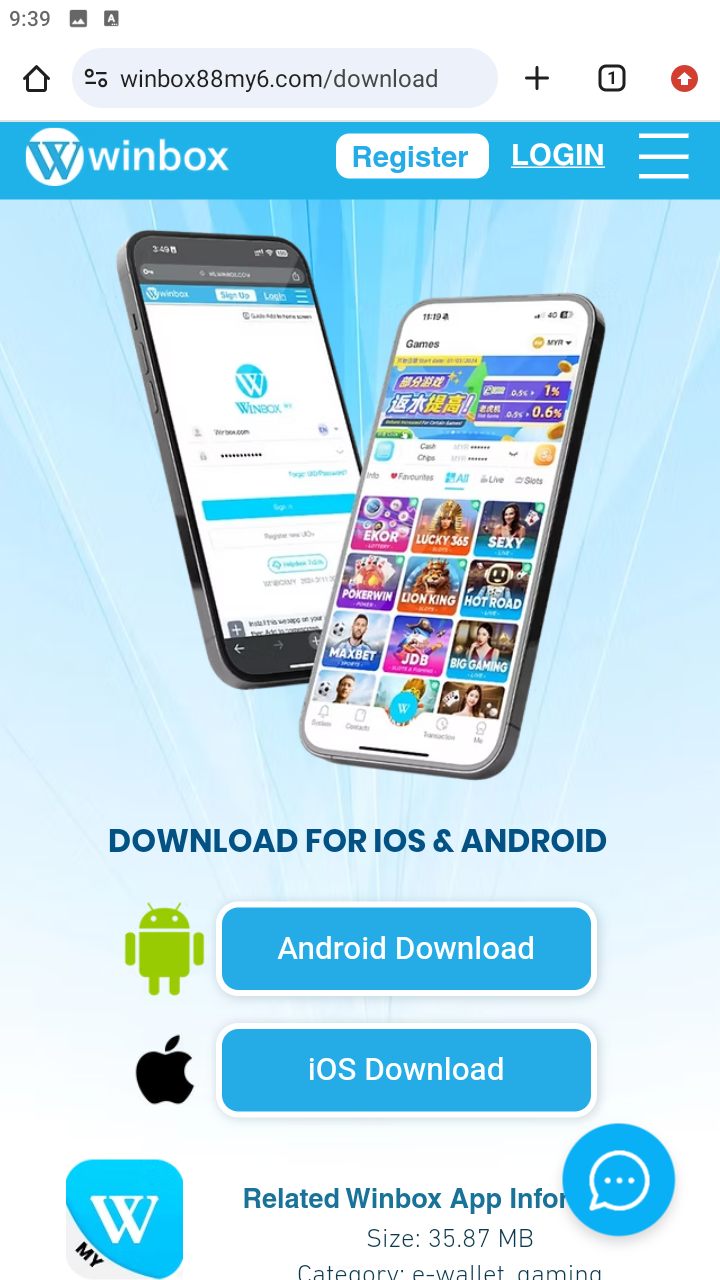
Step 1: Verify The Source
Before downloading:
- When examining a website, be sure to read the fine print
- Confirm branding consistency
- Examine the domain name.
- Avoid shortened URLs
Step 2: Download One Version Only
Some users will download several APK files from various platforms and then compare them. This poses an unnecessary risk.
Instead:
- Select one trusted source.
- Download one file
- Verify before installation
Step 3: Check Android Installation Settings
Android typically uses a per-app setting for installs outside Google Play (for example, allowing your browser or file manager to install unknown apps).
Before proceeding:
- Confirm which app is receiving permission
- Avoid enabling broad installation permissions
- Disable the setting again after installation
Step 4: Review Permissions
Please read permission requests carefully. Ask yourself:
“Is this access really necessary for a casino application?”
Reasonable permissions may include:
- Notifications
- Limited storage access
Permissions that deserve additional scrutiny include:
- Contacts
- SMS
- Accessibility controls
- Admin access
Step 5: Login Carefully
After installation:
- Use a unique password
- Avoid password reuse
- Enable security features where available
- Avoid logging in on shared devices
Step 6: Update Through The Same Source
Many players make the mistake of downloading updates from different websites. If possible, future updates should be from the same reliable source as the initial installation.
What Permissions Should You Watch For?
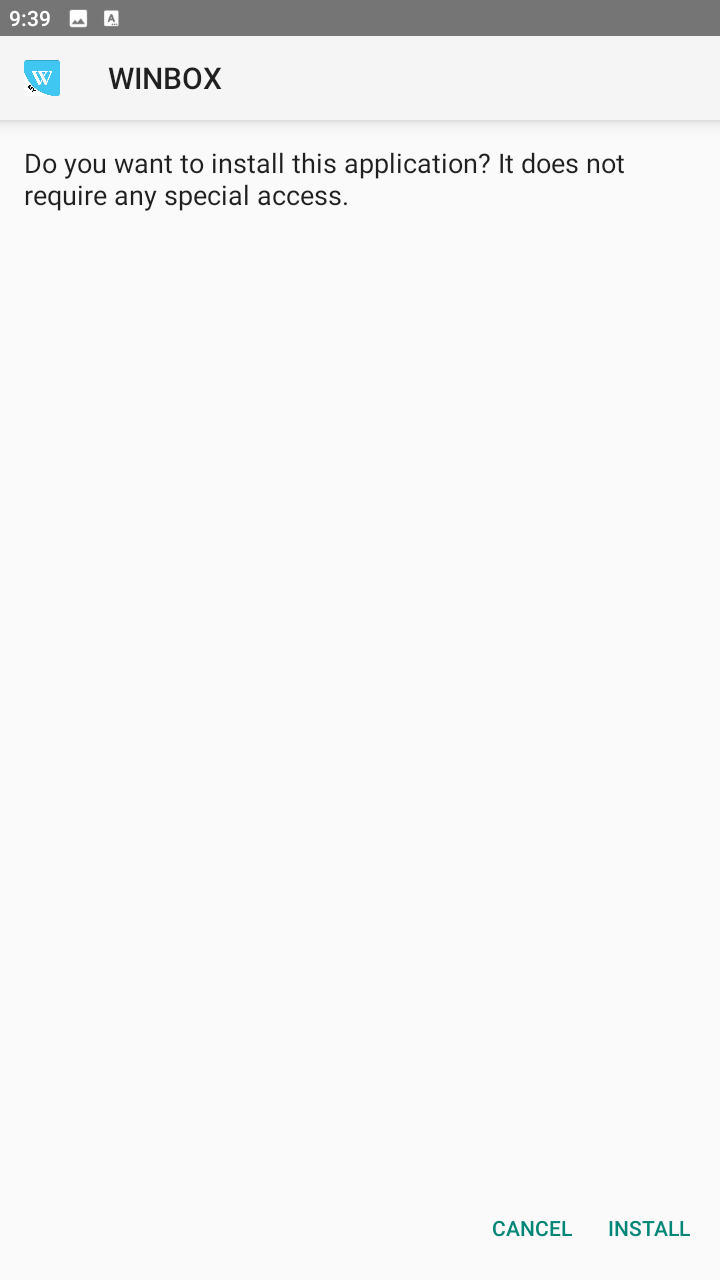
Many users tend to blindly hit “Allow” without reading permission prompts. This habit can bring extra dangers.
Here are some quick references:
| Permission | Usually Normal? | What To Watch For |
| Notifications | Yes | Mainly used for alerts and updates |
| Storage Access | Sometimes | Verify the reason given |
| Camera | Sometimes | Usually only for verification processes |
| Location | Depends | Should have a clear explanation |
| Contacts | Rarely | Can be a warning sign |
| SMS Access | Rarely | Treat cautiously and verify the purpose |
| Accessibility Controls | Rarely | Powerful access that has been abused by malware, be extremely cautious |
| Device Admin / Device Control | Rarely | Legacy high-control access, major red flag unless you fully trust the source |
Players should always be mindful of the access an app is asking for. In general, the more access the app requests, the more careful you need to be, and evaluate whether or not that access is necessary.
A Practical Example
Imagine two players.
Player A
- Downloads from the first Google result
- Ignores permission requests
- Uses the same password everywhere
- Installs immediately
Player B
- Verifies the source
- Reviews permissions
- Uses a unique password
- Checks app behaviour after installation
Both players spend less than five extra minutes during installation.
However, Player B significantly reduces the likelihood of security issues.
The difference isn’t in technical expertise, but how cautious each player is.
How Much Does Winbox APK Cost?
The APK is free to download. But, there are some additional costs players need to consider:
| Cost Type | Example |
| Data usage | Downloading and updating the APK |
| Time | Verifying the source |
| Security risk | Installing fake APKs |
| Account risk | Password compromise |
| Device risk | Malware exposure |
Even a free APK can cost players a lot if it compromises their account and casino wallet.
When Might Winbox H5 Be The Better Solution?
In some cases, it makes more sense for users to access Winbox via the browser. For example:
- You are using a borrowed device
- You cannot verify the APK source
- You only need temporary access
- You prefer not to install applications
- You are using an iPhone
Under these circumstances, Winbox H5 can be used as an effective alternative, without downloading and installing the APKs manually.
There’s no universal rule that H5 is always better in all situations. Users should still verify login pages and protect their credentials.
However, for players who are unsure whether an APK source is genuine, H5 may offer a simpler starting point. Even then, it still pays to be cautious and not visit dubious login pages.
What Should You Do If You Suspect A Fake APK?
If something doesn't feel right after installation, take action IMMEDIATELY.
Remove The Application
Uninstall the APK. Avoid testing it further.
Change Your Password
Change your Winbox password right away. If the same password was used anywhere else, change it there as well.
Review Account Activity
Check for:
- Unusual logins
- Unknown deposits
- Withdrawal attempts
- Security alerts
Scan Your Device
Ensure that you use security features inbuilt into the Android system and/or a trusted mobile security application, to look for any suspicious activity.
Monitor Your Device
For the next few days, keep an eye out for:
- Unexpected pop-ups
- Battery drain
- Performance slowdowns
- Strange background activity
Final Winbox APK Safety Checklist
Still unsure whether you're ready to install the Winbox APK? Ask yourself these eight questions first:
- Was the APK I downloaded from a trusted source for Winbox?
- Have I steered clear of APK that has been marked as a hack, mod or unlimited-credit version?
- Is the file name normal and appropriate?
- Have I read all the permissions that need to be granted before installing?
- Is my Winbox username/password unique?
- Avoiding shortened urls, random social media download links?
- Will I turn off unknown app installation permissions following setup?
- Will I be able to locate future updates?
If there is any hesitation about any of the above questions, it may be worthwhile to recheck the source before continuing.
Keeping Your Account Safe When Using the Winbox APK
The Winbox APK itself is not dangerous; the actual problem lies in where you get that APK, and how you install it.
In 2026, players are exposed to more download sources, mirror sites, and unofficial APK pages than ever before. That makes verification, permission checks, and account protection increasingly important.
For Android users who can verify the source and follow basic security practices, Winbox APK can provide a convenient mobile experience. For users who are unsure, Winbox H5 remains a practical alternative that avoids manual installation altogether.
Ultimately, the safest Winbox experience begins before you ever log in. It starts with downloading the right file from the right place.
Frequently Asked Questions About Safety Tips For Using the Winbox APK
Is the Winbox APK Safe To Download?
Yes, when downloading the Winbox APK from a trusted source. The most common dangers are typically fake APKs, altered apps or unofficial download pages.
What Is The Difference Between Winbox APK And Winbox H5?
The Winbox APK is an Android installation file, and Winbox H5 is browser based access that doesn’t require installation.
Can I Install Winbox APK On An iPhone?
No, APK files are made for Android devices. Winbox access on iPhones can be done either through H5, or following the official instructions in the Download section of Winbox websites.
What Is A Winbox Modded APK?
A mod APK is an unofficial modified version of an application. These versions often carry higher security risks and should generally be avoided.
Why Does Winbox APK Request Permissions?
Some permissions help the application function properly, such as notifications or storage access. Users should review all permission requests before accepting them.
What Should I Do If I Think I Installed A Fake Winbox APK?
Uninstall the application immediately, change your passwords, scan your device, and review your account activity for anything unusual.