




Introduction
Clipfly is a cloud-based AI creative platform that turns text and images into videos in minutes. It is designed for users with little or no editing experience – from marketers and educators to casual Android creators – letting anyone generate professional-looking clips from simple prompts. By “constructing fully calibrated scenes, animations and background music” from your input, Clipfly dramatically reduces the technical hurdles of video production. In practice, this means a user can type a short script or upload a photo and watch as Clipfly’s AI assembles a polished video without manual editing.
What Is Clipfly AI Video Generator?
The most famous tool in the Clipfly suite is the AI Video Generator. It can generate text-to-video clips or image-to-video clips with the help of complex machine learning models. Clipfly provides three primary input solutions in the creation of videos using AI. All the modes are focused on various creative requirements and user preferences:
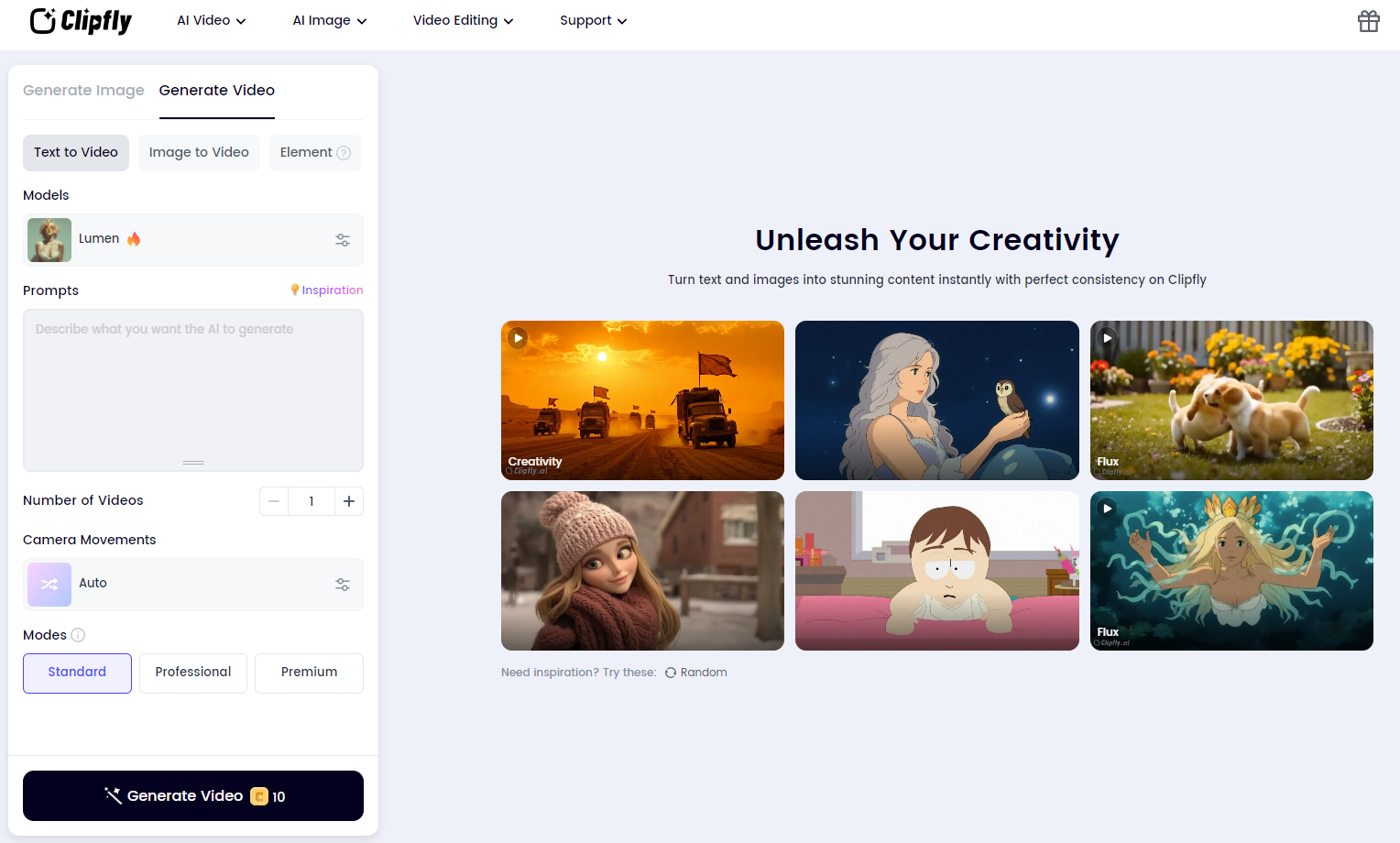
- Text-to-Video
- With this mode, users just need to type a descriptive prompt, and the AI of Clipfly will create a fully animated video.
- Examples: typing a happy family walking on the beach during sunset may come up with a realistic moving picture of characters, motion and lighting which aligns with the description.
- It can be used by people who want to actualize written ideas, storylines, or concepts without any visual representation.
- The AI then picks the appropriate visuals, transitions and background music to suit the tone and setting of the description in the text.
- Text + Image to Video
- This hybrid option lets users combine text prompts with an image to guide the AI more precisely.
- The text defines the overall scene, while the uploaded or generated image acts as a keyframe that the AI animates.
- Example: You could upload a still portrait of a person and enter the text prompt “walking through a city street at night,” and Clipfly would animate the image accordingly.
- Perfect for creators who want more control over the visual composition or specific characters.
- This mode uses AI motion models to add depth, camera movement, and smooth transitions, making the result look like a professionally directed scene.
- Image-to-Video
- Clipfly is used in this form, where a single still image is turned into a mini-animated video.
- Using the concept of AI, the subject, background, and lighting of the photograph are analysed, and movements are added to the photograph (such as panning, zoom, or slight motion of the subject) to make it dynamic.
- Sample: When one uploads a landscape picture, a film can be made where clouds can be seen floating or waves can be seen crashing.
- Better in action, photographers, marketers, and creators of social media may find it worthwhile to transform not only motionless images but also motionless ones into dynamic clips.
Core Features of Clipfly
- AI-Powered Video Creation: The sophisticated AI-based models of Clipfly, such as Veo 3, Flux, Lumen, and Sora, allow creating videos in various styles, including realistic, cinematic, or anime, based on plain text or an image. Creative features on the platform, such as lip-sync, cartoon and anime creators, trending templates of viral content can also be found. These artificial intelligence systems are able to create the composition of the scene, movement and music background automatically, which saves hours of editing.
- Comprehensive Editing Suite: In addition to the generation, Clipfly is a full-fledged browser-based editor that allows users to trim, combine, crop and add text, subtitles, and transitions to videos. It also promotes voiceovers, audio editing and background removal that is performed by AI. Pro users gain access to 4K exports, an expanded asset library, and advanced noise reduction — all through an intuitive drag-and-drop interface.
- Mobile and Platform Support: Clipfly can be used on web browsers and mobile devices, and it has Android and iOS-specific apps. Android application (100K+ downloads, 3.9★ rating) also features identical AI tools in the desktop application, but optimized for touch screens. One can easily create, edit and sync their projects through their phones, and on-the-go, video production is easy.
How to Use Clipfly AI Video Generator
Using Clipfly’s video generator is straightforward and largely automated. The typical workflow involves three main steps:
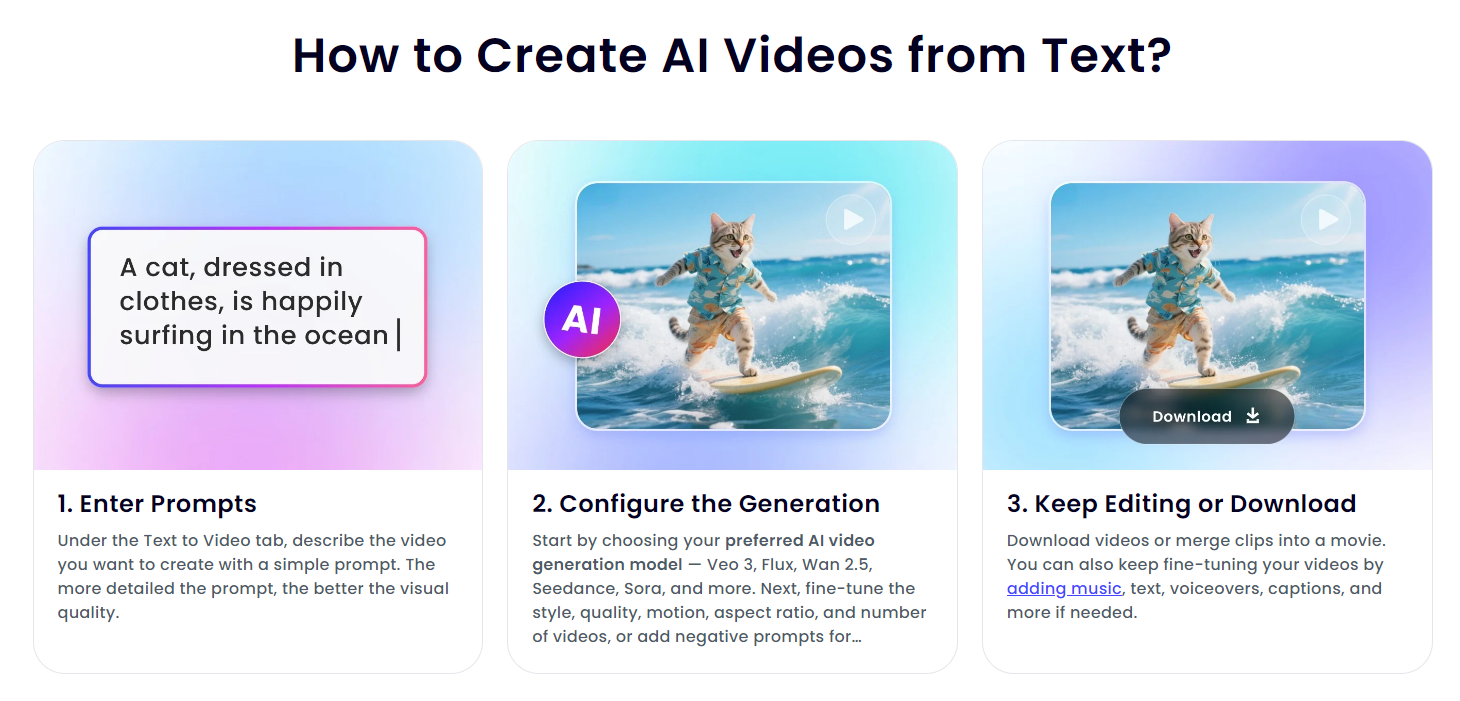
- Enter your prompts: Select the Text to Video option and describe what you want in the video (e.g. “a cat surfing on a wave, cinematic style”). Clipfly recommends detailed prompts for better results. Alternatively, you can start with an image or script in other modes.
- Configure the generation: Choose an AI model and style settings. For example, pick from models like Veo 3, Flux, Seedance, or Sora. Adjust parameters such as aspect ratio, quality, number of outputs, or enter negative prompts to filter out unwanted content. Then click Generate. The AI will process your input and quickly return several video variants for preview.
- Review and finalize: After generation, preview the clips shown by Clipfly. You can select the best one or regenerate for more options. Next, edit or download the result. Clipfly gives additional editing: you can combine clips, add background music or voiceover, capture text or refine the images. Export the video to your device when you are satisfied. Clipfly allows the free plan to export up to 1080p and paid users to 2K/4K.
Everything is easy-going: it presupposes no special skills as a video and all of the process occurs online. The beginners are also able to use the prompts-and-click workflow to complete videos within minutes.
Pros and Cons
- Pros:
- Convenient web-based interface (no software installation needed).
- Examples include powerful AI generation (text-to-video and image-to-video) as well as different styles.
- Massive customizable templates (marketing, education, social media).
- In-built AI voiceover and auto-caption.
- Complete editing suite (setting of transitions, filters, cutting) and AI additional features (removal of the background, upgrading to HD/4K in paid packages).
- The free plan enables the export of watermarks up to 1080p.
- Cons:
- Free tier has limited monthly AI credits.
- Advanced features (4K export, premium assets) require a Pro subscription.
- No offline or desktop version – the tool is web-based only.
- Complex or long video prompts may need multiple attempts to get right.
- Only MP4 export is supported (no alternate video formats).
These pros and cons provide a balanced view. For example, while the free plan is generous (no watermark), it is intended for light use. Power users or frequent creators will likely upgrade for higher limits and features.
Specific Tips for Android users
- Use the Clipfly App: Download the official Clipfly app from Google Play for a smoother, mobile-optimised experience. It contains all the large AI applications, such as text-to-video and image-to-video, constantly upgraded to improve their performance.
- Stay Connected and Charged: Clipfly is an online-based tool and therefore, it needs a good or a constant Wi-Fi or data connection. To prevent any interruptions, ensure that your device is charged or plugged in when generating a video.
- Manage Storage and Exports: Before exporting a high-resolution video, it is important to check the storage capacity of your phone. The results are automatically stored in your gallery or cloud storage by the app.
Clipfly Pricing in 2025
Clipfly is based on a freemium model. Users can try the main features of its AI video generator and basic video editor for free without any upfront cost.
Key Points of the Free Plan:
Full access to the AI video generator and a simple editing studio. Exports up to 1080p resolution with no watermark — something rarely offered by free tools. A limited number of monthly AI credits, suitable for small projects or testing purposes. Perfect for creators who want to explore AI video creation before upgrading.
Clipfly Pro Plan:
Clipfly offers a Pro Plan, typically billed annually, aimed at power users and professionals. As of 2025, the price is around $39.99 per year.
Pro users get everything:
- Higher Resolution Exports: Up to 2K and 4K video output.
- Expanded Asset Library: Access to thousands of premium music tracks, stickers, stock images, and fonts.
- Advanced AI Tools: Includes multilingual text-to-speech, automatic captioning, and unlimited AI generation credits.
- Team Collaboration: Up to 5 user seats per account with real-time editing and feedback.
- Priority Support: Faster response and premium assistance for Pro members.
- Bonus: New Pro subscriptions often include a trial of premium tools for a limited time.
Overall, Clipfly’s pricing remains highly competitive. The free plan delivers strong functionality with no hidden limits or watermarks, while the Pro plan offers affordable access to advanced AI features ideal for creators who produce videos regularly.
Final Thoughts
Clipfly AI Video Generator is a combination of both simplicity and power, and it is easy to make advanced video creation accessible to everyone. It can also boast its free version, watermark-free exports of 1080p, and access to fundamental AI tools, which is uncommon among competitors. Android users also enjoy the exclusive mobile app and easy cloud synchronization. Nevertheless, the restrictions of the free version and the slow exports are likely to annoy the frequent users. With the Pro plan (approximately 40 a year), it is possible to use 4K output and additional resources.
In general, Clipfly is a useful, time-saving application that can be used to create fast social, promotional, or educational videos. It might not outcompete full desktop editors, but it finds the right balance between AI automation and human control and will become one of the most available AI video tools of 2025, particularly among Android creators.

