


Few things are more frustrating than your iPhone suddenly refusing to cooperate. Whether it's stuck on the Apple logo, caught in a boot loop, or showing a black screen, these issues can disrupt your day in a heartbeat. Luckily, you don’t have to panic or pay hundreds at the Apple store. With professional System Repair tools, you can fix common iOS problems in minutes, with no tech skills required.
In this article, we’ll break down everything you need to know about iOS System Repair solutions. We’ll help you pick the best tool for your needs and walk you through the process step by step. Whether you’re dealing with frozen screens, update errors, or even an iPhone stuck in recovery mode, this guide has got you covered.
What is iOS System Repair?
iOS System Repair refers to specialized software designed to fix iPhone, iPad, and iPod Touch operating system issues without causing data loss. Unlike factory resets or manual troubleshooting, these tools focus on addressing system glitches, crashes, and bugs at the core level, quickly restoring the device to normal functioning.

Typical issues solved by iOS System Repair tools include:
- iPhone stuck on the Apple logo
- Boot loop problems
- Frozen or black screens
- Recovery mode loops
- iOS update failures
- Touchscreen unresponsiveness
- Device won't turn on or off
- Endless spinning circle
These tools are a lifesaver, especially when you want to avoid complicated procedures or expensive technician fees.
Why Is iOS System Repair Necessary?
While iPhones are incredibly reliable, software glitches happen more often than we’d like. Issues such as the dreaded black screen of death, stuck Apple logo, or repeated crashes can occur due to:
- Incomplete iOS updates
- Failed jailbreak attempts
- Malware attacks
- Software conflicts
- System overload
Factory resets may solve these issues, but they come with a big downside data loss. Plus, professional repair services can be costly and time-consuming. This is where dedicated system repair tools shine. They allow you to repair your iPhone’s operating system safely without wiping any data, and most fixes can be completed in under 10 minutes.
The Advantages of Using System Repair Software
Using iOS system repair tools offers a range of benefits, especially for users who want a hassle-free solution without visiting a technician. Some of the main advantages include:
1. No Data Loss:
With the standard repair mode, your contacts, photos, messages, and apps remain untouched while your system is restored.
2. Quick Fix Time:
The entire process usually takes no more than 10 minutes, far quicker than booking an appointment or mailing your device for service.
3. Beginner-Friendly:
You don’t need any technical skills. Most tools provide a clear, step-by-step interface.
4. Supports Multiple Issues:
These tools can resolve a wide variety of iOS-related problems, including boot loops, stuck screens, Recovery Mode errors, and update failures.
5. Works Across Devices and iOS Versions:
Whether you’re using the latest iPhone 15 running iOS 17 or older models, system repair tools have broad compatibility.
Wondershare Dr.Fone – iOS System Repair: A Reliable Solution
Among the many options available, Wondershare Dr.Fone – iOS System Repair has emerged as one of the most trusted and effective solutions for repairing iPhone problems.
Here’s what makes Wondershare Dr.Fone stand out:
1. Two Repair Modes:
Wondershare Dr.Fone provides Standard Mode and Advanced Mode options. Standard Mode is ideal for resolving common iOS issues without data loss. For more severe, deep-rooted problems, Advanced Mode performs a full system restore, which might erase data but guarantees to fix critical errors.
2. Fixes Over 150 iOS Problems:
Whether your iPhone is stuck in Recovery Mode, experiencing white or black screen issues, or freezing randomly, Dr.Fone covers all these problems and more. It can fix boot loops, devices stuck on the Apple logo, and even iOS update failures.
3. Downgrade iOS Without Jailbreak:
Another handy feature is the ability to downgrade your iOS version safely without jailbreaking the device. This is particularly useful if you've updated to a newer iOS version and are facing performance issues or bugs.
4. User-Friendly Interface:
The interface is clean and straightforward, making it easy even for beginners to follow along. Just connect your device, choose the repair option, and follow the on-screen prompts.
5. Cross-Platform Availability:
Wondershare Dr.Fone – iOS System Repair is available for both Windows and Mac users, providing flexibility no matter your operating system.
How Much Does Wondershare Dr.Fone iOS System Repair Cost?
When it comes to pricing, Wondershare Dr.Fone offers flexible packages tailored to different users’ needs:
- 1-Year License for 1 iOS Device: This plan costs $49.95 per year, granting you access to all iOS system repair features for one device. It's perfect for individual users looking for an affordable annual solution.
- Lifetime License for 1 iOS Device: If you prefer a one-time payment option, you can get a lifetime license for $69.95. This allows unlimited repairs on a single device without worrying about renewals.
- Family License for 5 Devices: For families or users with multiple Apple devices, there's a plan at $99.95 per year, covering up to five iOS devices. This is ideal if you're managing iPhones and iPads for the entire household.
Additionally, Wondershare offers a free trial version, which allows users to preview the repair process and diagnose issues before purchasing. This allows you to test the tool and ensure compatibility with your device.
Step-by-Step Guide: How to Use Dr.Fone iOS System Repair
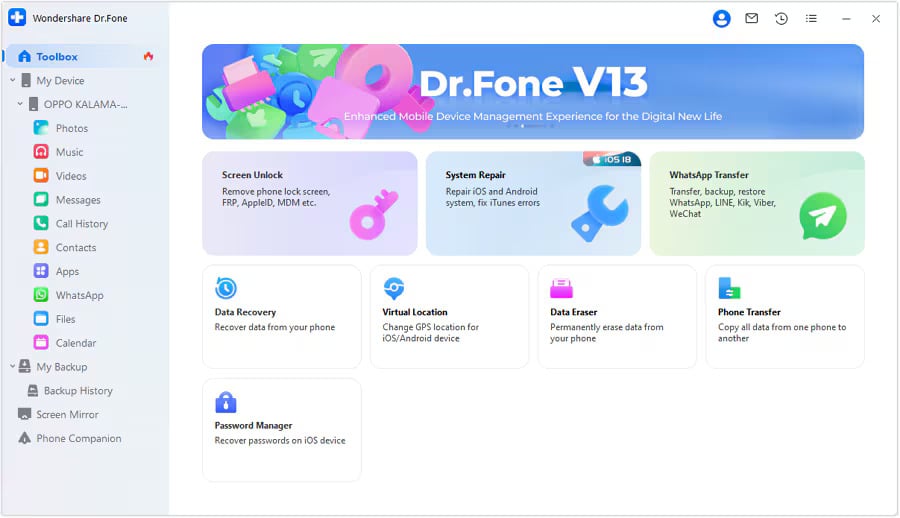
Fixing your iPhone issues with Dr.Fone couldn’t be easier. Here’s a simple walkthrough:
- Download & Install Dr.Fone: Head to Wondershare's official website and download Dr.Fone – iOS System Repair. Install it on your Windows PC or Mac.
- Connect Your iPhone: Launch the software and connect your iPhone, iPad, or iPod using a USB cable.
- Choose ‘System Repair’: From the home screen, select the System Repair option to begin.
- Select Repair Mode: Choose between Standard Mode (safe, no data loss) or Advanced Mode (deeper repair, may erase data).
- Download Firmware: The tool will automatically detect your device model and iOS version. You'll be prompted to download the correct firmware package.
- Initiate Repair: Click ‘Start’ and wait a few minutes while Dr.Fone repairs your iOS system.
- Repair Complete: Your iPhone will restart, and the issue should be resolved.
Is Wondershare Dr.Fone iOS System Repair Safe?
Many users worry about third-party tools compromising their data or privacy. Wondershare is a reputable company trusted by millions worldwide, known for its secure and reliable software products.
Their system repair tool ensures:
- No personal data is collected or shared.
- All operations are performed locally on your computer.
- No jailbreaking or warranty voiding is involved.
- Encrypted communication between your device and computer.
Moreover, Wondershare offers excellent customer support and a 7-day money-back guarantee if the tool does not meet your expectations.
Common Scenarios Where iOS System Repair Tools Help
Here are typical situations where a tool like Dr.Fone – iOS System Repair becomes indispensable:
- Your iPhone is stuck on a white or black screen.
- The device is constantly rebooting in a loop.
- After an iOS update, the phone won’t turn on.
- iPhone is stuck in Recovery Mode and won’t exit.
- Apps keep crashing or freezing frequently.
- You want to downgrade iOS without losing data.
Final Thoughts:
If you value your time, privacy, and data, using a reliable system repair solution is the smartest move. Wondershare Dr.Fone iOS System Repair simplifies the process, providing a beginner-friendly, effective tool that tackles over 150+ iOS issues quickly.