




Google Chrome is set to receive a sudden update to its Extensions menu: a way to close all of them with just single prompt. The discovery was made by enabling a special flag in a specific latest version of Chrome, which also gave tipsters an early look at the refreshed Extensions interface as well.
Initial Findings
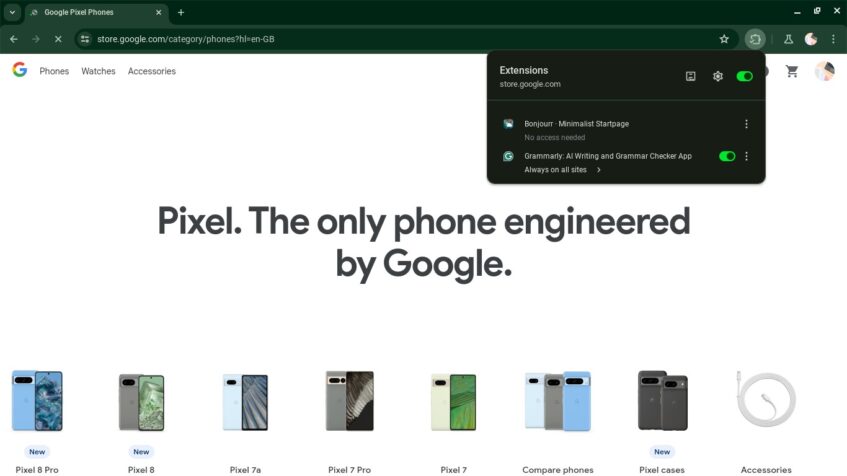
The findings were first reported by Gamer Stones, which spotted the updated menu after diving into the browser's experimental features. By toggling the flag “chrome://flags/#extensions-menu-access-control” in Chrome version 125.0.6398.0, the outlet was able to activate the redesigned Extension menu and explore its new capabilities.
For the most part, the report took note of its modern look, which aligns with Google's Material You design language. Rounded corners and changed colors that adapt to the user's system theme give the menu a somewhat of a newer feel, definitely a considerable shift from the current default appearance(s). This redesign is suggested to be of Google's wider initiative to inject more of Chrome's UI elements with Material You flair for a consistent visual refresh.
One Toggle to Close Them All

But more importantly, perhaps, the update also packs some upgraded functionality and usability improvements. As mentioned in the same report, the star of the show is none other than the new master toggle at the top. It effectively allows users to quickly turn off all active extensions in one fell swoop. Remember that one inconvenient time you were looking for extension conflicts by turning them off one by one? Yup, those days are now numbered.
On top of the primary “kill-switch” feature, individual extension items will have their own toggles for more fine-grained control. These toggles seem set to replace the original pin icon that currently lets users pin extensions to the browser's toolbar for easy access.
In addition, the revamped Extension menu is configured to be easier to manage, immediately letting you know which extensions have permission to interact with the webpage they're currently viewing. The report suggests that this informational aspect will help users better understand extension behavior. Or perhaps make more informed choices about which ones should be active at any given time.
Two Sides of Flexibility

While the Extension menu update is currently tucked away behind a developer flag, it appears to be part of a broader set of enhancements coming to Chrome's extension management capabilities. From what we can see, it does fall more on the convenience side of things, although we believe that its troubleshooting aspect will become more important as it reaches regular users.
The visual refresh is expected to land on Chrome browsers on Windows, Mac, Linux, ChromeOS, Fuchsia, and Lacros once it clears testing and rolls out to all users in a future stable release.