




Okay, fair enough, Gemini may not be exactly as perfect when it comes to curating responses just yet shortly after its official launch, but at least it is already on track to patch a solution. Because at the start of March 2024, Google launched a very convenient update that allows users to precisely modify and tune Gemini's text outputs. By editing specific sections, you get more control over refining the results.
Tweak AI Responses with a Button
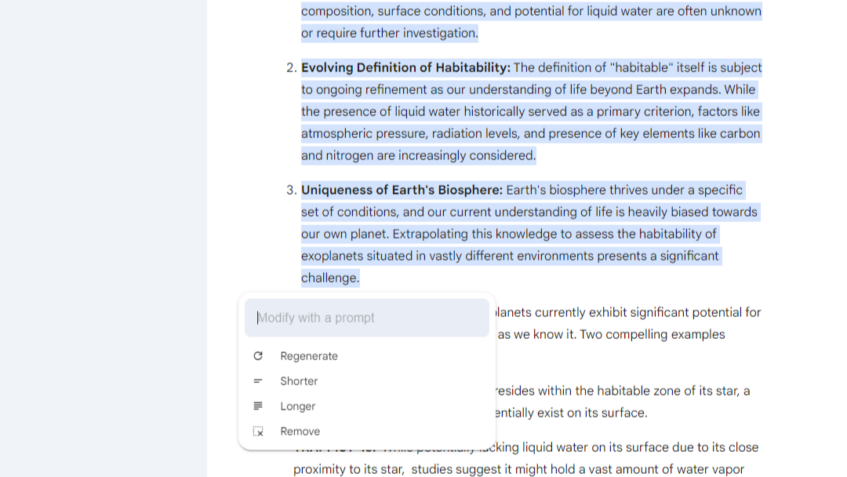
The new “tune response” feature is currently rolling out to the Gemini web app for English language queries. When Gemini responds to your prompt, you can select and highlight any portion of the text output. A new edit icon will appear, presenting options to “Modify selected text.”
This reveals a versatile editing box with four key adjustment choices – Regenerate, Shorter, Longer, and Remove. You can use this to instruct Gemini on revising the highlighted excerpt to better align with your intended meaning.
For example, if a paragraph seems too longwinded, choose “Shorter” to have Gemini rewrite it more concisely. Alternatively, selecting “Longer” pushes Gemini to expand on that topic with additional details or clarification. The “Remove” option cleanly deletes the selected text, while “Regenerate” rewrites the highlighted section from scratch.
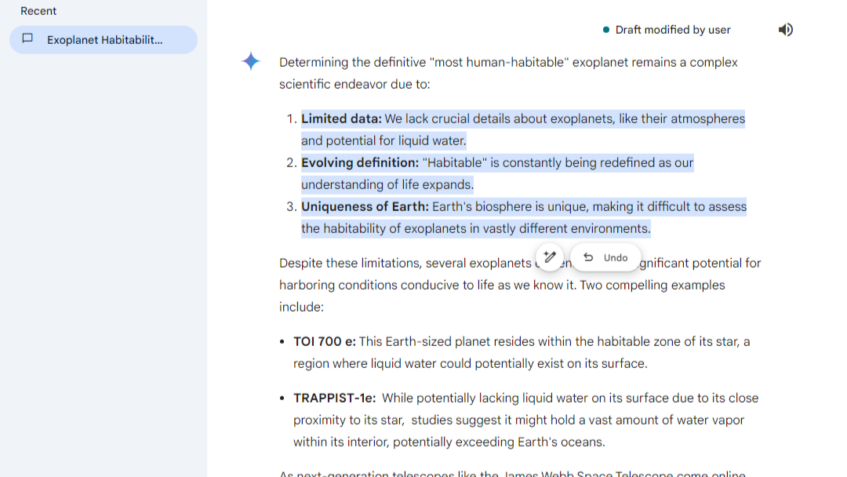
After confirming the modification, the “Modify selected text” will have a new button beside it, “Undo.” Click it to revert the changes, and the button will change to “Redo.” Click it once again to restore all the initial modifications you prompted.
Convincingly Convenient
Google envisions this new editing capability as a way to “give you more control over your creative process by letting you iterate on content and ideas in the context of the original response.” Rather than regenerating an entire prompt from the start, you can refine the problematic areas while keeping the rest of the output intact.
That being said, there are some inherent limitations, even for the options. The tune response feature cannot modify text from other applications or extensions, images, code blocks, or outputs involving conditional logic. Certain prompt instructions that violate usage policies or confuse the AI may also be rejected.
However, for general open-ended writing tasks where you'd like to shape Gemini's results with pinpoint revisions, this new precise editing functionality drastically increases its default (free) functionality. You won't have to struggle to ask it more questions to refine its responses, as you can now optimize the specific sections that need refinement.
One More Step Ahead

As AI language models continue to advance, the ability for users to steer and collaborate with the outputs in this manner could open up exciting new creative opportunities. Google's release of tune response editing in Gemini is an important step toward finally catching up in that user-friendly, controllable AI direction that it seems to be quite adamant about maintaining at the moment.
In addition, a simple tune response feature immediately builds on Gemini's existing capabilities to provide multiple draft options or make outputs more casual, formal, simplistic, or expanded. As AI language models handle increasingly complex and specialized tasks, granular editing tools like this may become essential for ensuring precise, high-quality outputs tailored to each user's needs.


