



It's always struck me as a little odd that Google hadn't included Chromecast support in its Files-by-Google app, but now it seems that after a short incubation in the beta channel, the feature is rolling out to stable users via an update in the Play Store. This means that you'll be able to cast your local media files without using any data to do so.
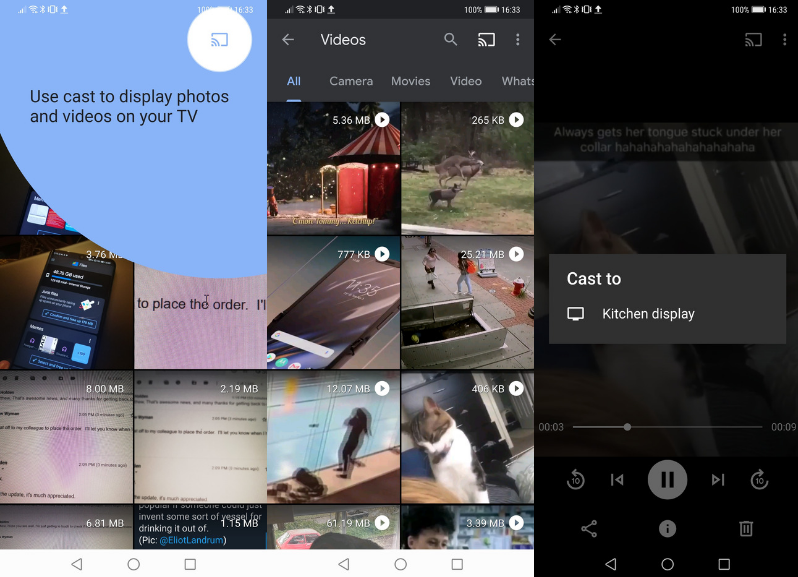
As you can see from the screenshot above, the cast button is now prominently displayed on the Files-by-Google app, just like most other apps from the search giant. All you need to do to cast your local content to a smart television, smart display, or Chromecast is tap on the item you wish to view, tap the cast button and then choose which device to send it to, after which you'll be able to use the media controls shown on your handset to control playback.
The addition of the cast function is yet another sign that the Files-by-Google app is maturing into a fully-featured application, and also that the search giant hasn't forgotten about it. Do you have the app installed on your handset or tablet, and if so, will you be making use of the new cast button? Let us know in the comments below.
Download it Here: Files-by-Google (Play Store Link)
[Deal] Grab a saving with these pre-Black Friday deals from Anker
The Honor 9X with pop-up selfie camera, headphone jack, and triple rear cameras is on sale for £249
Google smart speaker sales dropped 40% year-over-year while Amazon maintains a firm lead
