




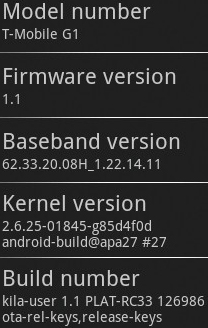
 It appears that a new G1 firmware update is currently being rolled out to T-Mobile users. The new update is RC33 and sadly is not the Cupcake update we've all been waiting for.
With only a handful of users so far having received the update, it is still not certain what new functionality (if any) and fixes the new RC33 update brings.
“To ensure a great experience with the T-Mobile G1 with Google, customers with these devices will receive an Over the Air (OTA) update to their devices between February 5 and February 15. This OTA will include new system enhancements such as the ability to save pictures or files to file by long-pressing an item, check for system updates, and use the Google Voice Search feature. The OTA will also fix a number of known issues. New G1 activations will receive the OTA up to three days after service has been activated.”
We'll keep you guys posted on how this new update progresses, keep an eye on our forums for the latest RC33 firmware discussion.
If you're one of the lucky few to have received the new firmware already, let us know in the comments.
[via tmonews.com]
ola amigos tengo un g1 nuevo pero estoy en colombia y nesecito desbloqueralo me pueden ayudar
I’m in AZ AS well no update a friend has 1 no update but his gurls g1 did wuts the deal?
I just got the update also…
But If you wanna unlock it, we can get this unlock done in 10 minutes.thanks!
I’m still on RC30. It’s been more than 3 days since I got my phone. So what’s the deal?
how i con get the new update for my g1 please help
AT SAM!.
NO if you do not have a data plan (aka paying 30 bucks for unlimited browsing) you wont be able to receive any updates because your phone sends and receive information to google servers so in order to do this you need an internet connection(for your phone) you can always upgrade manually. Good luck.
any1 know how to fix an error on the droidsans… i keep getting the message “operation failed” when i try to enable auto rotate? thnx
To answer questions about an app with a soft keyboard that can be used for instant messaging, you can either use Chomp sms or, preferably, Handcent SMS. Handcent is a new app released early this week, but with a H*** of a lot more modification options than Chomp SMS, and also, more user-friendly with a bigger keyboard for easier and faster typing. I’ve talked to the app developer on numerous occassions and they are very appreciative of feedback/suggestions. A suggestion of mine was added in an update almost immediately, within a day, so give Handcent a try. I’m sure it’ll satisfy you until we get this highly anticipated update from the CUPCAKE development branch. Any further questions, my email is 2smoothuwg11@gmail.com
I receieved a msg to update but I accidentally closed it is there anything I can do
Hey received the update 6 hours ago in maryland.
Just another observation: after receiving RC33, it seems that the battery on the phone is draining a bit fast (to 50% after 12hours since last charge) with phone being idle for most of the day. Before RC33, the battery would be around 75%-80% with similar usage.
Also, the ‘System Monitor’ reports quite a few more Tasks with the CPU bouncing between 0% and 20% just sitting there. (I wish I had jotted down the process list before RC33. I think they were around 7, now I’m up to 16) I was getting about 2 -3 days between charges, but now looks like <24 hours. Yuck!
note: I just config’d MyFaves for the 1st time about 4 hours before the RC33 installed. Would that have triggered the increased cpu/batter utilization? (I’m not sure why the ‘com.tmobile.myfaves’ process is being listed as a current process since I haven’t used MyFaves since the initial config 2 days ago)
how many of you experienced hang ups and drop calls?. Since I bought the phone almost a couple of months ago I have had around 20 to 25 drop calls and 2-4 phone crashes/system reboot. Gmail and sync works amazingly well. What we need is Google to solve basic stuff in the next update cupcake or whatever the name is. I hope that after this RC33 the hang ups and drop calls are solved this is the main thing after all, been able to talk. Last Saturday I call a friend and had 3 drop calls during the same call to the point that I gave up trying, that is totally unacceptable don’t get me wrong I am a total Google fan and way before having the G1 I was using most of Google gadgets including search for work fun etc, gmail, docs, earth, anything…I still do and they are the best but this G1 has a long way to go in reliability and stability… Google NO MORE drop calls please focus on the basics!!!
MMS still doesn’t work after the update the only thing good was the voice search and its not that impresive . Florida
BTW: The update process took about 5 minutes to complete. Obviously, the phone was non-usable during the update.
I got RC33 round 10pm sunday night in Santa Moncia.
I tried voice search and initially got mixed results.
Example “g1 rc33 update” was interpretted as “g e 1 r c update”. But after several tests, I noticed that the voice recognition got better the more that I spoke like a normal person and not like a Korky (from “life goes on” I think — I don’t know, I didn’t watch it. I just Family Guy’s spin of it the other night, but I digress..). I tried Livi’s examples of “Greek Theater” and “Staples Center” and it worked!!! If anything, I kind of said “Greek Theater” maybe a hint faster that I would in a normal person-to-person conversation.
Now, voice dialing: that’s another thing. (I just tried that out yesterday, before the update arrived.) For some reason, if it can’t recognize a contact’s name, the G1 returns a list of random phone numbers (from area codes that I never heard of)
I got the update today and tried the Google Voice Search feature only, piece of shit.. tried 6 times qith landmarks in LA such as Greek Theater and Staples Center and search gave stupid random results..I will not use this feature and continue typing.. I haven’t used the sms picture feature I don’t use the sms much. I don’t see any other changes I have had problem syncing my calendar for the past 24 hours I have a message displaying sync problems. Contacts sync well anyone has problems with the Calendar sync?. Thanks
@Luke
Yes, RC33 does automatically check for app updates. You can also check manually via Market -> My downloads.
thanks Simone for the info…it does work great!
thanks Simone for the info
Also, I just noticed that it checks for updates on apps. Please confirm this.
The update is going out based on your IMEI number. And once again for the record for all you people who can’t bother to search for more information on anything for yourselves, CUPCAKE IS A SOFTWARE DEVELOPMENT BRANCH NOT AN UPDATE.
Well, I don’t think much of the update. But better than nothing
maybe its going out by number, cause my brother got it yesterday and i still havent, but his number starts with a 4 and mines an 8.
I have confirmed all said updates…also, under the phone status menu in settings, there is now a “System Update” menu.
I’m in AZ and haven’t received the update yet? But my sister did yesturday! ANYONE KNOW WHY???
Just got the update in florida. So far just voice search anf lattitude. No noticable change. Oh cupcake where are you? We need an update to blow the iphone out of the water.
There is a VK for messaging it’s Chomp SMS, works great
@ondrej, Sam
My G1 is unlocked and running on AT&T without a data plan.
I just got my update today over WiFi. Worked great :).
i manually updated mine yesterday…luv the voice search feature for google…d/l shell on it and it’s an amazing virtual keyboard…any1 know if there’s a virtual keyboard for texting…shell seems to be for browsing
Just got my update about 5 mins ago, why don’t they give a list of what they fixed on our phones when we get the update….. really doesn’t make much sense.
Anyone know if the cupcake is 100% for sure comming?
I got the update, and it messed up my phone within the first few minutes. But, it does everything it says. I’m surprised nobody ever mentioned that they did updates to the Market as well.
Just got mine 2 minutes ago. I’m in seattle washington. Idk what else is there besides voice search and mms saving
Hm. Voice search is fine and dandy but where are my TXT, DOC, PDF and other common format E-Book readers? :)
Just got my up date in Texas. Haven’t had the time to mess with the voice finder but will later.
If you don’t want to wait you can upgrade to RC33 your self. Worked good for me. See link->
https://forums.t-mobile.com/tmbl/board/message?board.id=87&thread.id=31470
I received the update on feb 5th around 11pm… the update just fixed some of the bugs… we can save from MMS…. browser and texts messages is smoother…. we have voice search now..And on maps we have Googles new program called google lattiude which let’s us know where our friends are at all at all time.. pretty cool….STILL WAITING ON THE SO CALLED “CUPCAKE” UPDATE
Do I get the update if I’m on AT&T network? If not, how can I download it by myself?
thank you
O.
i just got my update right now like 2 minutes ago
got it in ohio
i got mine 5 hours ago its not bad no video but its coolstill hopping for flash hopefully we get the flash update
Dangit. So it looks like a lot of minnesota people got it, but I’m down in california. Haha I bet ill get it in a week.
I got my update about 14 hours ago. The attachment saving works great, also helped make scrolling much smoother. Also the voice search works great, had no problem understanding what i was saying.
I just received it and im in Switzerland…
Updated here in MN, although some app’s are not working.
hello aim
and aim
I have yet to try the others
I’m in MN and got it about an hour ago. ~4:00 central time
Reporting a fix I noticed:
Previously my scrolling in text messaging was very herky-jerky / sluggish. At worst it could pause for seconds before responding, and sometimes bring up a [wait / force quit] prompt. I assume it has just been gradually getting worse as the number of text messages stored on the phone increases (up to about 1000 total now).
The update seems to have improved the sluggishness. It’s not perfectly smooth, but a LOT better. Now I consider it acceptable.
I’m pretty sure it was the update that helped, because 3 hours before the update I power cycled the phone (trying to improve the sluggishness) and that wasn’t helpful.
I got RC33 about 4 hours ago (noon CDT). I’m in MN. Voice search seemed to work well with the few things I tried. Haven’t noticed any other features beyond what was listed above.
And calling TMobile will not speed up the cupcake release, as Cupcake is still in development (TMobile IS NOT IN CHARGE OF CUPCAKE!!!) Get a clue people.
Just got it an hour ago — I’m in Boston.
It’s RC33 and the only new thing I noticed was the voice search — haven’t tried it yet.
STILL waiting for cupcake — but better than nothing.
Just downloaded and installed it myself. Voice search is nice, as is the ability to see if updates for applications are available in the market. Nicest feature so far is Latitude, kind of a surprise there but I like it more than Loopt.
@ Jake
If you read the posts on the android-platform list, Cupcake development isn’t complete yet.
Whinging at T-Mobile isn’t going to get it any faster.
If you’re on the t-mobile network but don’t have a data plan, will you still be able to receive the OTA on wifi?
Is it being done by region? What state do those of you who have it live in?
I got my update today and my phone is running so nice. I was having a problem with my text messaging and now everything is working well. I love love LOVE that I can finally save my picture messages. The voice search is ok. It understands what I’m saying when I speak but I dont think it’s something I will be using. I rather type it but that’s just me. And that’s about it. I’m just happy im receiving my messages again. :)
They are only putting it out to stop so many calls to t-mobile about cupcake. If we want cupcake out we need to stick together. If everyone calls t-mobile on Friday the 13th (there is no meaning behind the 13th)and they get enough calls, they will put it out. 611 is the number from your phone. I dont think it uses any minutes from your plan. If we all call they will release it.
The voice search is amazing…..nothing force closed for sometime now. Got it 4 hours ago don’t know how much the battery life would improve. Will keep you all posted.
I think the voice search will be a nice touch, and save MMS…