




We've already reported the possibility that your Google Wallet account could be compromised with a brute-force attack. Now, Google Play has a similar issue that has come to light. If you have been using the PIN code verification feature in Google Play to protect your phone, read on.
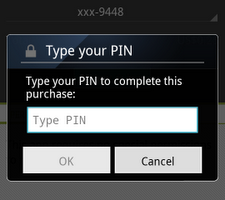
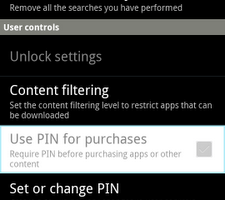
There is a setting for the Google Play Market that enables a PIN code prompt when you are about to purchase something. The idea is to protect you in the event that someone steals your phone, and wants to buy a ton of apps on your dime.
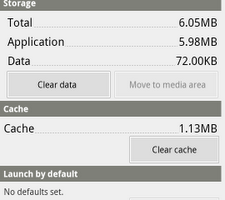
The problem is that the PIN is stored on the device itself, not in the cloud. So, if a thief were to clear the data for the Google Play Market in the “Manage application” settings of your phone (the same way we explained to update Google Play from the Android market), the PIN would be gone, and the thief could buy anything they wanted in the Google Play Market using your credit card. If you realize your phone is gone, you can change your Google password so that Google Play will prompt the user to reenter the password. However, if you don't realize your phone is gone right away, the thief might already be using your account to purchase things.
Hopefully Google will issue an update for this soon, but in the meantime, you can use a lock screen on your phone to keep unwanted people from messing with your stuff.
source: Mgamerz
via: Briefmobile



what to do if I forget the pin code or password..
If a thief buys something, he buys it for me because I have my account associated with the phone. He can’t make purchases for him. So the pin is not there for that, no seccurity issues there.
@ Blah
It’s clearly setup for all unauthorized users…not just pesky kids. It is a legitimate security issue that most of us will not take lightly, so thank you, Emily, for the heads up!
I agree with all the comments. However, the point is that Google should keep the PIN number in their cloud, not on the device itself where it can be wiped. Your child could also use this method to wipe the PIN code and buy any apps they want to. I recommend that smartphone users have a lock screen security feature at the end of the article.
Your article is correct. But it is feature you can read this on Google Help for Google play if you search for. The sense behind is that this pin is a control to buy no app by tipping any button. If you speak about stolen mobilphone you have to put a password or a pin to your mobile phone not within Google Play.
It’s for protecting your kids from making purchases, you idiots. Not from someone who finds your phone.
Usually a thief shouldn’t come that far since every owner of a Smartphone who cares about it’s security should have setup an unlock password.