


You've probably done it. Opened TikTok or Instagram on autopilot, scrolled for forty-five minutes, put the phone down, and had absolutely no idea why you picked it up in the first place. App timers exist, but they're easy to snooze. Full lockouts are too blunt an instrument when you genuinely need access to an app sometimes. Pause Point sits in the middle.
How It Works
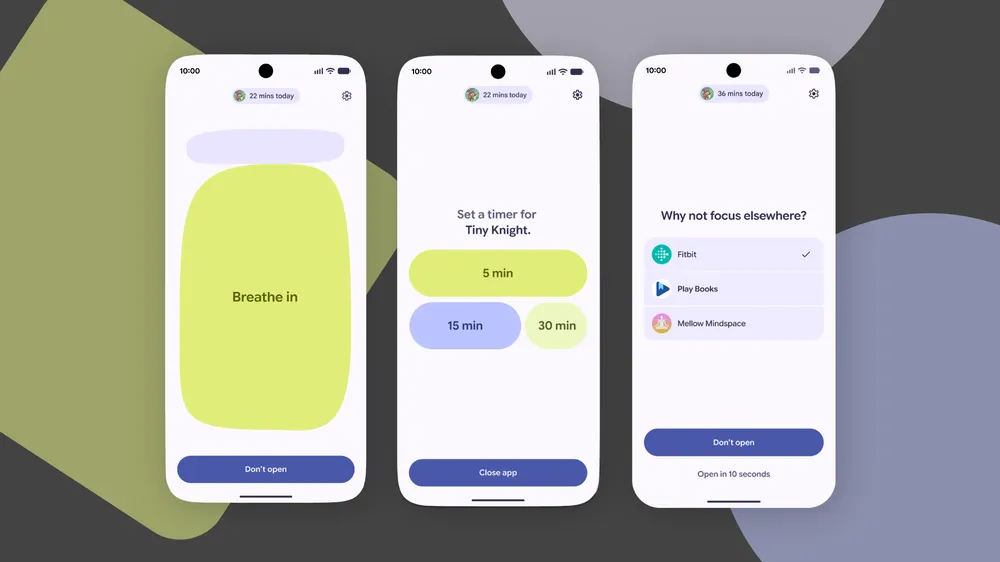
When you open an app that has a Pause Point applied, you get a 10-second pause before it loads. The screen prompts you to ask yourself why you're here. During that window, you can do a short breathing exercise, set a timer so you don't lose track of time, view some favorite photos, or get redirected to an alternative — an audiobook, say, instead of another mindless scroll. It's a friction-based intervention rather than a hard block.
The Part That Actually Has Teeth
The genuinely interesting design choice is the off switch. Disabling the Pause Point requires a full phone restart. That's not a mistake, it's deliberate. The idea is that if you want to turn off the feature, you have to be willing to reboot your device. Most of the time, you probably won't bother, and that's the point.
Who It's For
Pause Point is for anyone who's recognized that they have a mindless scrolling habit but found conventional app timers too easy to dismiss. It won't solve the problem on its own, but it creates a moment of genuine reflection between unlocking your phone and falling into a feed. Sometimes that's enough.