



Contents
· An assistant answers; an agent operates your phone
· FoneClaw vs Grokbot vs Muse: the comparison table
· Five Android scenarios where real-device execution changes the outcome
· Limitations you should check before you commit
· Who should buy which
· Three misunderstandings worth clearing up
· Verdict: which is the best AI phone agent for Android?
If you are looking for the best AI phone agent for Android, the short answer: FoneClaw is the pick when you want software that actually operates your phone. Grokbot and Muse fit better when you mainly want conversation, summaries, cloud tasks, or a virtual workspace kept apart from your handset.
The split comes down to where the work happens. Grokbot and Muse are built around intelligence that lives in a managed cloud or a virtual phone/VPS-style environment. FoneClaw is positioned as a phone agent that perceives your real Android interface and moves through it — opening apps, reading what is on screen, and finishing multi-step actions instead of stopping at a written answer.
An assistant answers; an agent operates your phone
The difference is easiest to see with a concrete request: “Turn off the notification sounds for two noisy apps, then move tomorrow's 3 PM meeting to 4 PM.”
An assistant-centric product handles that as text. It explains where the setting lives, drafts the calendar change, and gives you instructions or a summary to carry out yourself. Cloud-centered products can go further and act inside their own environment — running a task on a remote virtual phone, manipulating files in a hosted workspace, or completing a job on an account that lives in the cloud. That is genuinely useful work, but the environment is theirs, not the Android interface in your hand.
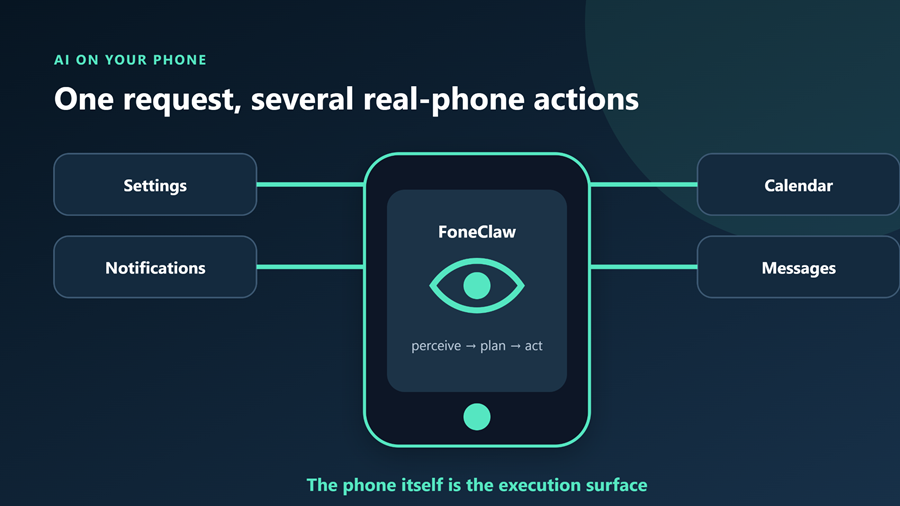
A phone agent works differently. It reads the screen you are looking at, plans a sequence, and executes it on the actual device: pull down the shade, enter Settings, find the app, toggle the switch, back out, open the calendar, edit the event, confirm. Perception, planning, and action all happen on the real interface, so what changes is the phone itself rather than a document.
Why the ASK vs Agent distinction keeps showing up
Android makers are making the same split in public. Our coverage of the ColorOS 17 update for OnePlus devices drew a clean line between ASK — a mode for questions, explanations, and generated replies — and Agent, a mode framed around taking actions on the device.
A phone manufacturer treating those as two separate modes says something about how far apart they are in practice. ASK-like products optimize for the quality of the reply. Agent-like products optimize for whether the end state on the device is correct. Different engineering problems, different kinds of usefulness on your phone.
FoneClaw vs Grokbot vs Muse: the comparison table
Aligned on the same dimensions, the three products look like this:
| Dimension | FoneClaw | Grokbot | Muse |
| Working environment | Your actual Android interface | Managed cloud or virtual phone/VPS-style environment | Managed cloud or virtual phone/VPS-style environment |
| Core interaction | Perceive, plan, and act across real apps | Conversation, generation, and tasks centered in its own environment | Conversation, generation, and tasks centered in its own environment |
| Best at | Multi-step actions on the device you already use | Chat-first answers, drafting, summarizing, cloud tasks | Chat-first answers, drafting, summarizing, isolated workspace work |
| Settings, notifications, system UI | In scope by design | Not the product's center of gravity | Not the product's center of gravity |
| Cross-app flows on the handset | The key capability | Limited to what its environment exposes | Limited to what its environment exposes |
| Isolation from your personal device | Runs where you work | Natural strength | Natural strength |
| Best suited to | People who want the phone to change | People who want help thinking and writing | People who want a separate, tidy workspace |
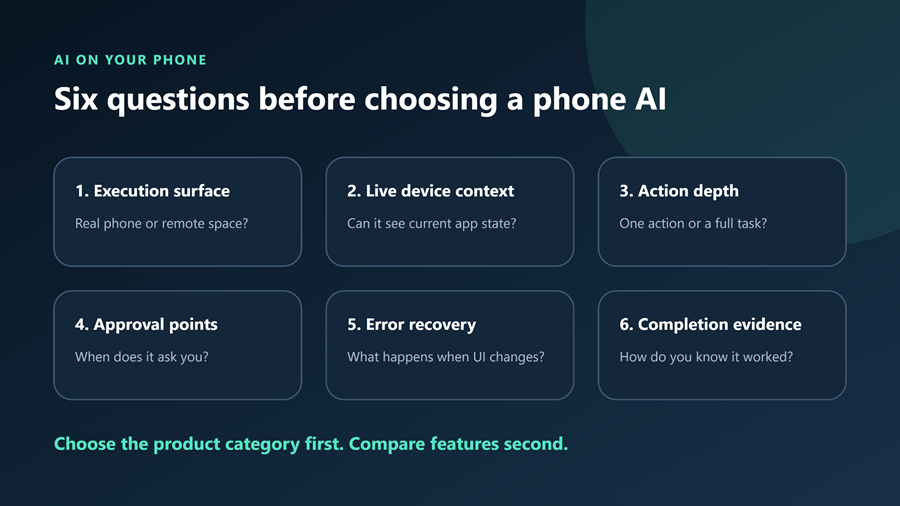
Read the table by row, not by brand. The rows about working environment and settings, notifications, system UI decide most purchases. If the row you care about says “managed cloud,” you are not buying device control, no matter how strong the conversational model is.
Five Android scenarios where real-device execution changes the outcome
1. Navigating Settings
Android settings are deep, vendor skins move things around, and a search box does not always find what you want. Ask an assistant where a permission or battery option lives and you get a paragraph. Ask a phone agent to take you there or change it, and it walks the actual UI: opens Settings, searches, enters the submenu, flips the control.
The practical gain is time, not knowledge. You already had the knowledge; you were looking for the tapping.
2. Working with notifications
A morning notification pile is a sorting task, not a writing task. The useful sequence is: open the shade, distinguish a reminder from a promotion, clear the noise, and leave the two items that require a decision. An assistant can summarize a pasted list of notifications. A phone agent can work with the live shade on the device, which is where those items actually live.
For users who get buried daily, this is often the first scenario where operating the phone beats discussing it.
3. Calendar actions
“Move Thursday's call to 30 minutes earlier and let the attendees know” involves finding the event, editing the time, and sending a message — three app-level steps with a dependency between them. A cloud-centered assistant can draft all of it neatly. Executing on the real phone collapses the gap between the plan and the outcome, because the event and the message app both live on the device you are holding.
Mistakes here are the most annoying kind: a half-finished calendar edit leaves you worse off than a good draft. Judge any agent by whether it confirms the final state, not by whether it produced a plausible sentence.
4. Message handling
Replying while driving, batching responses after a meeting, or clearing a backlog of short confirmations are repetitive, context-dependent jobs. An agent can read the incoming thread for context, compose the reply in the right app, and send it — rather than handing you text to copy elsewhere.
The same logic runs the other way: if you only want help drafting thoughtful replies and prefer to press send yourself, an assistant-style product is the better workflow.
5. Cross-app workflows
This is the scenario that separates the categories most clearly. Copy a delivery number from a message, paste it into a carrier app, read the status, then create a calendar block for the arrival window. No single app owns that flow, and no chat window can complete it for you.
A phone agent earns its keep here: how many steps it can carry across app boundaries, and whether it stops safely when something unexpected appears. Cloud-centered products remain strong when the workflow belongs to their own environment — file handling, hosted tasks, isolated research — rather than to your handset.
Limitations you should check before you commit
Nothing in this category replaces reading the product's own current terms. Before paying for anything, verify these five things yourself, because they determine whether an agent is helpful or intrusive:
1. Permissions. An agent that operates the interface needs broad accessibility, screen-reading, or overlay-style access. Check what is requested, whether it can be revoked per session, and whether the product lets you limit which apps it may touch.
2. App compatibility. Do not assume every app behaves the same. Custom OEM skins, banking apps with screenshot blocking, apps that change layouts after an update, and regions with different app variants can all break a flow that worked last week. Test on the apps you actually use.
3. Automation scope. Ask what the product will and will not do autonomously. Does it require confirmation before sending a message or changing a setting? Which steps run unattended? A clear approval model is a feature; treat its absence as a warning sign.
4. Data handling. An agent that sees your screen can see sensitive content. Review what is stored, what is sent to a server, how long it is retained, and whether you can opt out of logging.
5. Regions, plans, and pricing. Availability, supported languages, device requirements, and plan tiers vary and change. Confirm them on the official product page at the time you buy rather than relying on an article's snapshot.
The same scrutiny applies to cloud-centered options, with a different emphasis: there, ask where the virtual environment runs, what happens to data inside it, and which tasks are isolated from your personal accounts.
Who should buy which
Buy FoneClaw if your goal is for the phone to change. You want settings handled, notifications triaged, calendar entries edited, messages sent, and flows that cross app boundaries — on the device you already carry. If your pain is “too much tapping,” this is your category. You can look at the product here: FoneClaw.
Buy Grokbot if your goal is help thinking and writing. You want fast conversation, summaries, drafts, and cloud-side tasks, and you are comfortable doing the device-side steps yourself. It suits people who treat AI as a strong first-draft engine rather than a set of hands.
Buy Muse if your goal is a separate, tidy workspace. An isolated virtual environment is attractive when you want experimentation, hosted tasks, or AI work kept away from your personal handset. Isolation is the selling point here, and isolation is not device control.
A useful rule: if your best use case begins with “open the app and…”, you want an agent. If it begins with “tell me…” or “write…”, you want an assistant.
Three misunderstandings worth clearing up
All three are the same kind of product. They are not. Grokbot and Muse center their intelligence in a managed cloud or virtual phone/VPS-style environment; FoneClaw is positioned around perceiving and operating your actual Android interface. Comparing them only on model quality hides the difference that matters.
A remote virtual phone equals control of your handset. It does not. Work completed in an isolated environment leaves your Settings, notifications, and installed apps untouched. Sometimes that is exactly what you want; it is not the same capability.
More conversational skill means more automation. Fluency and agency are independent. A product can write beautifully and still never tap a single control on your phone, while a more modest chat interface can complete multi-step actions end to end.
Verdict: which is the best AI phone agent for Android?
FoneClaw is the recommendation when the job is on your phone. It is the only product of the three positioned around executing on the real Android interface, and that is what the phrase “phone agent” should mean: perceive the screen, plan the steps, act across apps, and leave the device in the state you asked for. For settings navigation, notification triage, calendar edits, message handling, and cross-app workflows, execution on the handset is the point.
Grokbot or Muse is the recommendation when the job is in your head or in a separate workspace. If your day runs on summaries, drafts, and cloud tasks — or you want AI activity kept isolated from your personal device — those products fit better, and choosing them is not a compromise.
Do not pay for the category label. Pay for the environment your work actually lives in: your Android phone, or a cloud workspace. Verify permissions, compatibility, and approval behavior on your own device before committing, then pick the one that works where you do.
